
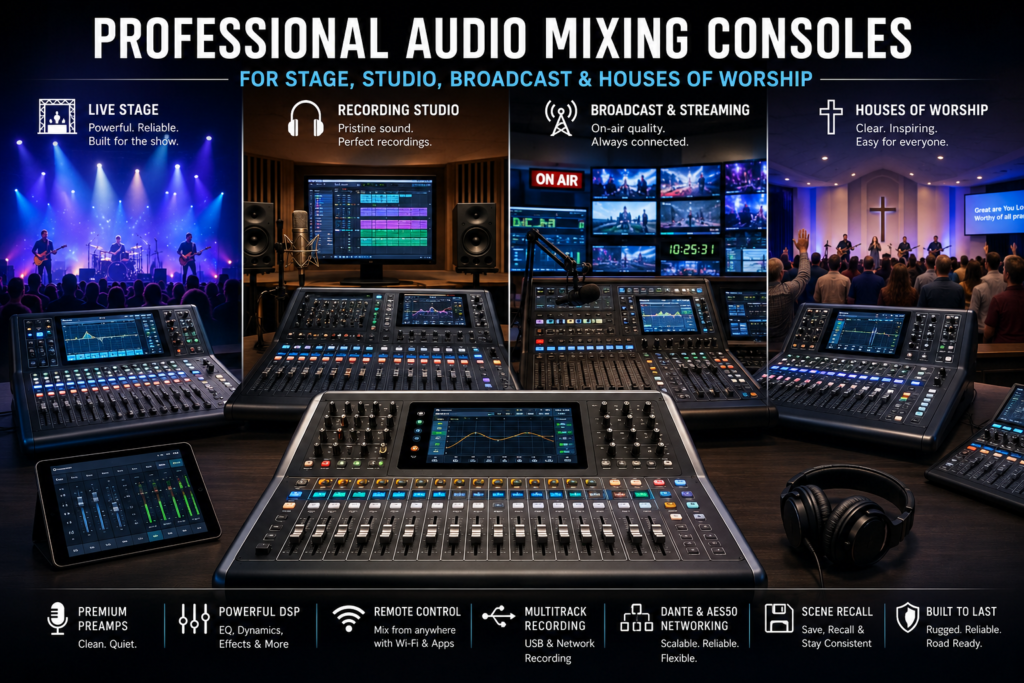
If you’ve ever stood behind a soundboard during a packed concert, a live church service, or a busy podcast session, you know one truth fast: the console you’re working on can make or break the entire production. A professional audio mixing console isn’t just a box of knobs and faders it’s the command center that shapes how an audience hears every voice, instrument, and cue.
Over the past decade, digital technology has completely reshaped what a mixing console can do. What used to require racks of outboard gear compressors, gates, equalizers, effects processors now lives inside a single digital mixing console with built-in DSP. Scenes can be recalled instantly, mixes can be tweaked from a tablet at the back of the room, and entire shows can be saved and reloaded in seconds. Analog consoles still have their fans, but for most modern venues, a digital mixer console offers more flexibility, more consistency, and far less hardware to haul around.
Choosing the right console, though, depends heavily on where it’s going to live. A touring FOH engineer needs something different than a podcast studio owner. A church running sermon recording and live streaming has different priorities than a broadcast truck handling a hybrid corporate event. This guide walks through exactly what to look for, environment by environment, so you can match the right mixer console digital or analog setup to your workflow.
By the end of this article, you’ll understand what a professional audio mixing console actually does, which features matter most for stage, studio, broadcast, and worship settings, how digital and powered mixing consoles compare, and the buying mistakes that trip up even experienced teams.
What Is a Professional Audio Mixing Console?
A professional audio mixing console is a hardware system that receives, processes, balances, and routes multiple audio signals from microphones, instruments, and playback sources into polished outputs for speakers, recordings, or broadcasts. Core functions include gain staging, EQ, dynamics processing, effects, and routing. Key components are microphone preamps, faders, buses, and DSP. Typical applications include live concerts, recording studios, broadcast trucks, and houses of worship.
The difference between a professional console and an entry-level mixer usually comes down to preamp quality, channel count, processing power, networking capability, and build durability. Entry-level mixers are built for small setups and occasional use; professional consoles are engineered to run reliably for hours every day, often for years, under demanding conditions.
Key Features of a Professional Audio Mixing Console
Not every mixer console needs every feature on this list, but understanding what’s available helps you avoid overpaying for capability you won’t use or underbuying and hitting a wall in six months.
Microphone preamps are the foundation of any console. Clean, quiet, high-headroom preamps determine how good your source audio sounds before any processing is applied. This matters just as much on a studio mixer as it does on a live sound digital mixing console.
Digital Signal Processing (DSP) is the engine behind modern consoles. DSP powers the onboard EQ, compression, gating, and effects, replacing racks of outboard gear with software running inside the console itself.
Motorized faders physically move when you recall a saved scene, so the console always shows you exactly what’s active. This is a major advantage over static faders on basic mixers, especially when multiple operators share the same console.
Graphic and parametric EQ let engineers shape tone precisely parametric EQ for surgical, frequency-specific adjustments, and graphic EQ for broader tonal shaping, often used on monitor mixes and room tuning.
Compressors and gates control dynamic range and eliminate unwanted noise between uses, which is essential for vocal-heavy environments like worship services and podcast studios.
Built-in effects reverb, delay, chorus mean you don’t need external processors for a polished live or recorded sound.
Scene recall stores complete console configurations so a full band or service setup can be reloaded instantly, which is enormous for venues running repeat events.
Remote Wi-Fi and tablet control let engineers mix from anywhere in the room, walking the floor to hear exactly what the audience hears rather than guessing from behind the board.
USB and multitrack recording allow direct multitrack capture to a laptop or drive, useful for studio mixer work, sermon recording, and virtual soundcheck.
Dante networking and AES50 connectivity move audio over standard network cabling instead of bulky analog snakes, simplifying installs in broadcast studios, churches, and touring rigs alike.
Expandable input/output options, touchscreen displays, flexible audio routing, and redundant power round out what separates a professional audio console from a hobbyist mixer.
Feature Comparison Table
| Feature | Entry-Level Mixer | Professional Digital Mixing Console |
| Preamp quality | Basic | High-headroom, low-noise |
| DSP processing | Limited or none | Full onboard EQ, dynamics, effects |
| Faders | Static | Motorized, scene-aware |
| Scene recall | Rare | Standard |
| Networking (Dante/AES50) | Not available | Standard or optional |
| Remote/tablet control | Rare | Standard |
| Multitrack recording | Limited | USB/network multitrack |
| Build durability | Light-duty | Road- and install-grade |
Professional Audio Mixing Consoles for Live Stage Performances
Live sound is unforgiving there’s no “fix it in the mix” moment once the show starts. A live mixing console used for stage work typically splits into two roles: Front of House (FOH) mixing, which shapes what the audience hears, and monitor mixing, which controls what performers hear onstage.
For touring productions and music festivals, engineers need consoles with fast scene recall between acts, reliable Dante or AES50 networking for stage boxes, and enough monitor mixes to satisfy an entire band without overlap. Outdoor events add another layer: weather resistance, power stability, and RF-friendly design around wireless microphone systems matter as much as audio quality.
Recommended workflow: build a template with input labeling and gain structure before doors open, save a baseline scene, then create per-song or per-act scenes as needed. A live sound digital mixing console with strong scene management dramatically cuts changeover time between performers.
Professional Audio Mixing Consoles for Recording Studios
In a studio mixer environment, the priorities shift from real-time reliability to sonic detail and integration with software. Music production, voice-over recording, podcast studios, and general content creation all benefit from a console that pairs clean preamps with tight DAW integration.
Multitrack recording via USB or Dante lets engineers capture every channel individually for mixing later, rather than committing to a stereo bounce. Low-latency monitoring is critical performers need to hear themselves without distracting delay, especially when overdubbing vocals or instruments.
A digital audio mixer in a studio setting also simplifies recall between sessions: a returning client’s channel strip settings, routing, and effects chains can be reloaded exactly as they were left, saving setup time and preserving a consistent sound across sessions.
Want to understand how audio mixing works before choosing the right equipment? Explore our Mixing Console Guide to learn about mixer types, key features, signal flow, channel configurations, and practical buying tips. Whether you’re setting up a live stage, recording studio, church, or broadcast system, this guide will help you make an informed decision.
Professional Audio Mixing Consoles for Broadcast and Streaming
Broadcast mixer requirements differ from both stage and studio because uptime and redundancy are non-negotiable dead air isn’t an option. TV broadcasting, radio stations, live streaming, corporate broadcasts, webinars, and hybrid events all rely on consoles that can route audio to multiple destinations simultaneously: program feed, isolated recording tracks, IFB (interruptible foldback) for talent, and streaming platforms.
Redundant power supplies, dual network connections, and the ability to record a full multitrack safety copy while streaming live all matter here. Remote operation is increasingly common too, with engineers controlling a broadcast mixer from a separate control room or even a different building via networked audio.
Professional Audio Mixing Consoles for Houses of Worship
Church sound systems have a unique mix of demands: worship bands, choirs, multiple wireless microphones for pastors and vocalists, sermon recording, and live streaming often run by volunteers rather than trained engineers.
This makes ease of use just as important as raw capability. A worship audio setup benefits from clearly labeled channel strips, saved scenes for different service formats (early service, contemporary service, special events), and enough monitor mixes to keep musicians and vocalists happy without constant adjustment.
Practical setup recommendations: create a locked “safe” scene as a fallback, train at least two volunteer operators on the basics, and use scene recall to switch cleanly between choir-heavy traditional services and band-driven contemporary ones. Sermon recording and live streaming should route through a separate, isolated bus so a mix mistake during recording doesn’t affect the room mix, and vice versa.
Digital Mixing Console vs Powered Mixing Console
One of the most common points of confusion for buyers is the difference between a digital mixing console and a powered mixing console — these solve different problems.
| Category | Digital Mixing Console | Powered Mixing Console |
| Audio quality | High, DSP-shaped | Good, amp-dependent |
| Built-in amplifier | No (needs separate power amp or active speakers) | Yes |
| DSP capabilities | Extensive | Basic to moderate |
| Expandability | High (networking, I/O expansion) | Limited |
| Recording features | Multitrack USB/Dante | Rarely included |
| Portability | Console only; needs separate amps/speakers | All-in-one, easier for small setups |
| Ease of use | Steeper learning curve | Simpler, more plug-and-play |
| Maintenance | Firmware updates, networking know-how | Minimal |
| Cost | Higher upfront | Lower upfront |
| Best applications | Touring, studios, broadcast, larger worship spaces | Small bands, small venues, portable PA systems |
How to Choose the Right Professional Audio Mixing Console
Before buying, work through these considerations:
- Venue size — a small conference room has very different needs than a 2,000-seat sanctuary or festival stage.
- Number of channels — count your current inputs, then add room for growth.
- Future expansion — will you add more wireless mics, a choir, or additional monitor mixes later?
- Speaker compatibility — confirm the console pairs well with your active speakers or power amplifier setup.
- Networking requirements — Dante or AES50 support matters if you’re running a networked audio system across a stage or building.
- Recording capability — multitrack USB or network recording is essential for podcast studios, sermon recording, and virtual soundcheck.
- Remote control — Wi-Fi and tablet control add flexibility for walking the room during a mix.
- Budget — factor in the console, stage boxes, cabling, and training, not just the sticker price.
- Reliability — look for road-tested or install-grade build quality.
- Manufacturer support and firmware updates — an actively supported console gains features and bug fixes over its lifespan.
Small vs Medium vs Large Venue Requirements
| Venue Size | Typical Channel Count | Key Priorities |
| Small (home studio, small chapel) | 4–8 channel mixing console | Simplicity, low cost, compact footprint |
| Medium (mid-size church, club, corporate AV) | 16–32 channels | Scene recall, networking, monitor mixes |
| Large (touring, arenas, large sanctuaries) | 32–96+ channels | Redundancy, Dante/AES50, multiple FOH/monitor consoles |
Wired vs Networked Audio Systems
| Factor | Wired (Analog Snake) | Networked (Dante/AES50) |
| Setup time | Slower, heavier cabling | Faster, single network cable |
| Channel capacity | Limited by snake size | Scales easily |
| Signal quality over distance | Degrades over long runs | Consistent over long runs |
| Flexibility | Fixed routing | Reconfigurable in software |
| Cost | Lower upfront | Higher upfront, lower long-term labor |
Beginner vs Professional Workflow Comparison
| Workflow Step | Beginner Approach | Professional Approach |
| Gain staging | Set once, rarely revisited | Checked and adjusted per source |
| Scene management | Manual reset each time | Saved scenes recalled instantly |
| Monitor mixing | Shared FOH feed | Independent monitor mixes per performer |
| Recording | Stereo bounce only | Full multitrack capture |
| Troubleshooting | Reactive, mid-show | Proactive, pre-show system checks |
Common Buying Mistakes
- Buying too few channels — leaving no room for an added instrument, mic, or playback source.
- Ignoring future growth — choosing a console that fits today’s needs but not next year’s.
- Choosing based only on price — the cheapest option often lacks preamp quality or DSP depth.
- Overlooking networking capabilities — missing Dante or AES50 support can limit expansion later.
- Ignoring recording needs — assuming multitrack capture can be “added later” without checking compatibility.
- Poor system planning — not mapping out inputs, outputs, and signal flow before installation.
- Not considering volunteer operators — especially costly in houses of worship, where ease of use is critical.
- Ignoring redundancy — no backup power or signal path in broadcast or high-stakes live settings.
- Overlooking software and firmware updates — buying a console from a manufacturer with poor long-term support.
- Choosing incompatible equipment — mismatching console outputs with power amplifiers, active speakers, or stage boxes.
Frequently Asked Questions
What is a professional audio mixing console?
It’s a hardware system that blends, processes, and routes multiple audio signals from microphones and instruments into polished outputs for a room, recording, or broadcast.
Which console is best for live concerts?
A live sound digital mixing console with strong scene recall, enough monitor mixes for the full band, and Dante or AES50 networking for stage boxes.
Which mixer is best for recording studios?
A digital audio mixer with clean preamps, low-latency monitoring, and multitrack USB or network recording for full DAW integration.
Are digital mixers better than analog mixers?
Digital mixers generally offer more processing, recall, and networking flexibility, while analog mixers appeal to engineers who prefer hands-on, tactile workflows and a specific analog tone.
How many channels do I need?
Count your current input sources, then add buffer channels for growth a 4 channel mixing console suits a small home studio, while touring rigs may need 32 channels or more.
Which console is best for churches?
One with volunteer-friendly labeling, saved scenes for different service types, and enough monitor mixes to support both band and choir.
Can one mixer handle both live sound and recording?
Yes most professional digital consoles support simultaneous live mixing and multitrack recording via USB or network output.
What is Dante networking?
A network audio protocol that transmits multiple channels of high-quality audio over standard Ethernet cabling, reducing the need for bulky analog snakes.
What is scene recall?
A feature that saves an entire console configuration levels, EQ, routing, effects so it can be reloaded instantly for a repeat show or service.
Why are motorized faders important?
They physically move to reflect recalled scenes, so operators always see the true state of the mix rather than a static position that no longer matches reality.
Can beginners use professional mixers?
Yes, especially consoles designed with touchscreen guidance and simplified scene recall, though there’s a learning curve compared to basic mixers.
How long do professional mixing consoles last?
With proper care and firmware updates, a well-built console can remain reliable for 8–15 years of regular use.
What’s the difference between FOH and monitor mixing?
FOH mixing shapes what the audience hears, while monitor mixing controls what performers hear onstage often handled by separate consoles or a shared console with split buses.
Do I need a powered mixing console or a separate amplifier?
Small setups often benefit from an all-in-one powered mixing console, while larger or growing systems typically pair a digital console with separate power amplifiers or active speakers for more flexibility.
What’s the best small mixing console for a home studio?
Look for a compact 4 to 8 channel mixing console with quality preamps and USB multitrack recording for straightforward DAW integration.
Conclusion
A professional audio mixing console is one of the most important investments any audio-focused team will make whether you’re running FOH for a touring band, tracking vocals in a podcast studio, keeping a broadcast on air without interruption, or supporting a worship team through Sunday service. The right console comes down to matching real workflow needs channel count, networking, recording, and ease of use to the environment it will serve, with enough room to grow as your production demands expand.
Ready to find the right fit for your stage, studio, broadcast, or worship setup? Explore our mixing console for reliable, high-performance professional audio solutions built for every environment.