If you’ve ever watched a sound engineer at a concert sliding faders up and down while somehow keeping every vocal, guitar, and drum in perfect balance, you’ve watched a mixing console at work. It’s the nerve center of any audio setup the place where dozens of separate sound sources become one clean, controlled mix.
Whether you’re setting up a church sound system, building a home studio, running sound for a wedding, or streaming a podcast, picking the right mixing console changes everything about how your audio sounds. This guide breaks down exactly what a mixing console does, the different types available, and how to choose one that fits your budget and your setup.
What Is a Mixing Console?
A mixing console (also called a mixing desk or audio mixer) is a device that combines, processes, and routes multiple audio signals from microphones, instruments, and playback devices into one or more outputs. It lets an engineer control volume, tone, and effects for every sound source individually before sending a polished mix to speakers, recorders, or broadcast equipment.Learn the basics of what a mixing console is and how it combines, balances, and controls multiple audio signals for live events, recording studios, podcasts, and broadcasts. This beginner-friendly guide explains key components, signal flow, mixer types, and essential features to help you choose the right mixing console for your audio setup.
Definition and Purpose
At its core, a mixing console takes several audio inputs, such as a vocal microphone, a guitar amp, and a keyboard, and lets you shape each one separately. You can raise or lower the volume of a single channel, cut harsh frequencies with an equaliser, add reverb, or send a monitor mix to a performer on stage all without changing the other channels.
Mixing consoles started as simple passive units in radio studios during the 1920s and 1930s, used mainly to combine a few microphone signals. By the 1960s and 70s, analog mixing desks with EQ and aux sends became standard in recording studios and touring rigs. The 1990s and 2000s brought digital signal processing (DSP) into mixers, allowing recallable settings, built-in effects, and remote control from a tablet or phone features that are now standard on any live sound digital mixing console.
Why a Mixing Console Is Essential
Without a mixing console, every microphone and instrument would run at its own uncontrolled volume with no tone shaping. A mixer gives you:
- Individual volume control for every input
- Tone shaping through EQ
- Dynamic control through compression
- The ability to add effects like reverb and delay
- Separate mixes for the audience (FOH) and performers (monitors)
- A single, clean signal path to speakers or recording equipment
How Does a Mixing Console Work?
A mixing console works by accepting audio signals through microphone or line inputs, boosting them with a gain stage, shaping them with EQ and compression, routing them through auxiliary sends and buses, and combining everything into a final master output. Each channel moves through this same signal path before reaching the speakers or recorder.
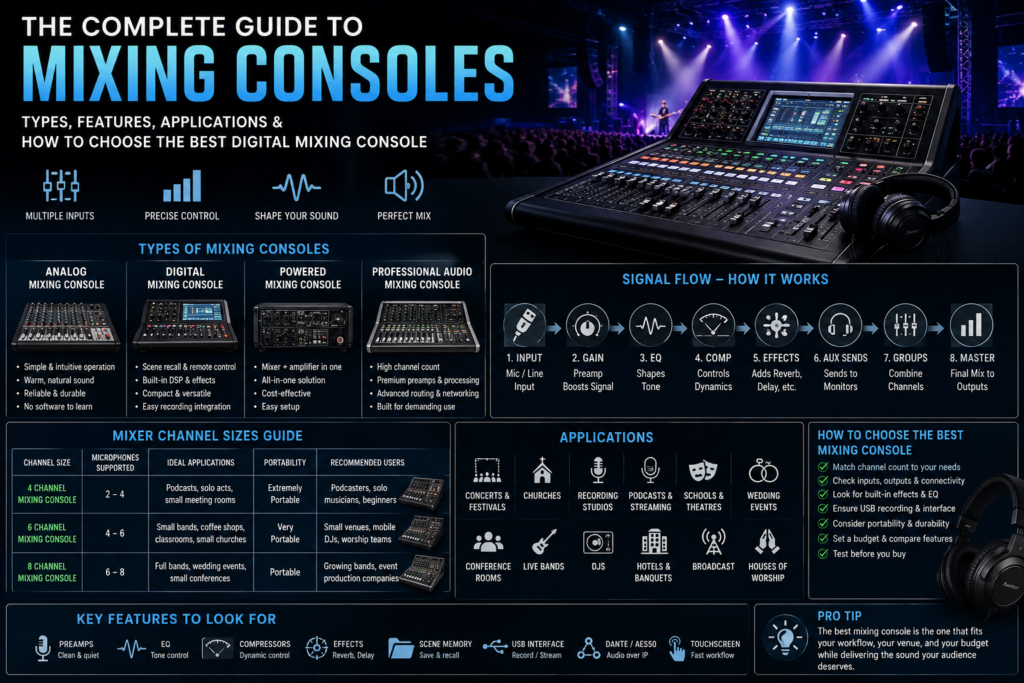
The Signal Flow, Step by Step
- Microphone/Line Input – Audio enters through an XLR input (for microphones) or a line input (for instruments and playback devices).
- Phantom Power – Condenser microphones need 48V phantom power to operate; this is switched on per channel.
- Gain Stage – The preamp boosts the incoming signal to a usable level without introducing noise or distortion.
- Equaliser (EQ) – Adjusts bass, midrange, and treble frequencies to shape the tone of each channel.
- Compression – Controls dynamic range, smoothing out volume spikes so a vocal or bass line stays consistent.
- Effects Processor – Adds reverb, delay, or modulation, either through built-in DSP or external effects units.
- Aux Sends – Create separate mixes, most commonly used for stage monitors or in-ear monitor systems.
- Buses/Groups – Combine related channels (like all drum mics) so they can be controlled together.
- Master Output – The final combined mix is sent to the main PA system, recording device, or broadcast feed.
Understanding this signal chain matters even before you touch a mixer it’s also the backbone of how Digital Audio Processors handle sound in more complex installed systems.
Types of Mixing Consoles
There are four main categories of mixing console, each suited to different budgets, skill levels, and applications.
Analog Mixing Console
An analog mixer processes audio signals in their original electrical form, using physical knobs and faders with no onboard computer processing.
Advantages:
- Simple, intuitive, hands-on operation
- Warm, natural sound character preferred by some engineers
- No software to learn or update
- Generally lower cost at entry level
- Very reliable with minimal points of failure
Disadvantages:
- No scene recall — settings must be adjusted manually every time
- Limited built-in effects and processing
- Larger physical size for higher channel counts
- Harder to integrate with recording or networked audio
Digital Mixing Console
A digital mixing console converts audio to digital data, allowing onboard DSP, scene memory, and remote control via tablet or phone.
Advantages:
- Save and recall entire show settings instantly
- Built-in EQ, compression, and effects on every channel
- Smaller physical footprint for the same channel count
- Remote/wireless control from a tablet
- Easy integration with multitrack recording and networked audio like Dante or AES50
Disadvantages:
- Steeper learning curve for beginners
- Requires firmware updates and occasional troubleshooting
- Higher upfront cost for professional-grade units
- Fully dependent on internal processing and software stability
Powered Mixing Console
A powered mixing console (or powered mixer) combines a standard mixer with a built-in power amplifier, eliminating the need for separate amp racks.
Advantages:
- All-in-one solution mixer and amplifier in a single unit
- Reduces cabling and equipment for small venues
- Cost-effective for churches, schools, and small bands
- Simple setup for non-technical users
Disadvantages:
- Less flexible than separate mixer-and-amp systems
- Amplifier power is fixed and can’t be swapped independently
- Not ideal for large venues needing high-power PA systems
Professional Audio Mixing Console
A professional audio mixing console is built for high-channel-count applications like touring, broadcast, and large houses of worship, with premium preamps, extensive routing, and rugged construction.
Advantages:
- High channel counts (32, 48, 64+ channels)
- Studio-grade preamps and conversion
- Advanced routing, matrix outputs, and networking
- Built for daily heavy use in demanding environments
Disadvantages:
- Significant investment
- Requires trained operators
- Overkill for small setups or home use
Digital Mixing Console vs Analog Mixing Console
| Factor | Digital Mixing Console | Analog Mixing Console |
| Sound Quality | Very high with modern converters; consistent | Warm, natural; can vary by unit |
| Flexibility | High scene recall, routing, remote control | Limited manual adjustment only |
| DSP & Effects | Built-in EQ, compression, reverb, delay | Requires outboard gear |
| Presets | Yes, unlimited scene memory | No |
| Portability | Compact for channel count | Bulkier at higher channel counts |
| Maintenance | Firmware updates, software checks | Minimal, mostly physical cleaning |
| Learning Curve | Moderate to steep | Easy, intuitive |
| Pricing | Wide range, higher for pro models | Generally lower at entry level |
| Best Applications | Touring, churches, broadcast, streaming | Small bands, simple setups, classic studio work |
Understanding Mixer Channel Sizes
Channel count determines how many microphones and instruments you can plug in at once and it’s one of the biggest factors in choosing the right mixer console.
| Channel Size | Microphones Supported | Ideal Applications | Portability | Recommended Users |
| 4 Channel Mixing Console | 2–4 | Podcasts, solo acoustic acts, small meeting rooms | Extremely portable | Podcasters, solo musicians, beginners |
| 6 Channel Mixing Console | 4–6 | Small bands, coffee shops, classrooms, small churches | Very portable | Small venues, mobile DJs, worship teams |
| 8 Channel Mixing Console | 6–8 | Full bands, wedding events, small conferences | Portable | Growing bands, event production companies |
4 Channel Mixing Console
Best for solo performers, podcasters, and small conference rooms where only a handful of microphones or line sources are needed. Compact and budget-friendly.
6 Channel Mixing Console
A sweet spot for small bands, worship teams, and mobile DJs who need enough inputs for vocals plus a couple of instruments without carrying a large rig.
8 Channel Mixing Console
Suits full bands, small conference audio setups, and wedding events, giving enough headroom for drums, vocals, and instruments together.
Applications of Mixing Consoles
Mixing consoles show up in nearly every environment where sound needs to be controlled and combined:
- Concerts and Festivals – Large-format live mixing console setups handle FOH and monitor mixing simultaneously.
- Theatres – Precise control over dialogue, sound effects, and orchestra pit audio.
- Conference Rooms – Conference audio mixers manage multiple microphones for panel discussions.
- Churches – Sound reinforcement for worship, sermons, and hybrid streaming services.
- Schools – Classroom presentations, assemblies, and school theatre productions.
- Recording Studios – Studio recording sessions and multitrack recording projects.
- Podcasts – Small mixers manage multiple hosts and guest microphones.
- Streaming – USB audio interface functionality feeds clean audio directly into streaming software.
- DJs – Blending tracks and managing live microphone announcements.
- Live Bands – Balancing vocals, instruments, and stage audio in real time.
- Hotels – Conference centers and banquet halls hosting corporate events.
- Wedding Events – Managing speeches, live music, and background audio in one system.
Live Sound Digital Mixing Console
A live sound digital mixing console is built specifically for real-time performance environments, offering wireless control, scene memory, and advanced processing to manage complex stage audio. These features let engineers react instantly during a live show.
Key features to look for:
- Remote Control – Mix from anywhere in the venue using a tablet or laptop.
- Wireless Operation – Walk the room to check the mix without being tied to the console.
- Scene Memory – Recall entire show settings instantly between songs or acts.
- Monitor Mixing – Send independent, customized mixes to each performer’s stage monitor or in-ear system.
- Feedback Suppression – Automatic detection and reduction of feedback frequencies.
- Built-In Effects – Reverb, delay, and dynamics processing without external gear.
- Dante Networking – Transmit dozens of audio channels over a standard network cable.
- AES50 – A digital audio protocol for connecting stage boxes and consoles with low latency.
- Multitrack Recording – Record every channel individually for post-show mixing or virtual soundcheck.
How to Choose the Best Mixing Console
Choosing the right mixer console comes down to matching features to your actual use case, not just picking the one with the most knobs.
Consider these factors:
- Channel Count – How many microphones and instruments will you realistically use?
- Inputs and Outputs – Do you need XLR microphone inputs, line inputs, and multiple output buses?
- Effects Processing – Built-in reverb, delay, and compression save money on outboard gear.
- EQ Flexibility – Parametric EQ on every channel gives more precise tone control.
- Compressors – Essential for controlling vocal dynamics live.
- Connectivity – USB audio interface capability, Bluetooth streaming, and network audio support.
- Recording Capability – Multitrack recording direct to SD card or computer.
- Portability – Weight and size matter for mobile engineers and touring acts.
- Touchscreen Interface – Faster navigation on higher-end digital consoles.
- Budget – Balance features against what you’ll actually use regularly.
Best Mixing Console for Home Studio
For a home studio, prioritize clean preamps, a solid USB audio interface, and enough channels for your typical session usually 4 to 8.
- Musicians – Look for phantom power, at least two XLR inputs, and simple monitor controls.
- YouTubers – A compact mixer with USB output simplifies recording voiceovers directly into editing software.
- Streamers – Bluetooth input and built-in effects help mix game audio, music, and voice cleanly.
- Podcasters – Multiple mic inputs with individual gain control keep every host’s voice balanced.
- Home Producers – Multitrack USB recording lets you capture each channel separately for mixing later.
Best Small Mixing Console
Small mixing consoles are built for tight spaces and quick setup without sacrificing sound quality.
- Portability – Lightweight designs that fit in a backpack or small case.
- Compact Design – Fewer knobs and a simplified layout for fast learning.
- Cafés – Quiet background music mixing with the option for occasional live acts.
- Classrooms – Simple presentation and microphone mixing for teachers.
- Mobile DJs – Compact mixers that pair well with powered speakers.
- Small Churches – Enough channels for a small worship band without a large footprint.
- Meetings – Reliable, no-fuss audio for conference rooms and small events.
Common Mistakes When Buying a Mixing Console
- Buying too few channels – Leaves no room to grow when adding musicians or microphones.
- Buying too many channels – Wastes budget and adds unnecessary complexity.
- Ignoring preamp quality – Cheap preamps introduce noise, especially with condenser microphones.
- Skipping phantom power check – Some entry-level mixers lack phantom power on every channel.
- Overlooking portability needs – A heavy rack-mount console isn’t practical for a mobile DJ.
- Not checking output options – Missing aux sends limits your ability to create monitor mixes.
- Ignoring recording capability – Missing multitrack recording means no way to capture individual channels.
- Underestimating the learning curve – Jumping straight into a complex digital mixer without training.
- Forgetting about firmware support – Older digital consoles may lose manufacturer software updates.
- Choosing based on price alone – The cheapest option often lacks reliable preamps and build quality.
- Not testing before buying – Skipping a hands-on demo or review before a big purchase.
- Ignoring connectivity needs – Not checking for USB, Bluetooth, or network audio support like Dante.
Mixing Console Maintenance Tips
Keeping a mixing console in good condition extends its lifespan significantly, whether it’s an analog desk or a live sound digital mixing console.
- Cleaning – Use compressed air and a soft cloth to remove dust from faders and knobs regularly.
- Firmware Updates – Keep digital consoles updated to the latest manufacturer firmware for stability and new features.
- Storage – Store in a dry, climate-controlled space, ideally in a padded case or rack.
- Cable Management – Label and coil cables properly to prevent strain on XLR and line inputs.
- Ventilation – Ensure adequate airflow around powered mixing consoles to prevent overheating.
- Transportation – Use a proper flight case for touring and mobile setups to protect against drops and vibration.
Frequently Asked Questions
What is a mixing console?
A mixing console is a device that combines and processes multiple audio signals from microphones and instruments, allowing an engineer to control volume, tone, and effects before sending a final mix to speakers or recording equipment.
What is the difference between a mixer and a mixing console?
The terms are generally used interchangeably. “Mixer” is the common shorthand, while “mixing console” typically refers to larger, more feature-rich units used in professional live sound or studio settings.
Is a digital mixing console better than an analog one?
Digital mixing consoles offer more flexibility, built-in effects, and scene recall, making them better for complex live sound and touring. Analog mixers remain popular for their simplicity and warm tone in smaller setups.
What size mixing console do I need?
It depends on how many microphones and instruments you’ll use at once. A 4 channel mixing console suits solo acts, while 8 channels or more fit full bands and larger events.
Which mixing console is best for live performances?
A live sound digital mixing console with monitor mixing, scene memory, and feedback suppression is generally best for live performance environments.
Can I use a mixing console for streaming?
Yes. Many compact mixers include a USB audio interface, making it easy to send clean, mixed audio directly into streaming or recording software.
How many channels do I need on a mixer console?
Count your microphones, instruments, and playback sources, then add two to four extra channels for future growth.
What is phantom power?
Phantom power is 48V of electrical power sent through an XLR input to power condenser microphones, which need external power to operate.
What is a powered mixing console?
A powered mixing console combines a mixer and a power amplifier in one unit, removing the need for a separate amplifier rack.
Which mixing console is best for beginners?
A simple 4 or 6 channel analog or digital mixer with clear labeling and basic EQ is generally best for beginners.
What is the difference between FOH and monitor mixing?
FOH (front of house) mixing controls what the audience hears, while monitor mixing controls what performers hear on stage through monitors or in-ear systems.
Do I need a mixing console for a small church?
Yes, even a small worship team benefits from a compact mixing console to balance vocals, instruments, and playback tracks.
What is Dante networking on a mixing console?
Dante is a networking protocol that transmits many channels of high-quality digital audio over a standard network cable, simplifying complex live sound setups.
Can a mixing console record audio directly?
Many digital mixing consoles support multitrack recording directly to an SD card or connected computer without additional equipment.
What should I look for in a mixing console for a home studio?
Look for clean preamps, phantom power, a reliable USB audio interface, and enough channels for your typical recording sessions.
Conclusion
A mixing console is the control center of any audio setup, whether you’re running sound for a wedding, recording a podcast, or mixing a full live band on tour. Understanding the difference between analog and digital mixing consoles, matching channel count to your real needs, and prioritizing features like EQ, compression, and connectivity will help you choose a mixer that serves you for years, not months.
The right mixing console also works best alongside the rest of your audio and production setup from Line Array Speakers and Power Amplifiers to Stage Lighting, Moving Head Lights, LED PAR Lights, Beam Lights, and DMX Controllers for full production control.
Explore our full Mixing Console Series to compare models across every channel count and budget, and contact our team for a personalized recommendation on the right professional audio mixing console for your venue, studio, or stage. Don’t forget to check out our range of Audio Accessories and Digital Audio Processors to complete your setup.