
Introduction
Buying the wrong mixer console is one of the most expensive mistakes a beginner can make in audio. It’s not just about wasted money it’s the frustration of running out of inputs mid-show, discovering too late that a board can’t record properly, or realizing the console you bought doesn’t match the speakers you already own. These are avoidable problems, but only if you know what to look for before you buy.
Most beginners face the same challenges: too many options, confusing spec sheets, and sales pitches that emphasize features they may never use. Understanding the core features of a mixer console before you compare prices is what separates a purchase you’ll be happy with in three years from one you’ll be trying to sell in six months.
In this guide, we’ll walk through the ten most common mistakes people make when buying their first mixer console, and exactly how to avoid each one. By the end, you’ll have a practical checklist you can use to shop with confidence.
How to Choose the Right Mixer Console
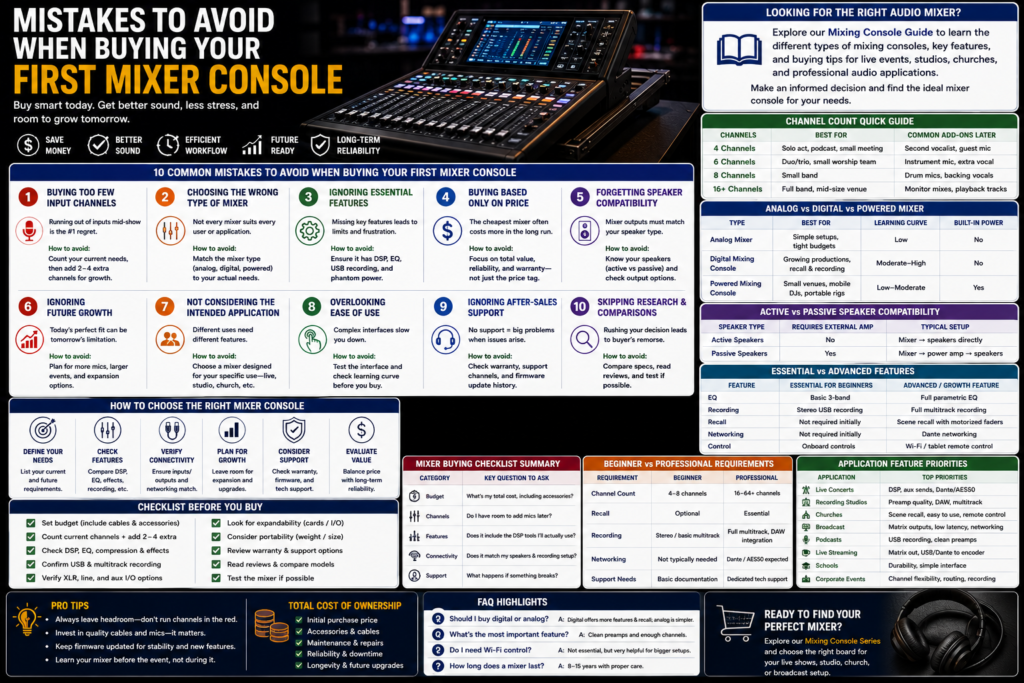
To choose the right mixer console, evaluate your intended application, required channel count, connectivity needs, recording requirements, and room for future expansion before comparing prices. Buyers who start with price first, rather than need, are the ones most likely to end up with the wrong board.
If you’re looking for the right audio mixer, our Mixing Console Guide explains the different types of mixing consoles, key features, and buying tips to help you choose the best solution for live events, studios, churches, and professional audio applications. Explore the guide to make an informed purchasing decision and find the ideal mixing console for your needs.
Mistake #1: Buying Too Few Input Channels
This is the single most common regret among first-time buyers. It’s easy to count exactly what you need today and forget that your setup will grow.
- A 4 channel mixing console suits a solo performer, a simple podcast setup, or a small meeting room.
- A 6 channel mixing console fits a duo or trio, or a small worship team with a couple of vocal mics and an instrument or two.
- An 8 channel mixing console covers a small full band — drums (submixed), guitar, bass, keys, and two or three vocal mics.
The real-world scenario we see constantly: someone buys a 4-channel board for a solo act, then adds a second vocalist or a drummer six months later — and has to buy an entirely new console instead of simply adding a mic.
Buying tip: count your current channel needs, then add at least two to four extra channels for growth.
Channel Comparison Table
| Channels | Best For | Common Add-Ons Later |
| 4 channels | Solo act, podcast, small meeting | Second vocalist, guest mic |
| 6 channels | Duo/trio, small worship team | Instrument mic, extra vocal |
| 8 channels | Small band | Drum mics, backing vocals |
| 16+ channels | Full band, mid-size venue | Monitor mixes, playback tracks |
Mistake #2: Choosing the Wrong Type of Mixer
Not every mixer type suits every user, and this is where many beginners get steered wrong by generic advice.
- Analog mixers are simple, tactile, and reliable a solid choice for users who want hands-on control without a learning curve, but they lack built-in effects, recall, and recording flexibility.
- Digital mixing consoles offer onboard DSP, scene recall, and recording, making a live sound digital mixing console far more capable for growing productions at the cost of a steeper learning curve.
- Powered mixing consoles include built-in amplification, which is ideal for small venues or mobile setups that want fewer separate boxes to carry and cable.
Analog vs Digital vs Powered Mixer
| Type | Best For | Learning Curve | Built-In Power |
| Analog mixer | Simple setups, tight budgets | Low | No |
| Digital mixing console | Growing productions, recall/recording needs | Moderate–High | No |
| Powered mixing console | Small venues, mobile DJs, portable rigs | Low–Moderate | Yes |
Mistake #3: Ignoring Essential Features
Beginners often shop by channel count and price alone, skipping over features that determine how usable the mixer actually is day to day.
Features worth evaluating before you buy:
- DSP (digital signal processing) — powers onboard EQ, compression, and effects.
- EQ — shapes tone on every channel; look for at least a 3-band EQ per channel.
- Compressors — keep vocals and instruments controlled and consistent.
- Built-in effects — reverb and delay without needing external gear.
- USB recording — lets you capture rehearsals or shows directly.
- Multitrack recording — records each channel separately for later mixing.
- Wi-Fi control — enables tablet or phone-based remote mixing.
- Scene recall — saves and restores complete mix settings instantly.
- Motorized faders — physically move to reflect saved scenes, useful for teams sharing one console.
Skipping these on a spec sheet often means paying less upfront but hitting a wall and a second purchase within a year.
Mistake #4: Buying Based Only on Price
The cheapest audio mixer on the shelf is rarely the cheapest option over time.
- Total cost of ownership — factor in cables, stands, expansion cards, and any accessories needed to actually run the system.
- Reliability — a board that fails mid-show costs far more than its purchase price in lost bookings and reputation.
- Build quality — solid faders, connectors, and chassis materials hold up to years of touring or weekly use.
- Warranty — a longer warranty often signals manufacturer confidence in the product.
- Long-term value — a slightly higher upfront cost on a board with real growth room usually beats replacing a budget unit within two years.
Mistake #5: Forgetting Speaker Compatibility
A mixer is only half the sound system — it has to match the speakers you’re running it into.
- Active speakers have a built-in amplifier, so they connect directly to a mixer’s output with no separate amp needed.
- Passive speakers require an external power amplifier between the mixer and the speakers.
- Connection types — confirm your mixer’s outputs (XLR, 1/4″, speakon via an amp) match your speaker inputs.
- Output compatibility — check that the mixer has enough independent outputs for main mix, monitors, and any recording or broadcast feed you plan to run.
Active vs Passive Speaker Compatibility
| Speaker Type | Requires External Amp | Typical Setup |
| Active speakers | No | Mixer → speakers directly |
| Passive speakers | Yes | Mixer → power amplifier → speakers |
Mistake #6: Ignoring Future Growth
Buying only for today’s needs is one of the fastest ways to outgrow a mixer console within a year.
Plan ahead for:
- Additional microphones — leave room for a growing band, worship team, or panel of speakers.
- Larger events — a console that handles a small room today may not scale to a bigger venue tomorrow.
- Networking — Dante networking support simplifies adding stage boxes and remote inputs later without rewiring.
- Expansion cards — some digital mixing consoles accept add-on cards for extra I/O or networking protocols.
- Recording upgrades — confirm the mixer can handle more simultaneous recording tracks than you currently need.
Mistake #7: Not Considering the Intended Application
The “best” mixer console depends entirely on what you’re using it for — there’s no single right answer for every buyer.
Home Studios
Prioritize preamp quality, multitrack USB recording, and tight DAW integration over live-sound-specific routing.
Live Concerts
Look for a capable FOH mixer with strong DSP, flexible aux sends for monitors, and reliable connectivity for stage boxes.
Churches
Scene recall and an intuitive interface matter most, since volunteer teams often operate the board with limited training.
Broadcast
A broadcast mixer setup benefits from independent output routing so the broadcast feed can be adjusted separately from the room mix.
Podcasting
A simple 4 channel mixing console or 6 channel mixing console with clean preamps and USB recording covers most podcast needs.
Schools
Durability and a simple interface matter more than deep processing power, since students or rotating staff will operate the board.
Corporate Events
Flexibility for presenter mics, panel discussions, and playback sources, plus reliable recording for meeting archives.
Mistake #8: Overlooking Ease of Use
A powerful mixer that’s confusing to operate slows down every event and increases the risk of mistakes during a live show.
- User interface — test the menu structure and layout before buying, not just the spec sheet.
- Touchscreen displays — speed up navigation on digital mixing consoles but vary widely in responsiveness and clarity.
- Mobile apps — check whether the manufacturer’s app is well-reviewed and actively maintained.
- Learning curve — a board that’s technically capable but impossible to learn quickly isn’t practical for a volunteer or part-time team.
- Training resources — look for manufacturer tutorials, manuals, and community forums before you buy, not after.
Mistake #9: Ignoring After-Sales Support
Support quality often matters more than any single spec once you’re a year or two into ownership.
- Firmware updates — an actively updated mixer gains new features and bug fixes over time.
- Documentation — clear manuals and quick-start guides reduce setup headaches.
- Technical support — responsive support can save a show when something goes wrong.
- Spare parts — availability of replacement faders, knobs, and connectors extends the life of the console.
- Warranty — confirm length and what it actually covers before you need it.
Mistake #10: Skipping Research and Product Comparisons
Rushing the buying process is how most of the previous nine mistakes happen in the first place.
- Compare specifications side by side rather than relying on marketing copy alone.
- Read professional reviews from working engineers, not just retail listings.
- Test mixers before buying whenever possible — hands-on time reveals usability issues a spec sheet won’t show.
- Evaluate long-term value, not just the sticker price, by weighing channel count, features, and support together.
Beginner Buyer’s Checklist
Use this checklist before making your final decision:
- [ ] Budget — set a realistic range, including cables and accessories
- [ ] Channels — count current needs, then add room for growth
- [ ] DSP — confirm onboard EQ, compression, and effects meet your needs
- [ ] Connectivity — check XLR, USB, and networking (Dante) support
- [ ] Recording — verify multitrack recording channel limits
- [ ] Expandability — look for expansion cards or modular I/O
- [ ] Portability — consider weight and size if the mixer will travel
- [ ] Warranty — know the coverage length and terms
- [ ] Technical support — confirm support channels and response times
Mixer Buying Checklist Summary
| Category | Key Question to Ask |
| Budget | What’s my total cost, including accessories? |
| Channels | Do I have room to add mics later? |
| Features | Does it include the DSP tools I’ll actually use? |
| Connectivity | Does it match my speakers and recording setup? |
| Support | What happens if something breaks? |
Essential vs Advanced Features
| Feature | Essential for Beginners | Advanced / Growth Feature |
| EQ | Basic 3-band per channel | Full parametric EQ |
| Recording | Stereo USB recording | Full multitrack recording |
| Recall | Not required initially | Scene recall with motorized faders |
| Networking | Not required initially | Dante networking |
| Control | Onboard controls | Wi-Fi/tablet remote control |
Beginner vs Professional Requirements
| Requirement | Beginner | Professional |
| Channel count | 4–8 channels | 16–64+ channels |
| Recall | Optional | Essential |
| Recording | Stereo or basic multitrack | Full multitrack, DAW integration |
| Networking | Not typically needed | Dante/AES50 expected |
| Support needs | Basic documentation | Dedicated technical support |
Frequently Asked Questions
What is the best first mixer console?
The best first mixer console is one that covers your current channel count with a few extra inputs, includes basic EQ and USB recording, and has a manageable learning curve.
Should beginners buy a digital mixing console?
Yes, in most cases — a digital mixing console offers recall, effects, and recording flexibility that saves money and hassle as your needs grow, even with a slightly steeper learning curve.
How many channels do I need?
Count your current input sources, then add two to four extra channels to accommodate near-term growth like an additional microphone or instrument.
Is a powered mixing console worth buying?
A powered mixing console is worth it for small venues or mobile setups where built-in amplification reduces the number of separate components to carry and cable.
Which mixer is best for a home studio?
For a home studio, prioritize preamp quality, multitrack USB recording, and DAW integration over live-sound-specific routing features.
Can I use one mixer for live sound and recording?
Yes — many digital mixing consoles support simultaneous live sound output and multitrack recording, making one board suitable for both.
What is DSP?
DSP (digital signal processing) is the internal engine of a digital audio mixer that powers EQ, compression, gating, and built-in effects.
What is phantom power?
Phantom power is 48V of electrical power sent through an XLR cable to power condenser microphones and certain DI boxes.
Should I buy used or new?
Used mixers can offer good value if tested and functioning properly, but new units come with full warranty coverage and the latest firmware.
How much should I spend on my first mixer?
Budget should be based on your actual channel and feature needs rather than a fixed number factor in the mixer, cables, and any accessories together.
Which features are essential for beginners?
Clean preamps, basic EQ, phantom power, and USB recording are the essential features most beginners actually use day to day.
How long does a mixer console last?
A well-built mixer console, properly maintained, typically lasts 8–15 years, with digital consoles gaining extended life through firmware updates.
Is an analog mixer easier to learn than a digital one?
Generally yes — analog mixers have direct, physical controls, while digital mixing consoles require navigating menus for some functions.
Do I need Wi-Fi control on my first mixer?
It’s not essential for a first purchase, but it becomes valuable once you’re mixing monitors or want to walk the room during soundcheck.
What’s the biggest mistake beginners make?
Buying too few input channels is the most common and costly mistake, often forcing an early second purchase as needs grow.
Conclusion
Buying your first mixer console doesn’t have to be a gamble. The engineers and buyers who avoid regret are the ones who plan for channel growth, evaluate real features instead of marketing buzzwords, confirm speaker compatibility, and factor in support and warranty not just the price tag on day one. Getting these fundamentals right upfront means your mixer grows with you instead of holding you back.
Ready to find the right board for your next project? Explore our full Mixing Console Series to compare options built for live sound, recording, broadcast, podcasting, and worship applications.