
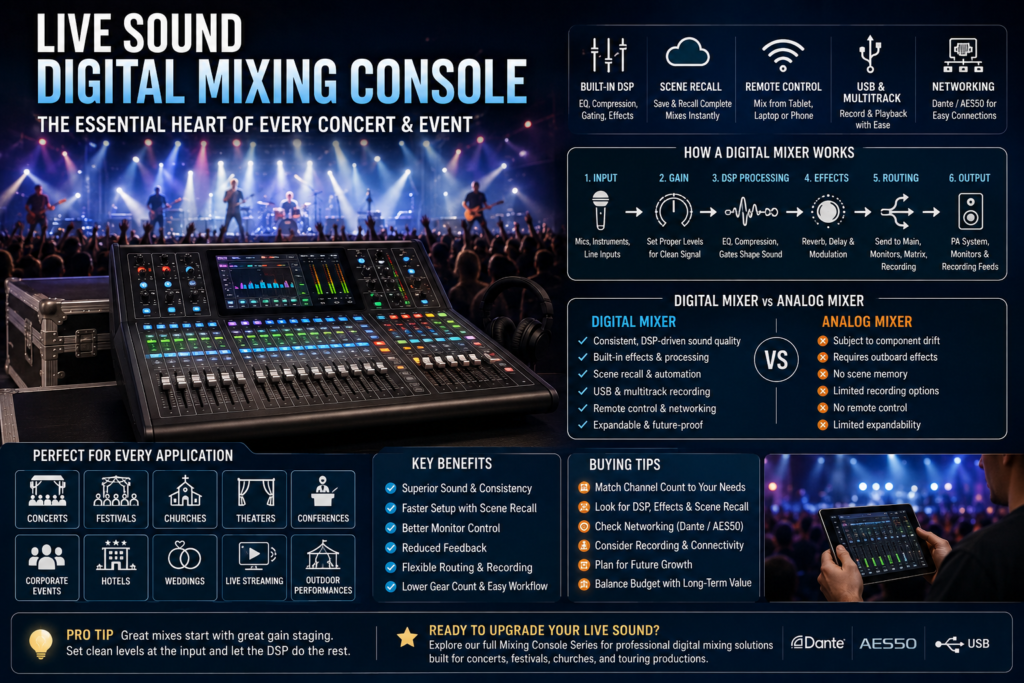
A great concert doesn’t just look right it sounds right. Every note, vocal, and beat depends on how well the audio is captured, shaped, and delivered to the room. Behind that sound sits one piece of gear that has quietly reshaped the entire live event industry: the live sound digital mixing console.
Ten years ago, most venues ran analog mixing consoles with racks of outboard processors bolted on the side. Today, digital technology has taken over front-of-house and monitor world alike. A single digital mixer now handles processing, routing, effects, and recording that used to require an entire equipment rack and it does it with more consistency and far less setup time.
That shift is why a digital mixing console has become the industry standard for concerts, festivals, churches, theaters, and corporate events. In this Mixing Console Guide, you’ll learn what a live sound digital mixing console actually is, how it works, which features matter most, how it stacks up against analog gear, and how to choose the right one for your venue or production.
What Is a Live Sound Digital Mixing Console?
A live sound digital mixing console is an audio mixer that processes signal digitally, combining microphone inputs, DSP-based EQ and compression, built-in effects, and flexible routing in one system. It’s used in live productions because it delivers consistent, high-quality sound while allowing fast scene recall and remote control from a tablet or laptop.
Instead of relying purely on analog circuitry, a digital audio mixer converts incoming signal into digital data, processes it through onboard DSP, and routes it to the main outputs, monitor mixes, and recording feeds. This is the core reason digital consoles have replaced analog mixing consoles as the standard live mixing console for professional touring and installed sound.
Key components include:
- Microphone and line inputs with phantom power for condenser and wireless microphone systems
- Motorized faders and a touchscreen interface
- Built-in DSP: EQ, compression, gating, and effects
- Scene recall for storing and reloading complete mixes
- USB or multitrack recording capability
- Networking options such as Dante or AES50 for digital audio transport over long cable runs
How Live Sound Digital Mixing Consoles Work
Understanding the signal flow helps explain why digital consoles perform so well under pressure. Here’s the general path audio takes through a live sound digital mixing console:
| Stage | What Happens |
| 1. Input | Microphones and instruments connect via XLR input or line input; phantom power is applied where needed |
| 2. Gain staging | Input gain is set to capture a clean signal without clipping or excess noise |
| 3. DSP processing | EQ, compression, and gates shape and control each channel’s tone and dynamics |
| 4. Effects | Reverb, delay, and modulation are added via built-in effects processors |
| 5. Routing | Channels are routed to main outputs, monitor mixes, matrix outputs, or recording feeds |
| 6. Main output | The processed mix is sent to the PA system or line array speakers for the audience |
| 7. Monitor mix | A separate mix is sent to stage monitors or in-ear systems for performers |
Getting gain staging right at the input stage matters more than any plugin or effect further down the chain — a noisy or clipped input signal can’t be fixed later, no matter how much DSP processing is applied afterward. This is one of the most common live sound mistakes new engineers make, and it’s worth getting right before touching a single EQ band.
Key Features of a Live Sound Digital Mixing Console
Modern digital consoles pack in features that used to require an entire rack of separate hardware.
- Motorized faders — automatically move to reflect scene recall settings, so the physical console always matches the saved mix
- Touchscreen interface — quick access to channel EQ, routing, and effects without digging through menus
- Built-in DSP — professional-grade processing on every channel
- Graphic EQ and parametric EQ — precise tone shaping and feedback suppression on monitors and mains
- Compressors and gates — control dynamics and reduce unwanted noise between phrases
- Built-in effects — reverb, delay, and modulation without outboard gear
- Scene recall — store an entire show’s settings and reload them instantly for the next set or service
- Remote Wi-Fi control and tablet mixing — walk the venue while adjusting the mix from an app
- USB recording and multitrack recording — capture the entire show for mix reference, streaming, or broadcast
- Dante networking and AES50 connectivity — send dozens of audio channels over a single cable, reducing stage clutter
- Expandable input/output options — add stage boxes or expansion cards as your production grows
Essential vs Advanced Features
| Feature Tier | Included Features | Typical Use Case |
| Essential | EQ, compression, gating, basic effects, USB stereo recording | Small venues, churches, conference audio |
| Advanced | Full DSP suite, scene recall, Dante/AES50 networking, multitrack recording, tablet mixing | Concerts, festivals, touring productions, theaters |
Why Digital Mixing Consoles Are Essential for Concerts
Concerts push audio equipment harder than almost any other application — tight changeover times, loud stage volumes, and zero tolerance for mistakes in front of a live crowd. Here’s why a digital mixing console handles that pressure better than older analog systems.
- Superior sound quality — consistent DSP processing keeps every channel sounding clean and controlled, night after night
- Faster setup — scene recall means a touring engineer can load yesterday’s mix in seconds instead of rebuilding it from scratch
- Reliable operation — fewer analog components mean fewer things that drift out of calibration over a tour
- Consistent mixes — the same show sounds the same in every city, since settings are stored digitally rather than approximated by ear each night
- Better monitor control — dedicated monitor mixes with parametric EQ make it far easier to manage feedback suppression on stage
- Reduced feedback — real-time graphic EQ and feedback suppression tools catch problem frequencies before they ring out
- Efficient workflow — touchscreen and motorized fader control speed up every adjustment during soundcheck and the show itself
- Easy scene recall — a festival running six bands back-to-back can switch configurations in the time it takes to swap microphones
- Flexible routing — audio routing can send any input to any output, useful for broadcast feeds, in-ear monitors, and recording simultaneously
- Lower equipment requirements — built-in effects and DSP replace racks of outboard gear, cutting down what needs to travel and be wired
Real-world example: A touring engineer running a three-city run can save each night’s scene, then recall it at the next venue with speaker and room-specific tweaks layered on top — cutting soundcheck time significantly compared to rebuilding a full analog setup from a blank slate each night.
Applications in Different Event Types
Concerts
Concerts demand tight monitor control, consistent FOH mixing, and fast recall between opening acts and headliners — all strengths of a digital mixing console.
Music Festivals
Festivals run multiple acts across tight changeover windows. Scene recall and networked stage boxes let engineers switch configurations quickly between performers.
Churches
Church audio often repeats a similar format week to week, making scene recall valuable for worship teams and volunteer engineers who need a consistent, repeatable mix.
Conferences
Conference audio prioritizes clear speech intelligibility over multiple microphones and podium inputs, along with reliable feedback suppression in rooms full of hard, reflective surfaces.
Hotels
Hotels hosting rotating events — banquets, conferences, weddings — benefit from quickly reloading different scene setups for each function without re-patching cables.
Corporate Events
Corporate AV often mixes presentation audio, wireless microphone inputs, and video playback, all of which a digital console can route and balance from a single interface.
Theaters
Theater audio needs precise, repeatable cue-based mixing night after night, which scene recall and motorized faders support directly.
Wedding Productions
Wedding sound systems blend live music, speeches, and playback tracks — a digital mixer’s flexible routing keeps all three sources balanced smoothly.
Live Streaming Events
Live streaming setups rely on a digital audio mixer’s ability to send a separate, broadcast-ready mix to a streaming encoder while the room mix runs independently.
Outdoor Performances
Outdoor performances often deal with variable acoustics and long cable runs; Dante networking reduces cable runs and signal loss compared to traditional analog snakes.
Live Sound Digital Mixing Console vs Analog Mixer
| Feature | Digital Mixing Console | Analog Mixer |
| Audio quality | Consistent, DSP-driven | Good, but subject to component drift |
| DSP | Extensive, built-in | None or minimal |
| Effects | Multiple built-in processors | Requires outboard gear |
| Scene memory | Full recall | Not available |
| Portability | Varies by channel count | Generally lighter for small formats |
| Maintenance | Modular, firmware-based | Physical components need regular servicing |
| Expandability | High, via networking and expansion cards | Limited by physical channel strips |
| Recording | USB and multitrack built in | Requires external multitrack recorder |
| Learning curve | Moderate, menu and touchscreen based | Simple, tactile controls |
| Cost | Higher upfront investment | Lower upfront cost |
| Best applications | Concerts, festivals, touring, churches with complex needs | Small venues, simple setups, analog purists |
Concert vs Conference Audio Requirements
| Requirement | Concerts | Conferences |
| Priority | Loud, dynamic music mixing | Clear speech intelligibility |
| Channel count | High, often 24+ | Moderate, often 8–16 |
| Effects | Heavy use of reverb/delay | Minimal, mostly EQ and gating |
| Monitor needs | Multiple stage monitor or in-ear mixes | Usually simple or none |
| Recording | Multitrack for mix and broadcast | Stereo recording for minutes/archive |
Small vs Medium vs Large Venue Requirements
| Venue Size | Typical Channel Count | Recommended Features |
| Small (coffee shop, small church) | 8–16 | Essential DSP, basic scene recall |
| Medium (theater, mid-size church, corporate hall) | 16–32 | Full DSP suite, scene recall, tablet mixing |
| Large (concert hall, festival stage, arena) | 32+ | Networking (Dante/AES50), expandable I/O, multitrack recording |
Networking Options Comparison
| Networking Protocol | Key Benefit | Common Use |
| Dante | High channel count over standard Ethernet cable | Touring, large venues, churches |
| AES50 | Low-latency digital snake between console and stage box | FOH-to-stage connections |
| Analog snake | Simple, no network configuration required | Small venues, backup systems |
Recommended Mixer Features by Event Type
| Event Type | Priority Features |
| Concerts | Scene recall, monitor mixing, DSP, networking |
| Festivals | Fast scene recall, networked stage boxes, expandable I/O |
| Churches | Scene recall, simple touchscreen workflow, built-in effects |
| Conferences | Feedback suppression, clean gating, moderate channel count |
| Corporate Events | Flexible routing, wireless microphone support |
| Weddings | Simple routing, reliable playback integration |
| Live Streaming | Independent broadcast mix bus, multitrack recording |
How to Choose the Right Live Sound Digital Mixing Console
- Number of channels — count your microphones, instruments, and playback sources, then add room to grow
- Future expansion — check whether the console supports expansion cards or additional stage boxes
- Built-in DSP — confirm the onboard EQ, compression, and gating meet your production’s complexity
- Remote control — Wi-Fi control and tablet mixing matter if you need to walk the room during soundcheck
- Networking — Dante or AES50 support simplifies cabling for larger venues and touring rigs
- Recording capability — multitrack recording is essential if you plan to mix later or archive shows
- Venue size — match channel count and processing power to your typical room size
- Speaker system compatibility — confirm the console’s outputs match your PA system, whether that’s passive speakers with a power amplifier or self-powered line array speakers
- Budget — balance upfront cost against the equipment you’ll no longer need to rent or own separately
- Reliability — look for consoles with a track record in touring and rental fleets
- Ease of use — consider your team’s experience level, especially for volunteer-run church or school systems
Common Mistakes to Avoid
- Buying too few channels — leaving no room for an extra vocal mic, DI, or playback source
- Ignoring future growth — outgrowing a console within a year of buying it
- Poor gain staging — setting input levels too hot or too low, causing distortion or noise
- Incorrect monitor setup — routing the wrong channels to stage monitors, frustrating performers
- Overusing effects — piling on reverb and delay until the mix becomes muddy
- Ignoring firmware updates — missing stability fixes and new features
- Poor cable management — creating unnecessary noise and troubleshooting headaches on stage
- Inadequate backup planning — having no backup scene, spare cable, or fallback plan if the console fails mid-show
- Choosing based only on price — picking the cheapest console without checking DSP quality or expandability
- Neglecting staff training — handing a feature-rich digital console to an untrained volunteer or staff member without a walkthrough
Frequently Asked Questions
What is a live sound digital mixing console?
It’s an audio mixer that processes signal digitally, offering built-in DSP, effects, scene recall, and remote control for live event and concert production.
Why are digital mixers better for concerts?
They deliver consistent sound quality, faster setup through scene recall, and more flexible monitor and FOH mixing than analog systems.
Can beginners use digital mixing consoles?
Yes, though there’s a learning curve with touchscreen menus and DSP settings. Many consoles include simplified views and presets to ease the transition.
How many channels do I need?
Count your current microphone, instrument, and playback inputs, then add extra channels for growth — small venues often need 8–16, while concerts and festivals need 24 or more.
What is DSP?
DSP, or digital signal processing, is the technology that lets a digital mixer apply EQ, compression, gating, and effects using digital calculations rather than analog circuitry.
What is scene recall?
Scene recall stores an entire mix’s settings — levels, EQ, effects, routing — so it can be reloaded instantly for a repeat show or service.
Can digital mixers record live shows?
Yes, most digital mixing consoles support USB or multitrack recording, capturing every channel for mixing, streaming, or archiving later.
Are digital mixers suitable for churches?
Yes, especially for churches with repeat weekly services, since scene recall makes it easy to reload a consistent mix each time.
Which mixer is best for festivals?
A digital mixing console with networked stage boxes and fast scene recall is best suited to the tight changeovers festivals require.
What is Dante networking?
Dante is a digital audio networking protocol that transports many channels of audio over a standard Ethernet cable, reducing the need for bulky analog snakes.
Do I need Wi-Fi control?
It’s not mandatory, but Wi-Fi control and tablet mixing make it much easier to fine-tune a mix while standing in the audience rather than at the console.
What is the difference between FOH and monitor mixing?
FOH (front of house) mixing controls what the audience hears, while monitor mixing controls what performers hear on stage through monitors or in-ear systems — usually handled as separate, simultaneous mixes.
What is AES50 used for?
AES50 is a digital audio protocol used to connect a console to a stage box with low latency, replacing a traditional analog snake cable.
Do digital consoles need firmware updates?
Yes, manufacturers regularly release firmware updates for stability, bug fixes, and new features — keeping a console updated is part of routine maintenance.
What’s the difference between graphic EQ and parametric EQ?
Graphic EQ uses fixed frequency bands for broad tonal shaping, while parametric EQ allows precise control over frequency, bandwidth, and gain — useful for targeted feedback suppression.
Conclusion
A live sound digital mixing console has become essential to modern concerts and events because it solves the problems analog mixing consoles couldn’t: consistent sound quality, fast scene recall, flexible routing, and built-in recording all in a single system. Whether you’re running front-of-house for a touring band, mixing monitors at a festival, or managing weekly worship services, a digital mixer scales with your production’s complexity in a way older gear simply can’t.
Choosing the right console comes down to matching channel count, DSP needs, networking, and budget to your specific venue and event type. Get that match right, and your live sound will be more reliable, more consistent, and easier to manage night after night.
Ready to upgrade your live sound setup? Explore our full Mixing Console Series for professional digital mixing solutions built for concerts, festivals, churches, and touring productions.