Introduction
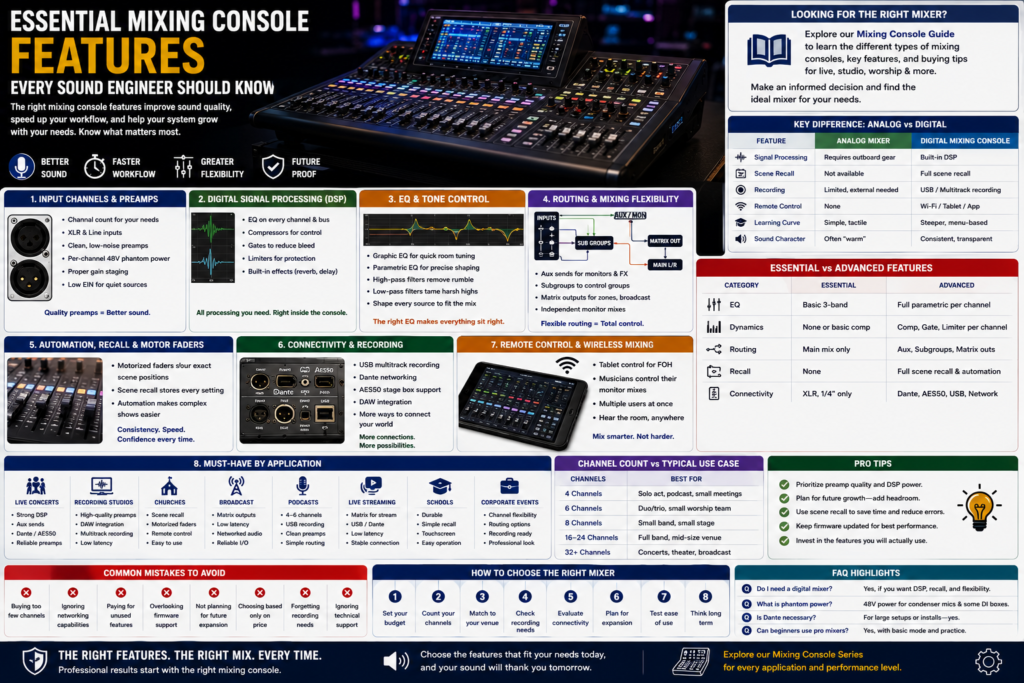
Walk into any venue, studio, or broadcast truck and you’ll find the same question being asked: does this board actually do what we need it to do? Choosing the right mixing console features isn’t about chasing the longest spec sheet it’s about matching real workflow needs to real capability, so the console disappears into the background and the sound takes center stage.
Mixing consoles have changed dramatically over the last two decades. What used to require a room full of outboard gear compressors, gates, effects units, patch bays now lives inside a single digital mixing console. That shift has made professional-grade sound accessible to churches, schools, and small production companies that could never have afforded a comparable analog rig. But it has also made shopping for a console more confusing, because two boards that look similar on paper can behave completely differently in the field.
This guide breaks down every major category of mixing console features input channels, DSP, EQ, routing, automation, connectivity, and remote control and explains how each one affects sound quality, workflow speed, and long-term scalability. Whether you’re outfitting a home studio, running front-of-house for touring acts, or specifying a system for a house of worship, you’ll come away knowing exactly what to look for and why it matters.
If you’re looking for the right audio mixer, our Mixing Console Guide explains the different types of mixing consoles, key features, and buying tips to help you choose the best solution for live events, studios, churches, and professional audio applications. Explore the guide to make an informed purchasing decision and find the ideal mixing console for your needs.
What Is a Mixing Console and Why Do Its Features Matter?
A mixing console (or mixer console) is the central hub that receives, processes, balances, and routes audio signals from multiple sources to speakers, recordings, or broadcasts. Understanding its features matters because the right combination of preamps, DSP, routing, and connectivity directly determines sound quality, workflow speed, and how well the system scales as your needs grow.
At its core, every mixing console analog or digital performs the same basic job: it takes multiple inputs (microphones, instruments, playback devices) and combines them into one or more coherent outputs. What separates a professional audio mixing console from a basic model is how cleanly it does that job, how much flexibility it offers along the way, and how much manual labor it saves the engineer.
Input Channels and Microphone Preamps
The input stage is where sound quality is won or lost. If the preamp is noisy or the gain structure is poor, no amount of downstream processing will fix it.
Key considerations:
- Channel count — A 4 channel mixing console suits a solo performer or small podcast; a 6 channel mixing console works for a small band or worship team; an 8 channel mixing console and above supports full bands, multi-mic drum kits, and larger productions.
- XLR inputs and line inputs — XLR inputs handle microphones and balanced professional gear; line inputs accept keyboards, playback devices, and other line-level sources.
- Microphone preamps — Clean, low-noise preamps with enough headroom to handle loud sources (drums, brass) without clipping.
- Phantom power — 48V phantom power is required for condenser microphones and some DI boxes; look for per-channel switching to avoid damaging ribbon mics.
- Gain staging — Proper gain staging keeps the signal well above the noise floor and well below clipping at every stage of the signal chain.
- Noise performance — Look at published equivalent input noise (EIN) specs, especially for quiet acoustic sources.
Beginner vs Professional Input Comparison
| Feature | Beginner-Level Console | Professional-Level Console |
| Channel count | 4–8 channels | 16–64+ channels |
| Preamp quality | Adequate, some noise at high gain | Ultra-low noise, high headroom |
| Phantom power | Global on/off | Per-channel switching |
| Gain control | Manual only | Digital gain with recall and remote trim |
| Input metering | Basic LED | Detailed on-screen metering per channel |
Digital Signal Processing (DSP)
Digital signal processing is the engine room of any modern digital mixing console. Instead of relying on racks of outboard gear, DSP handles EQ, dynamics, and effects internally.
What DSP typically includes:
- EQ — Shapes tone on every channel and bus.
- Compressors — Control dynamic range so vocals and instruments sit consistently in the mix.
- Gates — Reduce bleed and background noise on drum mics, lavalier mics, and stage wedges.
- Limiters — Protect speakers and outputs from sudden peaks.
- Built-in effects — Reverb, delay, chorus, and other time-based effects available without external hardware.
The benefit isn’t just convenience. Onboard DSP processes signal with consistent, repeatable settings that can be saved, recalled, and duplicated across shows something that’s far harder to replicate with a rack of analog outboard gear.
Equalization (EQ) and Tone Control
EQ is one of the most-used mixing console features, and understanding the different types helps engineers shape tone quickly and accurately.
- Graphic EQ — Fixed frequency bands with sliders, most often used on monitor mixes and master outputs for quick room correction.
- Parametric EQ — Fully adjustable frequency, gain, and bandwidth (Q) per channel — the workhorse tool for shaping individual instruments and vocals.
- High-pass filters — Remove low-frequency rumble, mic handling noise, and stage vibration from vocal and instrument channels.
- Low-pass filters — Tame harsh high-frequency content on cymbals, room mics, or noisy sources.
- Frequency shaping — The overall process of sculpting a channel’s tone to fit within the mix.
In live sound, a live sound mixer with flexible parametric EQ on every channel lets engineers react instantly to feedback, room acoustics, and shifting stage volume — something fixed-band EQ simply can’t match.
Audio Routing and Mixing Flexibility
Routing determines how signal moves from inputs to outputs, and it’s where a console’s real-world usability shows itself.
- Auxiliary sends — Feed monitor mixes, in-ear systems, effects processors, or broadcast feeds independently of the main mix.
- Subgroup buses — Group similar channels (drums, backing vocals) so they can be controlled together with one fader.
- Matrix outputs — Create custom output mixes for zones, delay speakers, recording feeds, or broadcast — separate from FOH and monitors.
- Monitor mixes — Independent mixes sent to each performer’s wedge or in-ear system.
Routing Examples
- FOH routing: Main L/R output → house speakers, with a matrix output feeding a lobby zone at reduced volume.
- Broadcast routing: A dedicated subgroup or matrix mix feeding the livestream, separate from the room mix, so broadcast levels can be adjusted independently.
- Recording routing: Direct outs from every channel feeding a multitrack recorder, while the main mix continues to FOH uninterrupted.
Motorized Faders, Scene Recall, and Automation
Automation features turn a console from a static tool into a dynamic production instrument.
- Motorized faders physically move to reflect saved scenes, so the engineer can see and feel exactly what’s changed between cues.
- Scene recall stores complete snapshots of every channel setting EQ, dynamics, routing, fader level for instant recall between songs, services, or segments.
- Automation speeds up complex productions by letting engineers pre-program transitions instead of adjusting dozens of parameters live.
This matters most in theater productions, where cues must fire precisely on script, and in houses of worship, where the same team may need consistent, repeatable mixes week after week regardless of who’s operating the board.
Recording and Connectivity Features
Modern consoles double as recording interfaces, which has quietly replaced entire outboard studio setups.
- USB recording — Multitrack or stereo recording directly to a laptop or USB drive.
- Multitrack recording — Capture every channel individually for post-production mixing.
- Dante networking — Send high channel-count audio over standard network cabling, dramatically simplifying large installs.
- AES50 — A digital audio protocol commonly used for stage box connections with very low latency.
- DAW integration — Direct control surface integration with recording software for studio workflows.
Connectivity Options Comparison
| Protocol | Best For | Channel Capacity | Cabling |
| USB | Small studios, podcasts, direct-to-laptop recording | Typically 2–32 channels | Standard USB cable |
| Dante | Live sound, install, broadcast, multi-room systems | Hundreds of channels | Standard Cat5e/Cat6 |
| AES50 | Stage box to console, low-latency live rigs | Up to 48 channels per port | Cat5e/Cat6 |
Remote Control and Wireless Mixing
Wi-Fi control and app-based mixing have changed how engineers work, especially for monitor mixing and walk-around FOH tuning.
- Tablet control lets the FOH engineer walk the room and hear the mix exactly as the audience does.
- Smartphone apps commonly give musicians remote monitor mixing letting each performer adjust their own in-ear or wedge mix without pulling the engineer away from the main console.
- Multiple-user access allows several team members to control different aspects of the mix simultaneously useful in large venues with separate FOH, monitor, and broadcast engineers.
For large venues, this means faster soundchecks, fewer trips back to the console, and more precise tuning based on what’s actually happening in the room, not just what’s shown on a screen at the mix position.
Essential Features for Different Applications
Live Concerts
Prioritize a robust live mixing console with strong onboard DSP, flexible aux sends for monitors, and reliable Dante or AES50 stage box connectivity for fast setup and teardown.
Recording Studios
A studio mixer or control surface with tight DAW integration, high channel-count multitrack recording, and high-quality preamps matters more than flashy live-sound automation.
Churches
Scene recall, motorized faders, and remote tablet control are essential for volunteer teams who need consistency without a full-time professional engineer on hand every week.
Broadcast
A dedicated broadcast mixer setup benefits most from independent matrix outputs, low-latency processing, and reliable networking for remote production.
Podcasts
A simple 4 channel mixing console or 6 channel mixing console with clean preamps, USB recording, and basic compression covers most podcast needs.
Live Streaming
Matrix outputs for a dedicated stream mix, combined with USB or Dante connectivity to a streaming encoder, are the top priorities.
Schools
Durability, simple scene recall, and an intuitive touchscreen display matter more than deep processing power, since consoles are often operated by students or rotating staff.
Corporate Events
Flexibility is key: enough channels for presenters, panel mics, and playback, plus reliable routing for both room reinforcement and recording/streaming.
Recommended Features by Application
| Application | Top Priority Features |
| Live Concerts | DSP, aux sends, Dante/AES50 connectivity |
| Recording Studios | Preamp quality, DAW integration, multitrack recording |
| Churches | Scene recall, motorized faders, remote control |
| Broadcast | Matrix outputs, low latency, networking |
| Podcasts | USB recording, clean preamps, simple routing |
| Live Streaming | Matrix outputs, USB/Dante to encoder |
| Schools | Durability, simple recall, touchscreen |
| Corporate Events | Channel flexibility, routing, recording |
How to Choose the Right Mixing Console Based on Features
- Budget — Set a realistic budget, then prioritize features that affect sound quality (preamps, DSP) over cosmetic extras.
- Number of channels — Count current needs, then add headroom for growth; running out of inputs mid-show is a common and avoidable problem.
- Venue size — Larger venues benefit more from networking, matrix outputs, and remote control features.
- Recording requirements — If multitrack recording matters, confirm channel count and DAW compatibility before buying.
- Networking — Dante or AES50 support simplifies cabling significantly in larger or multi-room installs.
- Expandability — Look for expansion card slots or modular I/O that let the console grow with future needs.
- Ease of use — A console that’s powerful but confusing slows down every show; test the interface before committing.
- Future upgrades — Firmware-updatable consoles gain new features over time without requiring new hardware.
Common Mistakes When Comparing Mixing Console Features
- Paying for unnecessary features — Don’t buy 64-channel broadcast routing for a 6-piece band’s weekly rehearsal.
- Buying too few channels — Underestimating channel count is one of the most common and costly planning errors.
- Ignoring networking capabilities — Skipping Dante/AES50 support can mean expensive cabling retrofits later.
- Overlooking firmware support — Consoles with poor firmware history stagnate in features and stability.
- Forgetting future expansion — A console with no room to grow gets replaced sooner than expected.
- Ignoring remote control features — Missing out on tablet or app control slows down soundcheck and mixing.
- Choosing based only on price — The cheapest option often lacks the preamp quality or DSP power needed for professional results.
- Not considering recording needs — Assuming recording is “good enough” without checking multitrack channel limits.
- Buying incompatible equipment — Mixing protocols (e.g., assuming AES50 gear works with a Dante-only console) without verifying compatibility.
- Ignoring technical support — Choosing a brand with limited local support or a thin user community can leave engineers stranded during a critical show.
Frequently Asked Questions
Which mixing console features are most important?
Clean microphone preamps, reliable DSP, flexible routing, and enough channels for your application are the most important mixing console features to prioritize.
What is DSP in a mixing console?
DSP (digital signal processing) is the internal processing engine of a digital audio mixer that handles EQ, compression, gating, and effects without external hardware.
Why are motorized faders useful?
Motorized faders physically move to match saved scenes, giving engineers a visual and tactile reference for exactly what has changed between cues.
Do I need USB recording?
If you plan to record rehearsals, services, or shows for review or release, USB recording is a valuable feature even on a small mixer console digital setup.
What is Dante networking?
Dante is a networking protocol that sends high channel-count digital audio over standard network cabling, simplifying large installs and multi-room systems.
How many channels should I choose?
Count your current input needs, then add roughly 25–30% headroom for future growth and unexpected sources.
Are digital mixers better than analog mixers?
Digital mixers offer more processing, recall, and routing flexibility, while analog mixers offer simplicity and a hands-on workflow the right choice depends on your application.
What features are best for live sound?
Strong DSP, flexible aux sends, reliable stage box connectivity, and remote monitor mixing are top priorities for a live sound digital mixing console.
Which features matter most for studios?
High-quality preamps, DAW integration, and reliable multitrack recording matter most for a studio mixer.
Can beginners use professional mixing consoles?
Yes most professional consoles include simplified or “basic” operating modes, though the learning curve is steeper than an entry-level board.
What is scene recall? Scene recall stores a complete snapshot of every channel and routing setting so it can be instantly restored later.
What is phantom power?
Phantom power is 48V of electrical power sent through an XLR cable to power condenser microphones and certain DI boxes.
What’s the difference between a graphic EQ and a parametric EQ?
A graphic EQ offers fixed frequency bands with sliders, while a parametric EQ allows full control over frequency, gain, and bandwidth on each band.
Do small mixing consoles include DSP?
Many of today’s best small mixing consoles include basic onboard DSP, though the depth of processing is typically more limited than larger boards.
What should I look for in a powered mixing console?
A powered mixing console should include enough onboard amplification for your speakers, plus the same preamp and DSP quality you’d expect from a standard mixer.
Analog vs Digital Mixing Console Features
| Feature | Analog Mixer | Digital Mixing Console |
| Signal processing | Requires outboard gear | Built-in DSP |
| Scene recall | Not available | Full scene recall |
| Recording | Limited, external interface needed | Built-in USB/multitrack |
| Remote control | None | Wi-Fi/tablet/app control |
| Learning curve | Simple, tactile | Steeper, menu-based |
| Sound character | Often described as “warm” | Consistent, transparent |
Essential vs Advanced Features
| Feature | Essential | Advanced |
| EQ | Basic 3-band | Full parametric per channel |
| Dynamics | None or basic compressor | Compressor, gate, limiter per channel |
| Routing | Main mix only | Aux sends, subgroups, matrix outputs |
| Recall | None | Full scene recall with automation |
| Connectivity | 1/4″ and XLR only | Dante, AES50, USB multitrack |
Channel Count vs Typical Use Case
| Channel Count | Typical Use Case |
| 4 channels | Solo performer, podcast, small meeting room |
| 6 channels | Duo/trio act, small worship team |
| 8 channels | Small band, small stage production |
| 16–24 channels | Full band, mid-size venue, house of worship |
| 32+ channels | Concerts, theater, broadcast, large install |
Conclusion
Choosing the right mixing console features comes down to matching real needs channel count, DSP power, routing flexibility, connectivity, recording capability, and remote control to the way you actually work. A professional audio mixing console loaded with unused features wastes budget just as easily as an underpowered board holds back your sound. Focus on preamp quality, the DSP tools you’ll actually use, routing that fits your venue, and connectivity that lets your system grow.
Ready to find the right board for your next live show, recording session, broadcast, or worship service? Explore our full Mixing Console Series to compare models built for exactly these applications.