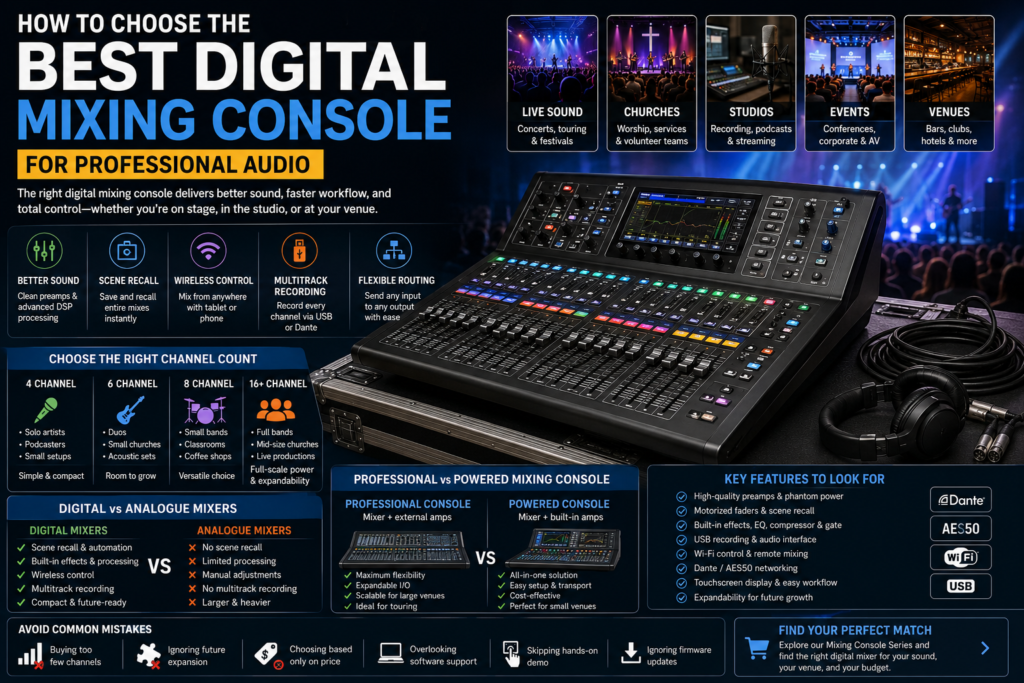
Choosing the best digital mixing console can make or break your sound whether you’re running front of house at a packed venue, mixing worship at a Sunday service, or tracking vocals in a home studio. Get it right, and every mix feels effortless. Get it wrong, and you’re fighting your gear instead of your sound.
Professional audio has changed fast. A decade ago, most live rooms and studios ran analogue mixing desks big, heavy, and limited to whatever hardware was bolted onto the console. Today, digital mixing consoles pack scene recall, built-in effects, remote control, and studio-grade preamps into a fraction of the space. The shift isn’t just about convenience; it’s changed how engineers work, how bands travel, and how churches and venues budget for audio.
In this guide, you’ll learn mixing console guide actually is, which features matter most, how to pick the right channel count, and how to avoid the buying mistakes that trip up first-time buyers. Whether you need a live sound digital mixing console for touring, a compact desk for a home studio, or a powered mixing console for a small venue, this guide will help you choose with confidence.
What Is a Digital Mixing Console?
A digital mixing console is an audio mixer that processes sound using digital signal processing (DSP) instead of analogue circuitry. It converts incoming audio to digital data, applies EQ, compression, and effects internally, then routes it to speakers, recording devices, or monitors. Unlike an analogue mixer, a digital audio mixer can store entire mix setups as recallable scenes.
At its core, a mixing console sometimes called a mixing desk, audio console, or sound mixer takes multiple audio sources (microphones, instruments, playback devices) and combines them into one or more outputs. A digital mixer does this using onboard processors rather than physical knobs wired directly to circuits, which is the main difference from an analogue mixer.
How It Works
When a signal enters through an XLR input or line input, it’s converted from analogue to digital almost instantly. From there, every adjustment gain, EQ, compression, gate, reverb, delay happens inside the console’s processing engine. The result is then converted back to analogue for the speakers, or kept digital for streaming, USB recording, or Dante networking.
Digital vs Analogue Mixers
The difference comes down to flexibility and recall. An analogue mixer requires manual adjustment of every channel every time. A digital mixing console lets you save a full show, service, or session as a scene and recall it instantly a massive advantage for churches, touring bands, and venues running repeat events.
Why Choose a Digital Mixing Console?
Digital consoles have become the default in professional audio installation for good reason. Here’s what they bring to the table:
- Better, more consistent sound quality — built-in DSP keeps processing clean and repeatable across shows.
- Onboard effects and processing — EQ, compressor, gate, reverb, and delay are built in, cutting the need for outboard gear.
- Scene recall — save an entire mix and load it back in seconds, ideal for churches and repeat events.
- Wireless control and remote mixing — walk the room with a tablet and adjust monitor mixing or front of house (FOH) levels from anywhere.
- Multitrack recording — most digital mixers offer USB recording or a built-in audio interface for capturing every channel.
- Smaller footprint — a 32-channel digital console can be smaller and lighter than a 16-channel analogue desk.
- Lower long-term maintenance — fewer moving parts and physical faders mean less wear compared to analogue mixers.
- Flexible audio routing — assign any input to any output without repatching cables.
- Future scalability — add Dante networking, AES50 expansion, or extra stage boxes as your needs grow.
Key Features to Look for in the Best Digital Mixing Console
Not every digital mixing console is built the same. Here’s what actually matters when comparing options.
Number of channels — Match channel count to your real-world needs, not just today’s setup, but growth over the next few years.
Microphone preamps — Clean, low-noise preamps directly affect how your vocals and instruments sound before any processing is applied.
Phantom power — Required for condenser microphones; confirm it’s available on every channel you’ll use, not just a few.
Motorized faders — These physically move to match a recalled scene, so what you see matches what you hear — critical for touring and live mixing console work.
Built-in effects — Reverb, delay, and modulation effects save you from renting or carrying outboard processors.
EQ, compressor, and gate — Per-channel dynamics processing is now standard on any professional audio mixing console and shapes your mix before it ever reaches the room.
USB recording and audio interface functionality — Lets you multitrack record a live show or session straight to a laptop.
Bluetooth — Useful for quick playback or background music without patching in an extra device.
Wi-Fi control and remote mixing — Mix monitors or FOH from a phone or tablet anywhere in the venue.
Dante networking and AES50 — Send audio over standard network cable instead of bulky multicore snakes — essential for larger live sound system installs.
Touchscreen display — Speeds up navigation, especially on consoles with dozens of channels.
Scene recall — Store full console states, ideal for repeat events like church services or weekly bookings.
Expandability — Look for expansion card slots or stage box compatibility so the console can grow with your venue.
DSP processing power — More onboard processing means more simultaneous effects and channel strips without maxing out the system.
Choosing the Right Channel Count
Channel count is one of the biggest decisions when buying a digital audio mixer. Buy too few, and you’ll outgrow it within a year. Buy too many, and you’re paying for unused inputs.
4 Channel Mixing Console
Best for solo performers, podcasters, small meeting rooms, and basic streaming setups. A 4 channel mixing console handles a couple of microphones and a playback source nothing more.
6 Channel Mixing Console
A step up for duos, small bands, or a small church with a modest praise team. Six channels typically cover vocals, an acoustic guitar, and a keyboard with room to spare.
8 Channel Mixing Console
A common choice for small bands, coffee shops, classroom AV, and small conference rooms. Eight channels usually accommodate a full rhythm section or a panel discussion with several microphones.
16+ Channel Digital Mixers
Built for full bands, touring productions, mid-size churches, and event production companies. 16+ channel digital mixers typically include expansion for stage boxes, giving room for drums, full vocal sections, and playback tracks.
| Channel Count | Ideal Users | Best Applications | Expandability |
| 4 Channel | Solo artists, podcasters, home studio owners | Voice-over, small streaming setup, home recording | Minimal |
| 6 Channel | Duos, small churches, small event production | Acoustic sets, small worship teams | Limited |
| 8 Channel | Small bands, classrooms, coffee shops | Live music, conference rooms, school AV | Moderate |
| 16+ Channel | Touring bands, mid-size churches, event production companies | Full bands, live concerts, outdoor festivals | Extensive (Dante, AES50, stage boxes) |
Professional Audio Mixing Console vs Powered Mixing Console
This is one of the most common comparisons buyers face, especially for small to mid-size venues.
A professional audio mixing console is a standalone mixer you still need separate power amplifiers and speakers. A powered mixing console combines the mixer and amplification in one unit, simplifying setup for smaller venues.
| Factor | Professional Audio Mixing Console | Powered Mixing Console |
| Features | Full DSP, expandable I/O, deeper routing | Simplified I/O, built-in amp channels |
| Performance | Scales with separate amps and speakers | Fixed power output, easier setup |
| Cost | Higher overall (mixer + amps + speakers) | Lower upfront cost for small setups |
| Flexibility | Highly flexible, modular system | Less flexible, fixed configuration |
| Applications | Touring, large venues, churches, festivals | Small bars, coffee shops, small conference rooms |
| Advantages | Scalable, professional-grade routing | Compact, fewer cables, easy transport |
| Limitations | Requires more gear and setup knowledge | Limited expansion, fixed power ceiling |
Live Sound Digital Mixing Console Buying Guide
Different environments call for different priorities. Here’s what matters most in each:
Concerts and touring productions — Prioritize channel count, Dante networking, and motorized faders for fast scene recall between acts.
Churches — Scene recall and simple wireless control matter most, since volunteer teams often run the desk.
Schools — Look for durability, straightforward layouts, and classroom AV compatibility over advanced DSP.
Hotels — Flexible routing and Bluetooth support cover both live events and background audio needs.
Conferences and corporate events — Clean preamps and gating matter for speech clarity across many microphones.
Outdoor festivals — Weatherproofing, expandability, and reliable AES50 stage box connections are essential.
Best Digital Mixing Console for Home Studio
For podcasters, YouTubers, streamers, voice-over artists, and music producers, the priorities shift from live sound system durability to recording quality.
Look for:
- A clean audio interface with low-latency USB recording
- Quality microphone preamps for spoken word and vocals
- Onboard compressor and gate to control dynamics without a laptop
- Small footprint that fits a desk setup
- Simple routing for multitrack recording into your DAW
Best Small Mixing Console
Compact mixers serve a different crowd mobile DJs, coffee shops, meeting rooms, small churches, and classroom AV setups where space and simplicity matter more than channel count.
Prioritize:
- Portability and light weight for mobile DJs
- Simple, intuitive controls for non-technical operators
- Bluetooth for quick background audio
- Enough phantom power for a handful of condenser microphones
- A reliable, no-frills EQ for basic tone shaping
Common Mistakes to Avoid
- Buying too few channels — leaves no room to add a monitor mix or extra instrument later.
- Ignoring future expansion — Dante or AES50 support matters more once your venue grows.
- Choosing based only on price — cheap preamps and DSP show up in your sound quality fast.
- Overlooking software compatibility — check the control app works with your tablet or laptop OS.
- Ignoring customer support and warranty terms — live gear fails at the worst times.
- Forgetting recording requirements — not every mixer includes true multitrack USB recording.
- Skipping a hands-on demo — workflow and menu depth vary a lot between brands.
- Underestimating the learning curve — some consoles need real training time for volunteer teams.
- Ignoring firmware update history — a console that hasn’t been updated in years may be abandoned.
- Not checking stage box and expansion card compatibility before buying.
- Overbuying DSP power you’ll never use, driving up cost unnecessarily.
- Neglecting proper gain staging during setup, which causes noise and distortion regardless of console quality.
Maintenance Tips
- Cleaning — Wipe down faders and touchscreens regularly; dust buildup affects motorized fader accuracy.
- Firmware updates — Install manufacturer updates promptly for bug fixes and new features.
- Cable management — Label and coil cables properly to avoid strain on XLR inputs and connectors.
- Safe transportation — Use a proper flight case for touring consoles to protect motorized faders.
- Dust protection — Use a cover when the console isn’t in use, especially in outdoor or industrial settings.
- Ventilation — Ensure proper airflow around the console to prevent DSP processing overheating.
- Backup settings — Save scene and show files to external storage in case of console failure.
Frequently Asked Questions
What is the best digital mixing console?
The best digital mixing console depends on your channel needs, budget, and use case a touring band needs different features than a home studio owner.
Is a digital mixing console better than analogue?
For most professional audio applications, yes digital mixers offer scene recall, built-in effects, and easier routing that analogue mixers can’t match.
How many channels do I need?
Count your current inputs, add monitor sends, then add 25-30% headroom for future growth.
What is a powered mixing console?
A powered mixing console combines a mixer and power amplifier in a single unit, simplifying setup for smaller venues.
Which mixer is best for churches?
Churches typically benefit most from consoles with strong scene recall and simple wireless control for volunteer operators.
Which mixer is best for recording studios?
Recording studios should prioritize preamp quality, multitrack USB recording, and DAW integration over live-focused features.
Can beginners use digital mixers?
Yes — many digital mixing consoles include simplified layouts and guided setup modes designed for newer users.
Is Wi-Fi control necessary?
It’s not required, but wireless control makes monitor mixing and walking the room significantly easier.
What is DSP?
DSP, or digital signal processing, is the technology that lets a digital mixer apply EQ, compression, and effects internally.
Which mixer is best for live performances?
Live performances benefit from consoles with motorized faders, strong preamps, and reliable scene recall for fast changeovers.
Do I need USB recording?
If you plan to record rehearsals, services, or live shows, USB recording or a built-in audio interface is worth prioritizing.
What should I consider before buying?
Consider channel count, expansion options, preamp quality, ease of use, and whether the console fits your specific venue or application.
What’s the difference between a mixing desk and an audio interface?
A mixing desk blends multiple sources into a live or recorded mix, while an audio interface primarily converts analogue signals for a computer though many digital consoles do both.
Do I need Dante networking?
Dante networking is worth it for larger venues or touring setups needing to send audio over standard network cable instead of heavy multicore snakes.
Are digital mixers good for streaming setups?
Yes — built-in USB recording and Bluetooth make digital mixers a strong fit for streaming setups and podcast studios.
Conclusion
Choosing the best digital mixing console comes down to matching real features to real needs: the right channel count, reliable preamps, scene recall for repeat events, and enough expandability to grow with you. Whether you’re running front of house at live concerts, mixing at a small church, or building out a podcast studio, the right digital mixing console improves sound quality, speeds up your workflow, and protects your investment for years to come.
Ready to find your perfect match? Explore our Mixing Console Series to find the professional audio solution built for your venue, your budget, and your sound.