A great recording starts before you ever hit record — it starts with the gear handling your signal path. Choosing the best mixing console for home studio work is one of the highest-impact decisions you’ll make, because a weak preamp or noisy gain stage shows up in every track, podcast episode, or stream you produce afterward.
The right mixer does more than combine signals. It shapes tone through EQ, tames dynamics with a compressor, and on digital models hands you effects, USB recording, and DAW integration that used to require a rack full of separate gear. That means better recordings with less outboard clutter, whether you’re tracking vocals, hosting a podcast, or streaming to YouTube.
In this guide, you’ll learn mixing console guide actually does, how digital and analog options compare, which features are worth paying for, how many channels you need, and the buying mistakes that trip up home studio owners most often.
What Is a Mixing Console and Why Do You Need One in a Home Studio?
A mixing console is an audio device that combines, processes, and routes multiple audio signals from microphones, instruments, or playback sources into a single output. In a home studio, it lets you set gain, apply EQ and compression, and blend multiple sources before they reach your recording software or speakers. Unlike a standalone audio interface, a mixer gives you physical, real-time control over each channel.
That distinction matters for home studios specifically. An audio interface is built primarily to move audio in and out of a computer it does the analog-to-digital conversion but rarely offers onboard EQ, compression, or hands-on mixing controls per channel. A mixing console does both jobs: it processes your signal and feeds it into your DAW, often through a built-in USB audio interface.
Benefits for Home Recording
A quality mixer console gives home producers hands-on gain control, cleaner preamps than most all-in-one interfaces, and the ability to mix multiple live sources like a podcast with three guests in real time, rather than relying entirely on post-production.
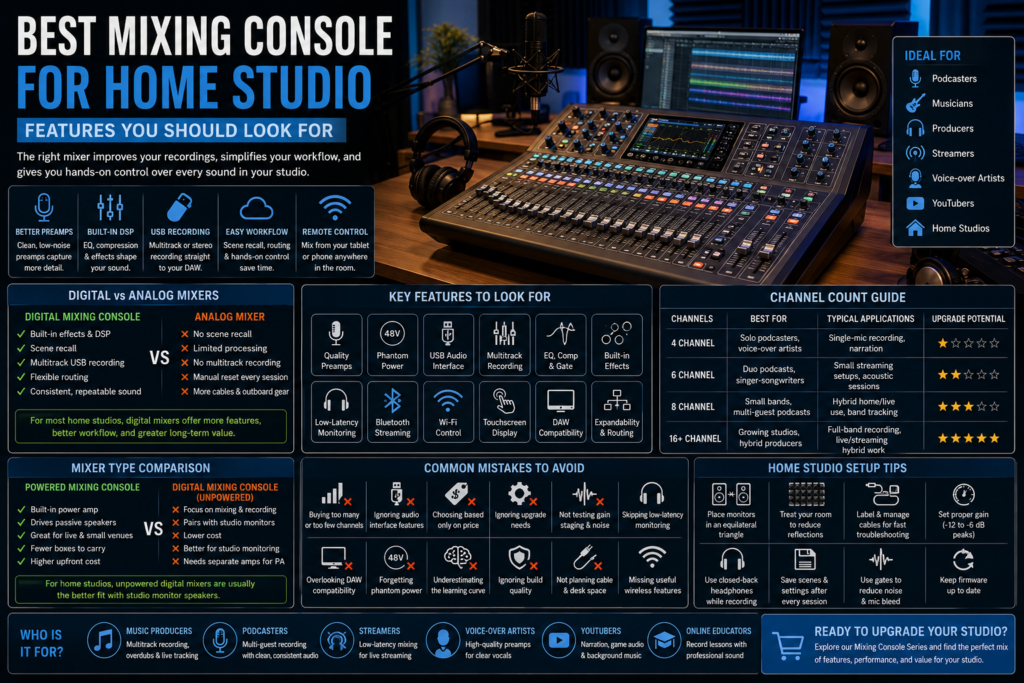
Digital Mixing Console vs Analog Mixer for Home Studios
This comparison trips up a lot of first-time buyers, so it’s worth looking at directly.
| Factor | Digital Mixing Console | Analog Mixer |
| Ease of use | Menu-based, steeper initial learning curve | Immediate, one knob per function |
| Sound quality | Consistent, digitally modeled EQ/compression | Warm, but subject to component drift over time |
| Built-in effects | Reverb, delay, and DSP effects included | Requires outboard gear or plugins |
| Recording capabilities | Multitrack USB recording built in | Usually stereo output only, unless paired with an interface |
| Workflow | Scene recall, saved channel settings | Manual reset of every knob per session |
| Expandability | Add channels via stage boxes or networking | Limited by physical channel strips |
| Cost | Higher for equivalent channel count | Lower entry cost for basic models |
For most home studios recording podcasts, vocals, or multitrack music, a digital mixing console’s built-in DSP effects and USB recording save real time and money compared to buying separate outboard gear.
Essential Features to Look for in the Best Mixing Console for Home Studio
Not every feature below is a must-have for every use case — but understanding each one helps you avoid overpaying for capability you won’t use, or missing something you need on day one.
| Feature | What It Does | Why It Matters for Home Studios |
| Number of channels | Sets how many simultaneous inputs you can use | Match to your typical session size, plus room to grow |
| Microphone preamps | Boosts mic-level signal cleanly to line level | Preamp quality directly affects your noise floor and clarity |
| Phantom power | Supplies 48V to power condenser microphones | Required for most studio-grade condenser mics |
| USB audio interface | Sends multitrack or stereo audio to your computer | Lets you record directly into your DAW without extra hardware |
| Multitrack recording | Captures each channel as a separate track | Essential for podcasts with multiple guests or full band tracking |
| Low-latency monitoring | Lets you hear your voice/instrument with minimal delay | Prevents the disorienting “double” sound while recording |
| Built-in DSP effects | Onboard reverb, delay, and dynamics processing | Reduces reliance on plugins and outboard gear |
| Equalizer (EQ) | Shapes tone per channel | Fixes muddy vocals, thin acoustic guitar, boomy rooms |
| Compressor and gate | Controls dynamics and cuts background noise | Keeps vocal levels consistent, removes mic bleed |
| Bluetooth connectivity | Streams audio in wirelessly | Useful for adding background music or reference tracks |
| Wi-Fi control | Enables remote mixing from a phone or tablet | Handy for solo streamers adjusting levels from on-camera position |
| Touchscreen interface | Visual access to routing, EQ, and metering | Speeds up navigation on higher-channel-count consoles |
| DAW compatibility | Works smoothly with your recording software | Avoids driver issues and workflow friction |
| MIDI support | Sends/receives MIDI data | Useful for producers integrating external instruments or controllers |
| Audio routing options | Flexible assignment of inputs to outputs/buses | Lets you send separate mixes to headphones vs. recording |
| Expandability | Add channels or networked audio later | Protects your investment as your studio grows |
| Build quality | Physical durability of knobs, faders, and chassis | Matters if the mixer travels or sees daily use |
Choosing the Right Channel Count
Channel count is the spec home studio buyers get wrong most often — usually by buying either far more or far less than they’ll actually use.
4 Channel Mixing Console
A 4 channel mixing console fits a solo podcaster, a voice-over artist, or a single-instrument-plus-vocal recording setup. It’s an efficient, affordable entry point, but it leaves little room for multi-guest podcasts or full band tracking.
6 Channel Mixing Console
A 6 channel mixing console suits a duo podcast, a singer-songwriter recording vocals and acoustic guitar simultaneously, or a small streaming setup with a mic, background music, and a guest line. It’s a common upgrade point once a 4-channel unit feels tight.
8 Channel Mixing Console
An 8 channel mixing console works well for a small band tracking session, a podcast with three or four guests, or a hybrid home studio that occasionally handles small live setups. It gives meaningful headroom without the cost or complexity of a large-format console.
Larger Mixers for Growing Studios
Studios producing full-band recordings, multi-camera YouTube productions, or hybrid home/live setups often outgrow 8 channels. Larger digital consoles add expansion via stage boxes or networked audio, letting a home studio scale into small live sound work without replacing the whole system.
Channel Count Comparison Table
| Channels | Best Users | Typical Applications | Upgrade Potential |
| 4 | Solo podcasters, voice-over artists | Single-mic recording, narration | Limited |
| 6 | Duo podcasts, singer-songwriters | Small streaming setups, acoustic sessions | Moderate |
| 8 | Small bands, multi-guest podcasts | Hybrid home/live use, band tracking | Good |
| 16+ | Growing studios, hybrid producers | Full-band recording, live/streaming hybrid work | Extensive |
Who Should Buy a Professional Audio Mixing Console?
A professional audio mixing console makes sense once your recording needs outgrow a basic USB mixer’s preamp quality or channel count:
- Music producers — need multitrack recording and flexible routing for overdubs and live tracking.
- Bands — recording together need enough channels and clean gain staging for every instrument and mic.
- Voice-over artists — benefit from a high-quality mic preamp and low noise floor, even on a single channel.
- Podcasters — with multiple guests need per-channel EQ, compression, and gating to keep levels consistent.
- YouTubers — recording narration alongside game audio or background music benefit from flexible routing and Bluetooth input.
- Streamers — need low-latency monitoring and often Wi-Fi control to adjust levels without leaving their camera position.
- Online educators — recording lessons need clean, consistent vocal capture and simple multitrack recording for editing.
- Hybrid home/live users — who occasionally run small live sound gigs benefit from a console that handles both studio and live duties well.
Can a Live Sound Digital Mixing Console Be Used in a Home Studio?
Yes — a live sound digital mixing console can work well in a home studio, though it comes with trade-offs worth knowing before you buy one for this purpose.
Advantages include high channel counts, robust build quality, and DSP effects designed for demanding live use. Limitations show up in size and cost live consoles are often larger and more expensive than home-studio-specific mixers, and some prioritize live routing flexibility over studio-friendly features like low-latency direct monitoring.
Flexibility is a real strength: many live digital consoles include Wi-Fi remote control, multitrack USB or Dante recording, and enough scalability to handle both home recording and occasional live streaming or small live sound gigs useful for hybrid home/live users who don’t want to own two separate systems.
Powered Mixing Console vs Digital Mixing Console
Another common point of confusion for home studio buyers: a powered mixing console isn’t a separate category from digital it’s a digital (or analog) mixer with built-in amplification for driving passive speakers directly.
| Factor | Powered Mixing Console | Digital Mixing Console (unpowered) |
| Home studio suitability | Useful if driving passive PA speakers directly | Better paired with studio monitor speakers and a separate audio interface workflow |
| Recording performance | Same DSP/recording features, plus onboard amps | Focuses processing power on mixing/recording, not amplification |
| Live applications | Strong — one box drives both mix and sound | Requires separate amps for live use |
| Cost | Higher upfront due to built-in amplification | Lower cost if you don’t need onboard power |
| Space requirements | Fewer boxes overall | Needs separate amp/interface gear |
For pure studio recording, a digital mixing console without built-in amplification is usually the better fit home studios monitor through powered studio monitor speakers rather than passive PA speakers, so onboard amplification often goes unused.
Common Mistakes When Buying a Home Studio Mixer
- Buying too many or too few channels — sizing for today’s sessions without planning for growth, or overspending on channels you’ll never fill.
- Ignoring audio interface functionality — assuming every mixer includes USB recording when it’s sometimes a separate add-on.
- Overlooking software/DAW compatibility — some USB mixers have driver quirks with specific operating systems or DAWs.
- Choosing based only on price — the cheapest option often has weak preamps that add noticeable noise to recordings.
- Ignoring upgrade needs — buying a mixer with no expansion path once your studio grows.
- Not considering microphone types — skipping phantom power on a mixer, then discovering your condenser mic won’t work.
- Skipping a hands-on test of gain staging — some preamps are noisy even before you add any processing.
- Underestimating the learning curve — digital consoles with deep menus take longer to master than a simple analog layout.
- Forgetting about low-latency monitoring — critical for vocalists and voice-over artists who need to hear themselves in real time.
- Overlooking build quality — flimsy faders and jacks wear out fast under regular home studio use.
- Ignoring Bluetooth or Wi-Fi needs — missing convenient wireless features that streamers and podcasters use daily.
- Not planning cable and desk space — buying a mixer that’s too large or small for the actual desk footprint available.
Home Studio Setup Tips
- Speaker placement — position studio monitor speakers in an equilateral triangle with your listening position, away from corners that cause bass buildup.
- Acoustic treatment — even basic foam panels or bookshelves at first reflection points noticeably reduce room reflections and improve recording clarity.
- Cable management — label XLR and USB cables to speed up troubleshooting and reduce accidental disconnects mid-session.
- Gain staging — set input gain so levels peak around -12 to -6 dB before any processing, leaving headroom and avoiding digital clipping.
- Monitoring — use closed-back studio headphones while recording to prevent mic bleed from monitor speakers.
- Recording workflow — save channel and scene settings after every session so you can recall a working setup instantly next time.
- Noise reduction — turn off unused channel gains and use gates on live mic inputs to cut background hum and bleed.
Frequently Asked Questions
What is the best mixing console for home studio use?
The best mixing console for a home studio depends on your channel needs and workflow a solo podcaster and a full-band producer need very different mixers, even within the same price range.
Do I need a digital mixing console?
Not necessarily a digital mixing console adds scene recall, built-in effects, and USB recording that analog mixers lack, but a well-built analog mixer paired with a separate audio interface works fine for simpler setups.
Can I record directly through a mixer?
Yes, most digital mixing consoles include a built-in USB audio interface for direct multitrack or stereo recording into your DAW.
Is a USB mixer enough for recording?
For basic podcasting or single-source recording, yes — but multi-guest or multitrack music sessions benefit from a mixer with more channels and stronger preamps.
How many channels do I need?
Count your maximum simultaneous inputs mics, instruments, and playback sources and add some headroom for future sessions.
What is phantom power?
Phantom power is 48V sent through an XLR cable to power condenser microphones, which need external power to operate, unlike most dynamic mics.
Is a powered mixing console suitable for home studios?
It can be, but home studios monitoring through studio monitor speakers rarely need the onboard amplification a powered mixing console provides.
Should I choose a mixer with built-in effects?
Built-in DSP effects like reverb and delay are convenient for quick recording sessions and reduce reliance on separate plugins or outboard gear.
Can I connect a mixer to my DAW?
Yes — most digital mixing consoles connect via USB and appear as an audio interface within popular DAWs, often with dedicated drivers for lower latency.
Which mixer is best for podcasting?
Podcasters generally do best with a mixer offering one channel per host/guest, built-in compression and gating, and simple USB multitrack recording.
What’s the difference between a mixer and an audio interface?
A mixer combines and processes multiple signals with hands-on controls; an audio interface is primarily built to convert analog signal to digital for your computer, often without per-channel EQ or compression.
Do I need MIDI support on a home studio mixer?
Only if you’re integrating external instruments, controllers, or hardware synths into your recording setup otherwise it’s not essential.
Is low-latency monitoring important?
Yes, especially for vocalists and voice-over artists, since noticeable latency while recording is distracting and can throw off timing and performance.
Can beginners use a digital mixing console?
Yes — many digital consoles include simplified views or guided setup modes, though full menu-based control takes some practice to master.
What should I look for before buying a home studio mixer?
Prioritize preamp quality, channel count with room to grow, USB recording capability, DAW compatibility, and low-latency monitoring.
Conclusion
Choosing the best mixing console for home studio work comes down to matching channel count, preamp quality, and recording features to how you actually create not to the longest spec sheet. Whether you’re podcasting solo, producing full-band recordings, or streaming to a live audience, the right mixer console will improve your recording quality, streamline your workflow, and scale as your studio grows.
Ready to upgrade your setup? Explore our full Mixing Console Series for professional audio solutions built for home studios, podcasters, streamers, and producers at every level.