
Choosing the right mixing console can shape everything about how a live show, recording session, or broadcast sounds. Get it right, and a church service, corporate event, or podcast episode comes through clean and balanced. Get it wrong, and even the best performers and speakers end up fighting a system that works against them instead of for them.
That choice usually comes down to one core decision: a digital mixing console or a traditional analog mixer. Both can deliver excellent sound, but they get there in very different ways — different workflows, different learning curves, and different long-term value depending on what you actually do with your gear. This guide breaks down exactly how they compare, so you can pick the mixer console that fits your setup instead of the one that just looks impressive on a shelf.
What Is a Mixing Console?
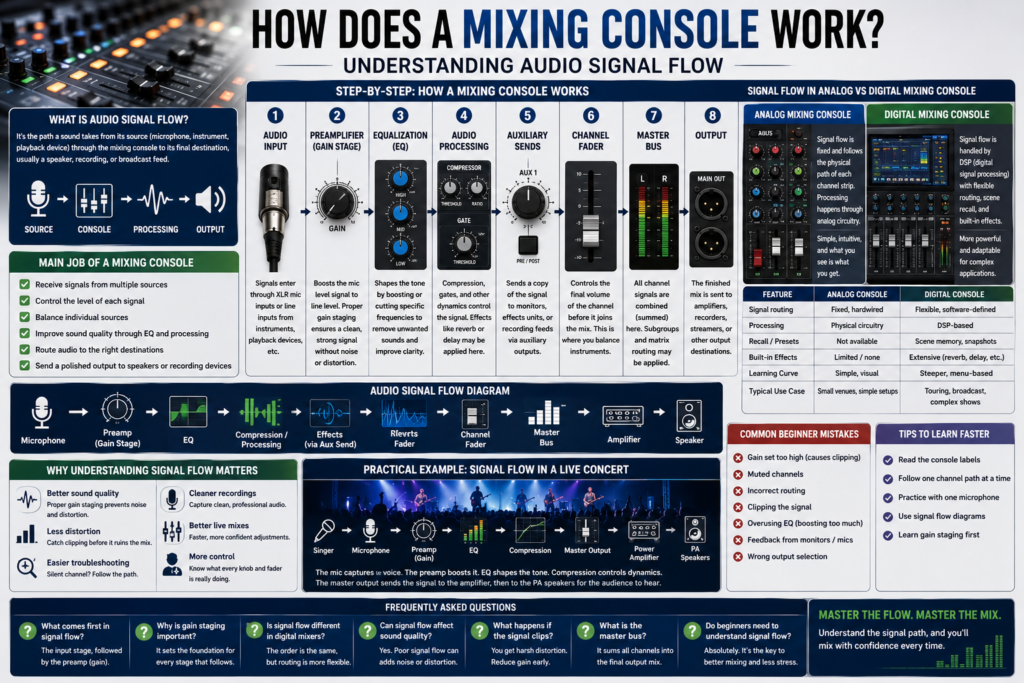
Before comparing digital and analog, it helps to answer a more basic question: what is mixing console, exactly? At its core, a mixing console is a piece of audio equipment that takes multiple input sources — microphones, instruments, playback devices — and combines them into a single, balanced output.
It does this through signal routing: each input channel can be adjusted, processed, and sent to different destinations, whether that’s a main PA system, a stage monitor, or a recording device. Every mixing console, regardless of type, handles the same basic functions: receiving signals, adjusting levels, shaping tone, and routing audio to where it needs to go.
For a deeper breakdown of these fundamentals, our guide on [What Is a Mixing Console? A Complete Beginner’s Guide] covers the basics in more depth, and [How Does a Mixing Console Work? Understanding Audio Signal Flow] walks through the full signal path stage by stage.
Our Mixing Console Guide covers everything you need to know about choosing, using, and optimizing an audio mixer. Learn about analog and digital mixing consoles, audio signal flow, key features, channel configurations, and expert tips to help you select the right mixing console for live sound, recording studios, churches, podcasts, and professional audio applications.
What Is a Digital Mixing Console?
A digital mixing console processes audio using DSP (digital signal processing) instead of analog circuitry. Instead of a separate physical knob for every function, most controls are accessed through a touchscreen or interface, with physical faders often assignable to different channels depending on what “layer” or “bank” you’re working on.
Some standout capabilities of a digital mixing console include:
- Presets and scene recall — save an entire console setup, including EQ, effects, and routing, and recall it instantly for the next show or session
- USB recording — record a multitrack session directly from the console without additional hardware
- Remote control — adjust levels and settings from a tablet or phone, useful for walking the room during a live mix
- Built-in effects — reverb, delay, compression, and gating without needing external processors
This combination of flexibility and recall makes a mixer console digital setup especially valuable for touring acts, churches with rotating volunteer teams, and any environment where consistency across multiple events matters.
What Is an Analog Mixer?
An analog mixer takes a more traditional approach: every function has its own dedicated physical control, and the signal path runs through analog circuitry from input to output. There’s no menu diving, no touchscreen, and no software to learn.
The appeal of an analog mixer comes down to a few core strengths:
- Traditional workflow — what you see on the panel is exactly what the signal is doing
- Physical controls — every channel’s gain, EQ, and fader are immediately visible and accessible
- Simplicity — no firmware updates, no software menus, no digital learning curve
- Reliability — fewer components that can fail, and no software glitches to troubleshoot mid-show
For straightforward setups where flexibility matters less than immediacy, an analog mixer remains a dependable, no-nonsense choice.
Digital Mixing Console vs Analog Mixer: Key Differences
| Feature | Digital Mixing Console | Analog Mixer |
| Sound Quality | Excellent, with digital conversion | Excellent, natural analog character |
| Workflow | Menu and layer-based | Direct, one-to-one control |
| Ease of Use | Steeper initial learning curve | Immediately intuitive |
| Learning Curve | Higher, but recall speeds up repeat use | Low, but no recall |
| EQ | Fully parametric, per-channel | Typically fixed-band |
| Built-in Effects | Extensive (reverb, delay, compression) | Limited or none |
| Routing | Highly flexible, software-defined | Fixed, hardwired |
| Recording | Multitrack USB recording built in | Requires external interface |
| Portability | Compact for channel count | Bulkier for equivalent channels |
| Reliability | Dependent on software/firmware | Very few points of failure |
| Expandability | Easily expanded via digital stage boxes | Limited by physical inputs |
| Maintenance | Firmware updates required | Minimal maintenance |
| Price | Higher for equivalent channel count | Generally more affordable |
| Best Applications | Touring, churches, broadcast, studios | Small venues, rehearsal, simple live sound |
Advantages of a Digital Mixing Console
A professional audio mixing console built around DSP brings capabilities that simply aren’t possible with analog circuitry alone. Some of the biggest advantages include:
- Built-in DSP for compression, gating, and EQ on every channel without extra outboard gear
- Scene memory that recalls an entire show’s settings instantly, ideal for touring or multi-service churches
- Automation for fader moves and mutes during complex productions
- Wireless control from a tablet, letting an engineer mix from the audience instead of a fixed booth
- Compact size relative to channel count, since physical controls are shared across layers
- Built-in recording, turning a live sound digital mixing console into a multitrack recorder for later mixing or archiving
These features make a digital mixing console especially valuable for FOH mixing at larger events, where recall and consistency across multiple shows or services save enormous amounts of setup time.
Advantages of an Analog Mixer
An analog mixer earns its place with a different set of strengths, built around simplicity rather than flexibility:
- Easy operation — no menus to navigate, just turn the knob you need
- Instant access — every parameter is always visible and reachable
- Affordability — analog circuitry is generally cheaper to manufacture at equivalent channel counts
- Durability — fewer digital components mean fewer things that can fail
- Lower learning curve — a new volunteer or first-time user can usually understand the layout within minutes
For small venues, rehearsal spaces, and simple sound reinforcement setups, these advantages often outweigh the flexibility a digital system offers.
Powered Mixing Console vs Digital Mixing Console
It’s worth clarifying a common point of confusion: a powered mixing console isn’t a separate category from digital or analog it’s a mixer (either type) with a built-in amplifier. Instead of running a separate power amp between the console and the speakers, a powered mixing console sends amplified signal directly to passive speakers.
This built-in amplification makes a powered mixing console ideal for smaller venues, mobile DJs, and event companies who want to minimize the amount of separate gear they haul and set up. A standalone digital mixing console, by contrast, typically requires a separate amplifier or powered speakers, but offers more routing and processing flexibility in exchange. Many modern powered mixers now include digital processing as well, blurring the line between the two — but the core distinction is amplification, not signal processing.
Which Mixing Console Is Better for Live Sound?
For live sound, the right answer depends heavily on the venue and the complexity of the show. A touring band moving between venues night after night benefits enormously from a live mixing console with scene recall — dial in the mix once during soundcheck, save it, and pull up a near-final starting point at the next stop.
Churches running multiple services with volunteer sound teams see similar benefits: a live sound digital mixing console lets a lead engineer preset EQ, compression, and monitor mixes ahead of time, so a less experienced volunteer just needs to ride faders during the actual service.
Corporate events and schools, on the other hand, often lean toward simpler analog setups when the audio needs are straightforward — a few microphones and a laptop for playback rarely justifies the complexity of a full digital workflow. Touring companies handling large-scale productions almost universally choose digital systems for the recall, remote control, and processing power they offer.
Which Mixing Console Is Better for Recording Studios?
In a recording studio, workflow needs shift again. A home studio focused on podcasting or singer-songwriter tracking often does fine with a compact analog mixer feeding into an audio interface, or a small digital unit with built-in USB recording — either can produce professional results at this scale.
Professional studios doing full band tracking or complex multitrack recording increasingly favor digital consoles, since built-in recording, recallable channel strips, and DSP-based processing streamline sessions that would otherwise require racks of outboard gear. For anyone specifically searching for the best mixing console for home studio use, the deciding factor usually comes down to channel count and whether built-in USB recording matters more than the tactile simplicity of analog controls.
Choosing the Right Channel Count
4 Channel Mixing Console
A 4 channel mixing console suits the smallest, most focused setups — podcasts, livestreams, and solo musicians who need just a couple of microphones and maybe a playback source. It keeps the workflow simple and the footprint small, without unused channels cluttering the workspace.
6 Channel Mixing Console
A 6 channel mixing console is a natural step up for small bands, rehearsal rooms, and smaller churches. It typically accommodates a modest drum kit or a full acoustic setup with vocals, striking a balance between capability and simplicity.
8 Channel Mixing Console
An 8 channel mixing console opens up room for fuller live performances and medium-sized venues, where a full band with multiple vocal mics and instrument lines needs dedicated channels. It’s also a practical choice for small-scale recording sessions with several simultaneous sources.
Best Small Mixing Console: Who Needs One?
For anyone prioritizing portability, the best small mixing console is usually judged by how much capability it packs into a compact footprint. Mobile DJs, solo performers, and content creators benefit most from this category — gear that fits in a backpack or a single case, sets up in minutes, and still delivers clean, professional sound reinforcement without the bulk of a full-size console.
Best Digital Mixing Console: What Features Should You Look For?
Not every digital mixing console is built the same way, and the “best” one depends entirely on your use case. When evaluating options, pay attention to:
- Channel count relative to your actual input needs, with some headroom for growth
- DSP quality — how natural the built-in EQ, compression, and effects sound
- USB recording capability for multitrack capture directly from the console
- Expandability through digital stage boxes or additional input expansion
- Wireless control via dedicated apps for tablets or phones
- Software support and how frequently the manufacturer releases firmware updates and improvements
The best digital mixing console for a touring engineer looks very different from the best one for a small church — matching features to actual workflow matters more than chasing the highest channel count or flashiest spec sheet.
Which One Should You Buy?
- Beginners benefit from the low learning curve of an analog mixer, or a simple digital unit with straightforward layout and minimal menu diving.
- Professionals handling complex productions typically gain more from a digital mixing console’s recall, processing, and routing flexibility.
- Churches with volunteer teams and multiple services see strong value in digital consoles with scene memory.
- Studios focused on multitrack work benefit from digital systems with built-in recording, while simpler home setups may do fine with analog.
- Live events with variable, one-off audio needs often favor the simplicity of analog gear.
- Touring companies almost always choose digital, given the value of consistent recall across venues.
- Schools with tight budgets and basic needs frequently find analog mixers more cost-effective and easier to maintain.
Frequently Asked Questions
What is a mixing console?
A mixing console is audio equipment that combines multiple input signals — like microphones and instruments — into a single balanced output through gain control, EQ, processing, and routing.
Is a digital mixing console better than an analog mixer?
Neither is universally “better” a digital mixing console offers more flexibility, recall, and built-in processing, while an analog mixer offers simplicity, reliability, and a shorter learning curve. The right choice depends on your specific needs.
Which is the best digital mixing console?
The best digital mixing console depends on your channel count needs, budget, and whether features like USB recording, wireless control, and expandability matter for your workflow.
What is a powered mixing console?
A powered mixing console is a mixer with a built-in amplifier, allowing it to drive passive speakers directly without a separate power amp.
Is a live sound digital mixing console suitable for recording?
Yes — most modern digital consoles include built-in USB multitrack recording, making them suitable for both live sound reinforcement and studio-quality recording.
Which mixer is best for a home studio?
For a home studio, the best mixing console for home studio use typically depends on channel count and whether built-in USB recording is a priority over the tactile simplicity of an analog mixer.
Should I buy a 4, 6, or 8 channel mixing console?
Choose a 4 channel mixing console for podcasts or solo work, a 6 channel mixing console for small bands or churches, and an 8 channel mixing console for fuller live performances or medium venues.
What makes a professional audio mixing console different?
A professional audio mixing console typically offers higher build quality, more precise gain staging, better preamps, and more robust routing and processing options suited to demanding live and studio environments.
Conclusion
There’s no single right answer to the digital mixing console vs analog mixer debate only the right answer for your specific setup. If you need recall, built-in effects, remote control, and multitrack recording, a digital mixing console will pay for itself in saved setup time and expanded capability. If your priority is simplicity, reliability, and an immediate, hands-on workflow, an analog mixer remains a rock-solid choice that’s hard to outgrow for smaller, straightforward setups. Match the mixer console to how you actually work, not just to the specs on the box, and you’ll end up with a system that serves your sound for years to come.