
If you’ve ever watched a live band, sat through a church service with crisp, clear vocals, or recorded a podcast that actually sounds professional, you’ve experienced the work of a mixing console. It’s one of those pieces of gear that quietly does a huge amount of work behind the scenes, yet most people have no idea what it actually does.
So, what is a mixing console? In simple terms, it’s the control center that takes sound from multiple sources microphones, instruments, playback devices and combines them into a single, balanced output. Whether you’re setting up a home studio, running sound for a school event, or mixing a live concert, understanding how a mixing console works is the first step toward better audio.
In this guide, we’ll break down exactly what a mixing console is, how it works, the different types available, where they’re used, and how to choose the right one for your needs. No jargon overload just clear, practical explanations for beginners and professionals alike.
What Is a Mixing Console?
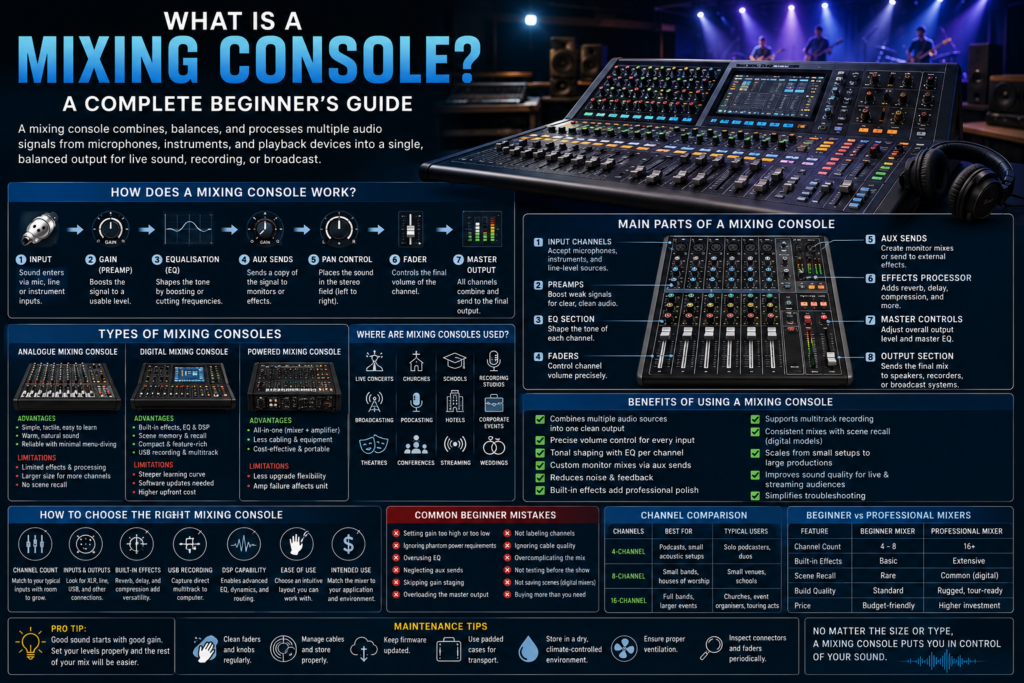
A mixing console, also called a mixer or mixing desk, is an audio device that combines, balances, and processes multiple sound signals into one or more output signals. It allows users to control volume, tone, and effects for each individual audio channel before sending a final mix to speakers, recording equipment, or a broadcast feed.
The term “mixer console” comes from its core function: mixing. Every input a vocal mic, a guitar, a keyboard, a laptop arrives as a separate audio signal. The console’s job is to blend these signals together in a way that sounds balanced and clear, rather than chaotic. Think of it as a traffic controller for sound, deciding how loud each element should be and where it fits in the overall mix.
Mixing consoles range from simple 4-channel units for home podcasters to massive 96-channel digital consoles used on world tours. Regardless of size, they all follow the same basic principle: take in sound, shape it, and send it out.
How Does a Mixing Console Work?
Understanding the signal flow through a mixing console makes everything else easier to grasp. Here’s a simplified, step-by-step look at how audio moves through the system:
- Input – Sound enters the console through an XLR input (for microphones), a quarter-inch jack (for instruments), or a line input (for playback devices). Many consoles also offer phantom power, a small electrical charge needed to run condenser microphones.
- Gain (Preamp) – The gain control boosts the incoming signal to a usable level. Setting gain correctly is one of the most important and most often overlooked steps in getting good sound.
- Equalisation (EQ) – The EQ section lets you shape the tone of each channel, cutting or boosting specific frequencies like bass, mids, and treble.
- Auxiliary Sends – Aux sends route a copy of the channel’s signal to a separate destination, most commonly a monitor mix for performers on stage.
- Pan Control – Pan determines where a sound sits in the stereo field, from far left to far right.
- Fader – The fader controls the final volume of each channel before it joins the master mix.
- Master Output – All channels combine at the master section, which sends the final, balanced mix to speakers, recording devices, or a broadcast system.
This audio signal path input, gain, EQ, aux, pan, fader, output is the backbone of virtually every mixing console, whether analogue or digital.
Main Parts of a Mixing Console
Every mixing console, regardless of brand or size, is built from a set of core components:
- Input Channels – Each channel accepts one audio source, such as a microphone or instrument.
- Preamps – These boost weak microphone signals to a usable line level, forming the foundation of clean sound.
- EQ Section – Allows tonal shaping per channel, helping each sound source fit better in the mix.
- Faders – Physical or digital sliders that control channel volume with precision.
- Aux Sends – Create separate mixes for monitors, in-ear systems, or effects processors.
- Effects Processor – Built-in reverb, delay, or compression that adds polish without extra outboard gear.
- Master Controls – Manage the overall output level and often include a master EQ or limiter.
- Output Section – Sends the finished mix to speakers, recording interfaces, or broadcast equipment.
Each part plays a specific role, but together they form a complete audio processing chain from raw signal to finished mix.
Types of Mixing Consoles
Not all mixing consoles are built the same way. Choosing the right type depends on your budget, technical comfort level, and intended use.
Analogue Mixing Console
An analogue mixer processes audio signals using physical electronic circuits rather than digital conversion. Every knob and fader directly controls voltage running through the hardware.
Advantages:
- Simple, tactile controls that are easy to learn
- Warm, natural sound character favored by many engineers
- Reliable with minimal menu-diving
Limitations:
- Limited effects and processing options
- Larger physical footprint for high channel counts
- No built-in recall or scene memory
Typical applications: Small venues, rehearsal spaces, basic live sound setups, and users who prefer hands-on control.
Digital Mixing Console
A digital mixing console converts incoming audio into digital data, allowing for advanced processing, scene recall, and remote control via tablet or computer.
Advantages:
- Built-in effects, EQ, and dynamic processing (DSP)
- Scene memory for instantly recalling saved settings
- Compact size relative to channel count
- USB recording and multitrack capability
Limitations:
- Steeper learning curve for beginners
- Requires software updates and occasional troubleshooting
- Higher upfront cost for premium models
Typical applications: Touring live sound, churches, broadcast studios, podcast production, and any setup requiring consistent, repeatable mixes.
Powered Mixing Console
A powered mixing console combines a standard mixer with a built-in power amplifier, eliminating the need for separate amp units.
Advantages:
- All-in-one convenience for small to mid-sized venues
- Reduced cabling and equipment
- Cost-effective for portable PA systems
Limitations:
- Less flexibility if you need to upgrade amplification separately
- Amp failure affects the entire unit
Typical applications: Mobile DJs, small bands, schools, and community events needing a simple, self-contained sound reinforcement system.
Comparison Table: Analogue vs Digital Mixing Console
| Feature | Analogue Mixer | Digital Mixer |
| Sound Processing | Circuit-based | DSP-based |
| Effects | Limited/none | Extensive built-in |
| Scene Recall | Not available | Yes |
| Learning Curve | Easy | Moderate |
| Portability | Bulkier at scale | Compact |
| Price Range | Lower to mid | Mid to high |
Where Are Mixing Consoles Used?
Mixing consoles show up in far more places than most people realize:
- Live concerts – Balancing bands, vocals, and monitor mixes in real time
- Churches – Managing sermons, choirs, and instrumental worship music
- Schools – Supporting assemblies, plays, and music programs
- Recording studios – Tracking and mixing multitrack recordings
- Broadcasting – Managing multiple audio feeds for TV and radio
- Podcasting – Blending host mics, guest audio, and pre-recorded clips
- Hotels – Running audio for conferences and banquet events
- Corporate events – Handling presentations, panel discussions, and AV needs
- Theatres – Mixing dialogue, sound effects, and live music
- Conferences – Supporting speakers, panels, and Q&A sessions
- Streaming – Managing audio quality for live online broadcasts
- Weddings – Balancing speeches, live music, and background audio
Benefits of Using a Mixing Console
- Combines multiple audio sources into one clean, balanced output
- Gives precise control over volume for each input
- Allows tonal shaping through dedicated EQ per channel
- Enables custom monitor mixes for performers via aux sends
- Reduces background noise and feedback through proper gain staging
- Adds professional polish with built-in effects like reverb and compression
- Supports multitrack recording for studio-quality production
- Improves consistency across shows with scene recall (digital models)
- Scales easily from small setups to large productions
- Enhances live sound quality for audiences and streaming viewers alike
- Simplifies troubleshooting by isolating problem channels quickly
How to Choose the Right Mixing Console
When shopping for a professional audio mixing console, consider these factors:
- Number of Channels – Match the channel count to your typical number of inputs, with a few spares for growth.
- Inputs and Outputs – Check for XLR, line, and USB connections that suit your equipment.
- Built-in Effects – Reverb, delay, and compression can reduce the need for extra gear.
- USB Recording – Useful for podcasters and musicians who want direct multitrack capture.
- Bluetooth Connectivity – Handy for quick playback from phones or tablets.
- DSP Capability – Digital signal processing enables advanced EQ, dynamics, and routing.
- Expandability – Look for models that can grow with future needs.
- Ease of Use – Beginners should prioritize intuitive layouts over feature-heavy consoles.
- Budget – Balance features against realistic spending limits.
- Intended Application – A podcast mixer has different needs than a live mixing console for touring bands.
Common Beginner Mistakes
- Setting gain too high or too low – Causes distortion or weak signals.
- Ignoring phantom power requirements – Condenser mics won’t work without it.
- Overusing EQ – Small adjustments usually sound more natural than extreme boosts or cuts.
- Neglecting aux sends – Poor monitor mixes lead to performer discomfort on stage.
- Skipping gain staging between channels – Uneven levels create inconsistent mixes.
- Not labeling channels – Leads to confusion during live shows.
- Overloading the master output – Causes clipping and distortion.
- Ignoring cable quality – Cheap or damaged cables introduce noise and dropouts.
Maintenance Tips
- Cleaning – Wipe down faders and knobs regularly to prevent dust buildup.
- Cable Management – Coil and store cables properly to avoid damage.
- Firmware Updates – Keep digital consoles updated for stability and new features.
- Safe Transportation – Use padded cases for touring or mobile setups.
- Storage – Keep consoles in dry, climate-controlled environments.
- Ventilation – Ensure proper airflow around powered consoles to prevent overheating.
- Regular Inspections – Check connectors and faders periodically for wear.
Frequently Asked Questions
What is a mixing console?
A mixing console is a device that combines, balances, and processes multiple audio signals into a single output for live sound, recording, or broadcast use.
What is the difference between a mixer and a mixing console?
The terms are generally used interchangeably. “Mixer” is often used casually, while “mixing console” typically refers to larger, more feature-rich professional units.
Is a digital mixing console better than an analogue one?
It depends on your needs. Digital consoles offer more flexibility and built-in processing, while analogue consoles are simpler and often preferred for their tactile control.
What is a powered mixing console?
A powered mixing console includes a built-in amplifier, combining mixing and amplification in a single unit.
How many channels do I need?
Count your typical inputs microphones, instruments, playback devices and add two to four extra channels for future flexibility.
Can I use a mixing console at home?
Yes, compact mixing consoles are ideal for home studios, podcasting, and streaming setups.
Is a mixing console suitable for podcasting?
Absolutely. A small digital mixer with USB recording is one of the most popular choices for podcast production.
What features should beginners look for?
Beginners should prioritize simple layouts, clear labeling, built-in effects, and USB connectivity for easy recording.
Do I need phantom power?
Only if you’re using condenser microphones, which require it to operate.
Can a mixing console improve live sound quality?
Yes, proper use of gain, EQ, and aux sends significantly improves clarity and reduces feedback.
What’s the difference between a mixer and an audio interface?
An audio interface primarily converts analogue signals for computer recording, while a mixing console offers hands-on control, EQ, and live mixing capabilities.
Are digital mixers harder to learn than analogue ones?
They have a steeper initial learning curve due to menus and digital controls, but many offer simplified layouts for beginners.
Comparison Table: 4 vs 8 vs 16 Channel Mixers
| Channels | Best For | Typical Users |
| 4-Channel | Podcasts, small acoustic setups | Solo podcasters, duos |
| 8-Channel | Small bands, houses of worship | Small venues, schools |
| 16-Channel | Full bands, larger events | Churches, event organisers, touring acts |
Comparison Table: Beginner vs Professional Mixers
| Feature | Beginner Mixer | Professional Mixer |
| Channel Count | 4–8 | 16+ |
| Built-in Effects | Basic | Extensive |
| Scene Recall | Rare | Common (digital) |
| Build Quality | Standard | Rugged, tour-ready |
| Price | Budget-friendly | Higher investment |
Conclusion
A mixing console is the heart of any audio setup, whether you’re recording a podcast, running sound for a live concert, or managing audio for a corporate event. Understanding how it works from gain staging to EQ to aux sends helps you make informed decisions about which mixer console fits your needs, whether that’s an analogue mixing console, a digital mixing console, or a powered mixing console.
Choosing the right equipment starts with understanding mixing console guide and how each component contributes to a clean, professional sound. If you’re ready to take the next step, explore our Mixing Console Series for a full range of professional audio solutions built for live sound, studios, and broadcast environments.