
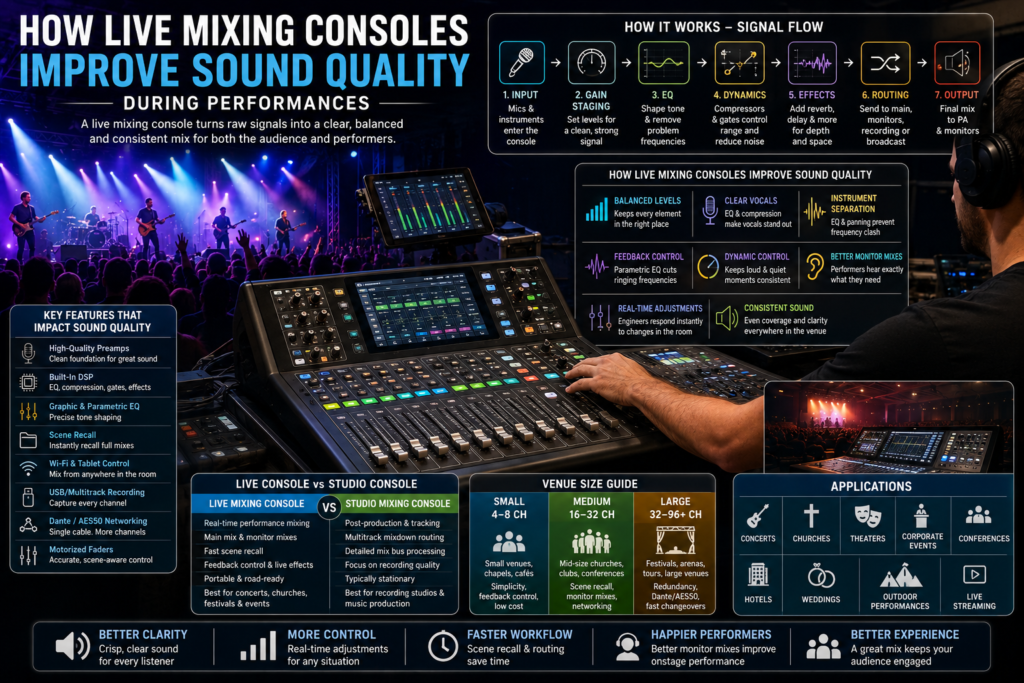
A great performance can be undone in seconds by muddy vocals, a screeching feedback loop, or a monitor mix that leaves the drummer unable to hear the bass. Sound quality isn’t a nice-to-have at a live event — it’s the difference between an audience that leans in and one that leaves early. At the center of that experience sits the live mixing console, the piece of gear responsible for taking dozens of raw signals and turning them into a clear, balanced, and consistent mix.
Digital technology has changed what’s possible behind the board. Where analog consoles once required physical outboard gear for every EQ, compressor, and effect, a modern live sound digital mixing console packs all of that processing into one system, with scene recall, networked audio, and remote control from a tablet. The result is faster setup, more consistent shows, and far more control over how a room actually sounds.
This guide breaks down exactly how a live mixing console works during a performance, the features that most directly affect sound quality, how it compares to a studio mixer, and how to choose the right one for your venue or event.
Want to understand how audio mixing works before choosing the right equipment? Explore our Mixing Console Guide to learn about mixer types, key features, signal flow, channel configurations, and practical buying tips. Whether you’re setting up a live stage, recording studio, church, or broadcast system, this guide will help you make an informed decision.
What Is a Live Mixing Console?
A live mixing console is an audio system used during real-time performances to blend, balance, and route signals from microphones and instruments into a clear mix for the audience and performers. Its core purpose is real-time control rather than post-production polish. Unlike a studio mixer, it prioritizes fast recall, monitor mixing, and feedback control. Typical applications include concerts, churches, theaters, and corporate events.
How a Live Mixing Console Works During a Performance
Every live mix follows a signal path, and understanding it makes troubleshooting far easier when something sounds off.
- Microphone and instrument inputs — signals enter through XLR inputs, often powered by phantom power for condenser microphones.
- Gain staging — each channel’s input level is set so the signal is strong but not clipping.
- Equalization (EQ) — graphic and parametric EQ shape tone and remove problem frequencies.
- Compression — evens out dynamic range so a singer’s quiet and loud moments both sit well in the mix.
- Gates — mute channels between uses to reduce stage noise bleed.
- Effects processing — reverb and delay add depth without needing outboard units.
- Audio routing — signals are sent to the correct buses: main mix, monitors, recording, or broadcast.
- Monitor mixes — separate, independent mixes are built for each performer’s stage monitor or in-ear system.
- Main speaker outputs — the final, polished mix reaches the PA system and line array speakers for the audience.
Signal Flow at a Glance
| Stage | What Happens | Why It Matters |
| Input | Mic/instrument signal enters via XLR | Sets the foundation for the whole mix |
| Gain staging | Level adjusted to avoid clipping or noise | Prevents distortion and weak signal |
| EQ | Tone shaped, problem frequencies cut | Improves clarity and reduces feedback |
| Compression/Gate | Dynamics controlled, noise reduced | Keeps vocals and instruments consistent |
| Routing | Signal sent to main, monitor, or recording bus | Enables independent mixes for each destination |
| Output | Final mix sent to speakers or monitors | Delivers the performance to the audience and performers |
How Live Mixing Consoles Improve Sound Quality
A well-run live mixing console affects nearly every part of what an audience hears:
Balanced audio levels keep no single instrument or vocal overpowering the mix, so a lead singer stays audible over a full band without constant manual adjustment.
Clear vocals come from a combination of clean preamps, targeted EQ, and compression that keeps a vocal sitting consistently on top of the mix, even as a performer moves closer to or further from the microphone.
Instrument separation is achieved through careful EQ and panning, so a guitar and keyboard occupying similar frequency ranges don’t blur into a muddy wall of sound.
Feedback reduction relies on parametric EQ and gain structure engineers can quickly identify and cut a ringing frequency before it becomes a squeal that stops a set.
Dynamic control through compressors and limiters keeps a drum hit from suddenly overwhelming the mix or a quiet acoustic passage from disappearing entirely.
Better monitor mixes mean performers hear exactly what they need a drummer might want more click track and kick, while a vocalist wants more of their own voice all built independently from the front-of-house mix.
Real-time adjustments let engineers respond instantly to a room filling with people (which changes how sound absorbs and travels), a performer’s energy shift, or unexpected feedback.
Consistent sound across the venue comes from proper system tuning paired with attentive live mixing, so listeners in the back row get nearly the same clarity as those up front.
Consider a mid-size festival stage: as the crowd grows, low-frequency buildup changes and vocal clarity can suffer. An engineer working a live sound digital mixing console can pull up saved EQ curves, adjust compression, and rebalance monitor mixes in seconds something far slower and more error-prone on a purely analog setup.
Essential Features of a Professional Live Mixing Console
High-quality microphone preamps are the starting point for clean, professional sound noisy or weak preamps limit everything downstream.
Digital Signal Processing (DSP) powers onboard EQ, compression, gating, and effects without needing external hardware.
Graphic and parametric EQ give engineers both broad tonal control and precise, surgical frequency correction.
Compressors, gates, and built-in effects like reverb and delay round out the dynamic and tonal control needed for a polished live mix.
Motorized faders move automatically to reflect recalled scenes, so the engineer always sees an accurate picture of the current mix.
Touchscreen interfaces, Wi-Fi and tablet control allow hands-on mixing from anywhere in the room critical for hearing what the audience actually hears.
Scene recall saves an entire configuration for instant reload between songs, acts, or services.
USB and multitrack recording capture the full show for virtual soundcheck, archiving, or post-event mixing.
Dante networking and AES50 connectivity replace heavy analog snakes with a single network cable, simplifying stage setups.
Expandable I/O ensures the console can grow alongside a band, venue, or production company’s needs.
Essential vs Advanced Features
| Feature | Essential (Small Events) | Advanced (Touring/Large Venues) |
| Preamps | Clean, basic quality | High-headroom, ultra-low noise |
| EQ | Basic parametric | Full parametric + graphic per channel |
| Dynamics | Compressor/gate | Multi-band compression, advanced gating |
| Recall | Manual reset | Full scene recall |
| Networking | Not required | Dante/AES50 standard |
| Control | Onboard only | Wi-Fi, tablet, multi-user remote |
| Recording | Stereo USB | Full multitrack over network |
Applications of Live Mixing Consoles
Concerts
Fast scene changes between songs, strong monitor mixing for musicians, and enough headroom for dynamic performances.
Music Festivals
Rapid changeovers between acts, weatherproofing for outdoor stages, and Dante networking to manage complex, multi-stage signal routing.
Churches
Volunteer-friendly workflows, saved scenes for different service formats, and reliable sermon recording alongside live streaming a defining need for any modern church sound system.
Theaters
Precise cue-based mixing, wireless microphone management for actors, and tight integration with sound effects playback.
Corporate Events
Clear speech intelligibility for presentations, conference audio routing, and simple operation for AV staff running multiple sessions.
Conferences
Multiple microphone inputs for panels and Q&A, plus reliable feedback control in rooms with challenging acoustics.
Hotels
Flexible, portable setups that adapt to weddings, banquets, and corporate functions in the same space.
Wedding Productions
Simple, reliable operation for ceremony speeches and reception music, often run by a mobile DJ or small AV team.
Outdoor Performances
Weather resistance, strong gain-before-feedback performance, and portable powered mixing console options for smaller outdoor setups.
Live Streaming Events
Dedicated recording and streaming buses, ensuring the broadcast audio mix stays clean and separate from the in-room live mix.
Live Mixing Console vs Studio Mixing Console
| Category | Live Mixing Console | Studio Mixing Console |
| Purpose | Real-time performance mixing | Post-production and tracking |
| Audio routing | Main mix, multiple monitor mixes | Multitrack routing for mixdown |
| Recording | Optional multitrack capture | Core, detailed multitrack recording |
| Portability | Often road-ready, portable | Typically stationary |
| DSP features | Feedback control, live effects | Detailed mix-bus processing |
| Monitoring | Stage monitors, in-ears | Studio monitors, headphones |
| Expandability | Stage boxes, networked I/O | Outboard gear, plugin integration |
| User workflow | Fast, real-time decisions | Slower, detail-oriented editing |
| Best applications | Concerts, churches, festivals | Music production, podcast studios |
How to Choose the Right Live Mixing Console
- Number of channels — count current inputs and leave room to grow.
- Venue size — a small chapel and a festival stage have very different demands.
- Speaker compatibility — check it pairs well with your PA system, whether powered or driven by a separate power amplifier.
- DSP capabilities — confirm onboard EQ, dynamics, and feedback suppression meet your needs.
- Remote control — Wi-Fi and tablet mixing add real flexibility during a live show.
- Recording features — multitrack USB or network recording supports virtual soundcheck and archiving.
- Networking — Dante or AES50 support simplifies stage box connections.
- Portability — touring and mobile setups need lighter, road-friendly consoles.
- Budget — factor in stage boxes, cabling, and training, not just the console.
- Ease of use — especially important for volunteer or part-time operators.
- Future expansion — choose a console that can scale with added inputs or venues.
Small vs Medium vs Large Venue Audio Requirements
| Venue Size | Typical Channels | Priorities |
| Small (coffeehouse, small chapel) | 4–8 channel mixing console | Simplicity, feedback control, low cost |
| Medium (mid-size church, club) | 16–32 channels | Scene recall, monitor mixes, networking |
| Large (festival, arena, touring) | 32–96+ channels | Redundancy, Dante/AES50, dedicated FOH and monitor consoles |
Analog vs Digital Live Mixers
| Factor | Analog Mixer | Digital Mixing Console |
| Sound character | Warm, hands-on | Clean, precise, DSP-shaped |
| Recall | None | Full scene recall |
| Learning curve | Simple, intuitive | Steeper, but more powerful |
| Networking | Not available | Dante/AES50 standard |
| Portability | Bulky for large channel counts | Compact for equivalent channel count |
| Best for | Small setups, purists | Touring, churches, complex events |
Common Mistakes That Affect Live Sound Quality
- Poor gain staging — setting levels too hot or too low, causing distortion or noise.
- Incorrect EQ settings — over-boosting frequencies instead of cutting problem areas.
- Overusing effects — excessive reverb or delay that muddies vocals and instruments.
- Ignoring monitor mixes — leaving performers unable to hear themselves clearly.
- Poor microphone placement — increasing feedback risk and reducing clarity.
- Buying too few channels — leaving no room for additional mics or instruments.
- Ignoring venue acoustics — not adjusting the mix for room reflections and absorption.
- Improper cable management — causing noise, dropouts, or signal loss.
- Outdated firmware — missing performance improvements and bug fixes.
- Lack of sound checks — skipping a proper check leads to on-the-fly surprises during the show.
Common Live Sound Problems and Solutions
| Problem | Likely Cause | Solution |
| Feedback squeal | Mic too close to speaker, boosted frequency | Cut the ringing frequency with parametric EQ |
| Muddy mix | Too many overlapping frequencies | EQ separation and better gain staging |
| Performer can’t hear themselves | Weak or missing monitor mix | Build an independent, dedicated monitor mix |
| Inconsistent vocal level | No compression | Add compression with moderate ratio |
| Signal dropout | Bad cable or connection | Check cabling, switch to networked audio where possible |
Recommended Mixer Features by Event Type
| Event Type | Recommended Features |
| Small acoustic set | 4–6 channel mixing console, basic EQ/compression |
| Full band concert | 16–32 channels, scene recall, multiple monitor mixes |
| Church service | Volunteer-friendly layout, saved scenes, recording bus |
| Corporate conference | Clear speech EQ, multiple mic inputs, simple routing |
| Festival stage | Dante networking, redundancy, fast scene changeovers |
Frequently Asked Questions
What is a live mixing console?
It’s an audio system that blends and routes microphone and instrument signals in real time to deliver a clear mix during a performance.
How does a live mixing console improve sound quality?
It balances levels, shapes tone with EQ, controls dynamics with compression, reduces feedback, and builds separate monitor mixes for performers.
Is a digital mixer better for live performances?
For most modern venues, yes digital mixers offer scene recall, networking, and onboard processing that analog mixers can’t match, though some engineers still prefer analog for smaller, simpler setups.
What is gain staging?
It’s the process of setting each channel’s input level so the signal is strong and clean without clipping or introducing noise.
Why is EQ important in live sound?
EQ shapes tone and removes problem frequencies that cause muddiness or feedback, directly improving clarity for the audience.
What is DSP?
Digital Signal Processing is the onboard technology that powers a console’s EQ, compression, gating, and effects without external hardware.
Can a live mixing console record performances?
Yes, most professional digital consoles support USB or networked multitrack recording alongside the live mix.
Which mixer is best for churches?
One with a volunteer-friendly layout, saved scenes for different service types, and reliable sermon recording and streaming capability.
How many channels do I need?
Count your current input sources and add buffer channels for growth small setups may need only a 6 channel mixing console, while touring rigs often need 32 or more.
What is scene recall?
A feature that saves an entire console setup so it can be instantly reloaded for a repeat show, service, or event.
What is the difference between FOH and monitor mixing?
Front of house mixing shapes what the audience hears, while monitor mixing controls what performers hear onstage through monitors or in-ears.
Can beginners use live mixing consoles?
Yes, especially models with touchscreen guidance and simplified scene recall, though live mixing still benefits from hands-on practice and training.
What’s the difference between a powered mixing console and a standard digital console?
A powered mixing console includes a built-in amplifier for driving speakers directly, while a standard digital console requires a separate power amplifier or active speakers.
How do I reduce feedback during a live show?
Use parametric EQ to cut ringing frequencies, position microphones carefully relative to speakers, and keep gain staging conservative.
What’s the best small mixing console for a home studio or small venue?
Look for a compact 4 to 8 channel mixing console with clean preamps and enough onboard EQ and compression for basic live or recording needs.
Conclusion
A live mixing console is what turns a room full of raw microphone and instrument signals into a clear, balanced, and consistent performance whether that’s a festival stage, a Sunday service, a corporate conference, or a wedding reception. The right console improves vocal clarity, controls feedback, delivers better monitor mixes, and gives engineers the real-time control that live sound demands. Choosing the right one comes down to matching channel count, DSP capability, networking, and ease of use to your venue and event type with room to grow as your production needs expand.
Ready to upgrade your live sound setup? Explore our Mixing Console for professional live sound solutions built for concerts, churches, festivals, and events of every size.