Picking the wrong channel count is one of the most common (and most expensive) mistakes people make when buying audio gear. Buy too few channels, and you’ll be scrambling to find inputs the moment your band adds a second vocalist or your church adds another microphone. Buy too many, and you’ve paid for a bulkier, more complicated mixer console than you’ll ever actually use.
Whether you’re comparing a 4 channel mixing console, a 6 channel mixing console, or an 8 channel mixing console, the right size comes down to how many microphones and instruments you’re running today and how much room you want for growth tomorrow. In this guide, you’ll learn exactly what each channel count is good for, see a full side-by-side comparison, and walk through the buying mistakes that trip up beginners and pros alike.
What Does the Channel Count on a Mixing Console Mean?
Channel count refers to the number of independent inputs a mixing console can accept and process at once each channel typically handles one microphone, instrument, or line-level source. Mono channels handle a single input like a mic, while stereo channels handle paired sources like keyboards. More channels mean more simultaneous inputs, but also a larger, more complex mixer console to learn and transport.
Each channel on a digital mixing console or analog mixer usually includes its own gain control, EQ, and routing options, so you can shape every microphone or instrument independently before it reaches the main mix. Channel count also affects future expansion: a mixer maxed out at 4 inputs leaves no room to add a second vocalist or extra instrument down the line, while a mixer with a couple of spare channels gives you breathing room as your setup grows.
4 Channel Mixing Console
A 4 channel mixing console is the smallest practical option for most users, typically offering 2–4 mic/line inputs, basic EQ per channel, and often USB connectivity for direct recording.
Features: Compact chassis, basic gain and EQ controls, USB output, sometimes Bluetooth audio. Advantages: Extremely portable, simple to learn, affordable, fast to set up. Limitations: No room for more than one or two mics and instruments; limited monitor mix options. Typical inputs: 2–4 combo XLR/line inputs.
Ideal users and best applications:
- Podcasters recording one or two hosts
- Solo musicians running vocal mic plus acoustic guitar
- Online meetings and webinars
- Small classroom presentations
- One-on-one interviews
- Basic home recording setups
| Pros | Cons |
| Very affordable | Limited input count |
| Extremely portable | No room for band growth |
| Simple learning curve | Fewer routing options |
| Fast setup | Limited monitor sends |
6 Channel Mixing Console
A 6 channel mixing console strikes a middle ground, giving you enough inputs for a small group while staying compact enough for easy transport.
Features: 4–6 mic/line inputs, onboard EQ and often built-in effects, USB recording, sometimes Bluetooth or basic DSP. Advantages: Handles small ensembles, still lightweight, more headroom for monitor mixes. Limitations: Can still run short for full bands or larger worship teams.
Ideal users and best applications:
- Acoustic duos with vocals and multiple instruments
- Small worship teams (vocalist, guitar, keys)
- Home studios recording small ensembles
- Small cafés and coffee shop performances
- Live streaming setups with multiple sources
- School events and assemblies
| Pros | Cons |
| Good balance of size and capability | Not enough for full bands |
| Handles small groups comfortably | Slightly heavier than 4-channel units |
| More routing flexibility | Learning curve increases with features |
| Suitable for basic worship setups | May still limit larger churches |
8 Channel Mixing Console
An 8 channel mixing console is the go-to choice once you’re running a full band, a worship team, or a multi-presenter event.
Features: 6–8+ mic/line inputs, multiple aux sends for monitor mixes, built-in DSP effects, USB or multitrack recording, often Wi-Fi remote control. Advantages: Supports full bands, multiple speech mics, and separate monitor mixes; strong expandability. Limitations: Bulkier and pricier than smaller options; steeper learning curve for beginners.
Ideal users and best applications:
- Churches running worship bands plus speech mics
- Small bands with drums, bass, guitar, and vocals
- Wedding events with DJ, speeches, and live music
- Corporate presentations with multiple speakers
- Conferences and panel discussions
- Mobile DJs mixing multiple sources
- Live performances with several instruments and vocalists
| Pros | Cons |
| Supports full bands and worship teams | Larger and heavier to transport |
| Multiple monitor mixes possible | Higher price point |
| Strong expandability | Requires more setup time |
| Often includes Wi-Fi/DSP features | More features to learn |
4 Channel vs 6 Channel vs 8 Channel Mixing Console
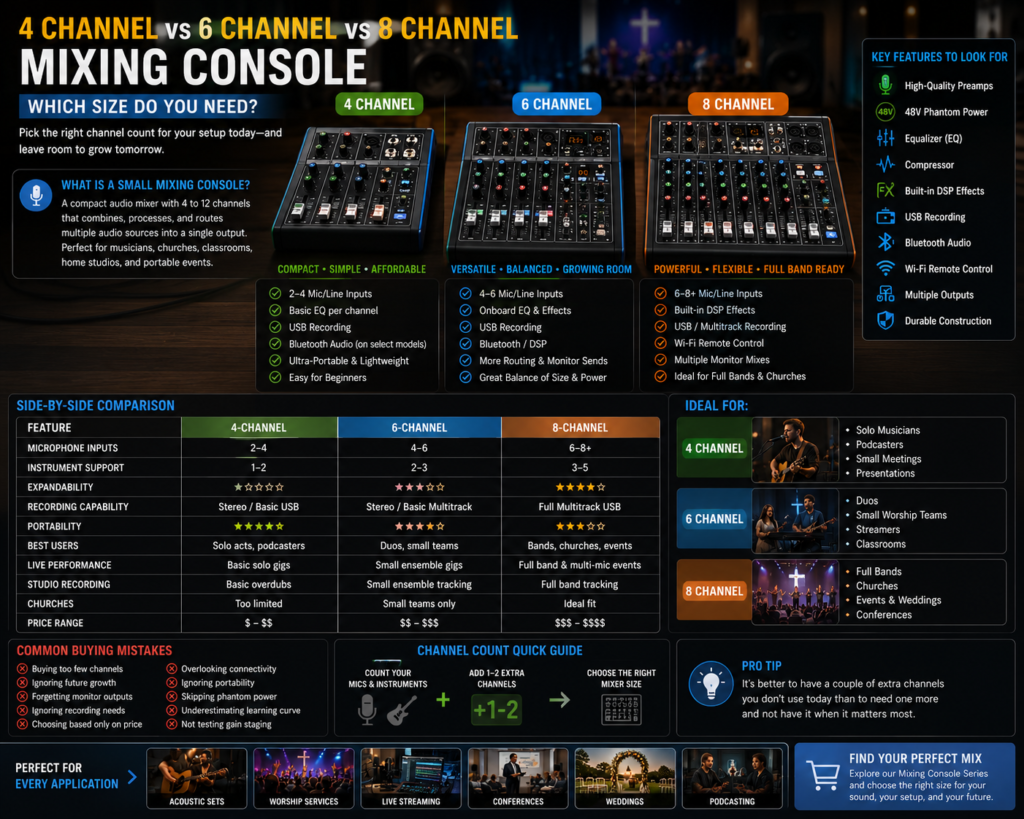
Choosing between a 4, 6, or 8 channel mixing console comes down to how many microphones and instruments you need to run at once, plus how much room you want for future growth. A 4-channel unit suits solo use, a 6-channel mixer fits small groups, and an 8-channel console handles full bands, churches, and multi-presenter events.
| Feature | 4-Channel | 6-Channel | 8-Channel |
| Microphone inputs | 2–4 | 4–6 | 6–8+ |
| Instrument support | 1–2 | 2–3 | 3–5 |
| Expandability | Minimal | Moderate | Strong |
| Recording capability | Stereo/basic USB | Stereo or basic multitrack | Full multitrack USB |
| Portability | Very high | High | Moderate |
| Best users | Solo acts, podcasters | Duos, small teams | Bands, churches, events |
| Live performance | Basic solo gigs | Small ensemble gigs | Full band and multi-mic events |
| Studio recording | Basic overdubs | Small ensemble tracking | Full band tracking |
| Podcasting | Excellent fit | Good for 3–4 hosts | Overkill for most podcasts |
| Churches | Too limited | Small teams only | Ideal fit |
| Price range | Budget-friendly | Mid-range | Higher-end |
| Upgrade potential | Low | Moderate | High |
Which Mixing Console Size Is Best for Different Applications?
Home Studio
A 6-channel digital mixing console usually covers small ensemble recording, while solo producers can often get by with a 4-channel audio mixer.
Podcasting
A 4-channel mixer console is ideal for one or two hosts; go with 6 channels if you regularly bring on multiple guests.
Live Streaming
6 channels give streamers enough inputs for a mic, game audio, and a guest, with room to spare.
Churches
An 8-channel mixing console (or larger) is the standard for worship teams, speech mics, and monitor mixes.
Small Bands
8 channels comfortably cover drums, bass, guitar, and vocals for a small band setup.
DJs
Mobile DJs typically prefer an 8-channel powered mixing console for handling multiple sources, wireless mics, and speeches.
Schools
6 channels suit classroom presentations and small assemblies; larger auditoriums may need 8 or more.
Conference Rooms
6 to 8 channels cover multiple presenters, panel discussions, and AV playback.
Weddings
8 channels handle live music, DJ input, and multiple speech mics throughout the event.
Digital Mixing Console vs Powered Mixing Console
| Factor | Digital Mixing Console | Powered Mixing Console |
| Features | Extensive DSP, EQ, scene recall | Basic mixing plus built-in amplifier |
| Cost | Mid to higher range | Often more budget-friendly for small PA |
| Performance | Excellent for complex mixes | Great for simple, all-in-one setups |
| Portability | Lightweight, no amp onboard | Slightly heavier due to amp |
| Expandability | High, often supports stage boxes | Limited |
| Recording capability | Strong, multitrack USB common | Basic stereo recording only |
| Ease of setup | Moderate learning curve | Very beginner-friendly |
How to Choose the Right Mixing Console
Before buying, walk through these considerations:
- Current equipment – Match input types (XLR, line) to your existing mics and instruments.
- Future expansion – Buy a few channels above your current need if growth is likely.
- Number of microphones – Count every mic you’ll use simultaneously, including speech mics.
- Number of instruments – Include keyboards, DI’d guitars, and playback sources.
- USB recording – Confirm whether you need stereo or full multitrack capture.
- Built-in DSP – Onboard effects and compression reduce the need for extra gear.
- Bluetooth – Useful for streaming backing tracks without extra cables.
- Wi-Fi control – Lets you adjust monitor mixes remotely from the stage.
- Audio interface – Check compatibility with your recording software if you plan to track music.
- Budget – Balance features against what you’ll realistically use.
- Ease of use – Beginners benefit from simpler layouts and fewer menus.
- Brand support – Reliable customer support matters when troubleshooting live issues.
- Firmware updates – Ongoing updates extend a digital mixing console’s lifespan and feature set.
Common Buying Mistakes
- Buying too few channels and running out of inputs at your very next event.
- Buying too many channels and paying for complexity you’ll never use.
- Ignoring future growth, like an expanding band or ministry.
- Forgetting monitor outputs, leaving performers without a usable stage mix.
- Ignoring recording requirements, then discovering the mixer can’t capture multitrack audio.
- Choosing based only on price, sacrificing preamp quality and build durability.
- Overlooking connectivity, such as USB, Bluetooth, or Wi-Fi control needs.
- Ignoring software compatibility with your recording or streaming setup.
- Buying without testing workflow, only to find the layout is confusing under pressure.
- Forgetting portability, ending up with a mixer too bulky for regular transport.
- Skipping phantom power, then discovering it’s needed for condenser microphones.
- Underestimating the learning curve of a full-featured digital mixing console.
Frequently Asked Questions
Is a 4 channel mixing console enough?
For solo musicians, podcasters, or single-presenter setups, a 4 channel mixing console is usually enough.
Who should buy a 6 channel mixing console?
Acoustic duos, small worship teams, streamers, and home studio users recording small ensembles benefit most from a 6 channel mixing console.
Is an 8 channel mixing console suitable for churches?
Yes, an 8 channel mixing console is a common and reliable choice for churches running worship bands and speech mics together.
Can I record music with a 4 channel mixer?
Yes, a 4 channel mixer console can record basic overdubs or simple sessions, though it won’t support full multitrack band recording.
Which channel count is best for podcasting?
A 4-channel mixer suits solo or two-host podcasts, while 6 channels give more flexibility for recurring guests.
Do I need a digital mixing console?
If you want built-in effects, USB recording, and scene recall, a digital mixing console is worth the investment over a basic analog mixer.
What is a powered mixing console?
A powered mixing console combines a mixer with a built-in amplifier, letting you drive speakers directly without a separate power amp.
Can beginners use digital mixers?
Yes, most modern digital mixing consoles are designed with simplified layouts to help beginners get usable mixes quickly.
How many microphones can I connect?
This depends on channel count: roughly 2–4 mics on a 4-channel mixer, 4–6 on a 6-channel mixer, and 6–8+ on an 8-channel mixer.
Which mixer is best for live events?
For most live events involving bands or multiple speakers, an 8-channel mixing console offers the best balance of inputs and monitor flexibility.
Should I buy extra channels for future expansion?
Yes, it’s generally worth buying one tier above your current needs if you expect your band, ministry, or setup to grow.
What’s the difference between mono and stereo channels?
A mono channel handles a single input like a microphone, while a stereo channel handles paired left/right sources like a keyboard or playback device.
Can I use a small mixing console for a wedding?
Yes, many wedding setups use an 8-channel mixing console to handle live music, DJ input, and speeches in one unit.
Do bigger mixers always sound better?
Not necessarily sound quality depends more on preamp quality and build than on channel count alone.
Can I expand a mixer later by adding a stage box?
Some digital mixing consoles support expansion through external stage boxes, so check this feature before buying if growth is likely.
Conclusion
Choosing between a 4 channel mixing console, 6 channel mixing console, and 8 channel mixing console comes down to matching your current microphone and instrument count to the right size while leaving a little room for growth. A 4-channel mixer suits solo musicians and podcasters, a 6-channel mixer fits small ensembles and worship teams, and an 8-channel mixer handles full bands, churches, and multi-presenter events with ease. Whichever size fits your needs today, planning for tomorrow’s growth will save you from an unnecessary upgrade down the road.
Ready to find the right fit? Explore our full Mixing Console to compare 4, 6, and 8 channel options built for musicians, churches, and professional event production.