
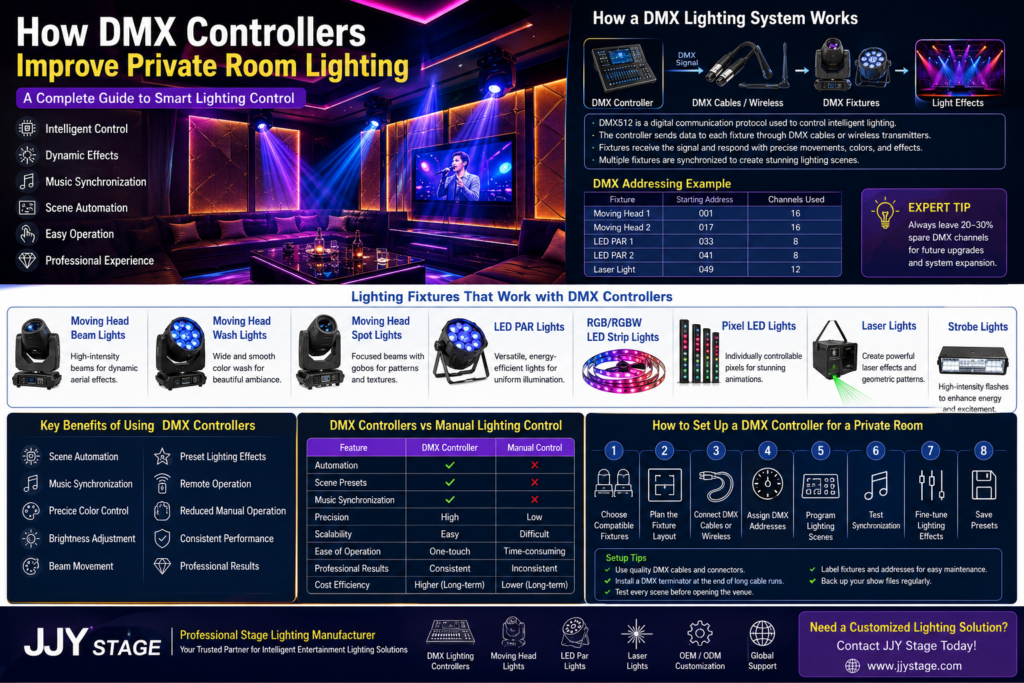
Private entertainment venues have evolved far beyond simple colored lights and manual wall switches. Modern karaoke rooms, KTV clubs, VIP lounges, hotel entertainment suites, gaming rooms, and luxury private theaters now rely on intelligent lighting systems that react instantly to music, atmosphere, and user preferences.
One of the biggest reasons for this transformation is how DMX controllers improve private room lighting. Rather than operating each fixture individually, a DMX controller brings every compatible lighting fixture together into one synchronized system. The result is smoother lighting transitions, dynamic visual effects, automated scene changes, and a far more immersive guest experience.
Professional private room lighting transforms ordinary entertainment spaces into immersive environments that enhance every performance and guest experience. By combining intelligent lighting control, moving head lights, LED PAR lights, RGBW fixtures, and synchronized lighting effects, venue owners can create dynamic atmospheres tailored to karaoke rooms, KTV venues, VIP lounges, home theaters, and private clubs. A well-designed lighting system not only improves visual appeal but also increases operational efficiency and customer satisfaction. Learn more in our comprehensive guide to Professional Private Room Lighting to discover the best lighting solutions for modern entertainment venues.
Whether you’re designing a new karaoke venue or upgrading an existing entertainment space, understanding DMX technology is essential. This guide explains how DMX512 works, why it has become the global lighting standard, and how a professionally designed DMX lighting system helps entertainment venues deliver memorable experiences while simplifying daily operation.
What Is a DMX Controller?
A DMX controller is the central device that communicates with lighting fixtures using the internationally recognized DMX512 protocol. It sends digital control signals that tell each light exactly what to do, including brightness, color, movement, beam angle, strobe speed, and countless other parameters.
Instead of adjusting every fixture manually, operators can control dozens—or even hundreds—of fixtures simultaneously from one controller.
Today, DMX512 is the standard communication protocol used throughout professional entertainment lighting, including:
- KTV rooms
- Karaoke venues
- Concert stages
- Hotels
- Theme parks
- TV studios
- Nightclubs
- Architectural lighting
- Event venues
- Luxury private entertainment rooms
Because nearly every professional lighting manufacturer supports DMX512, venue owners enjoy excellent compatibility when expanding or upgrading their systems.
The History of DMX512
Before DMX512 became the industry standard, many lighting manufacturers used their own proprietary communication systems. Different brands often couldn’t communicate with one another, making installations complicated and expensive.
To solve this problem, the entertainment industry developed DMX512 (Digital Multiplex 512), creating a universal communication language for lighting equipment.
Today, DMX512 allows fixtures from different manufacturers to work together seamlessly, making it one of the most important technologies in professional lighting control.
Its widespread adoption has made intelligent lighting systems more scalable, reliable, and cost-effective for venues of every size.
How DMX Communication Works
A DMX controller continuously sends digital data through DMX cables—or wirelessly in modern systems—to connected lighting fixtures.
Each fixture receives only the information assigned to its unique address.
For example:
- Fixture 1 receives channels 1–16
- Fixture 2 receives channels 17–32
- Fixture 3 receives channels 33–48
The controller sends updated information many times every second, allowing fixtures to react almost instantly.
This rapid communication enables:
- Smooth dimming
- Instant color changes
- Fast beam movement
- Perfect synchronization
- Complex lighting animations
- Music-responsive effects
Because communication happens continuously, every fixture remains synchronized throughout a performance or entertainment session.
Basic DMX Terminology
Understanding a few common DMX terms makes it much easier to design and operate an intelligent lighting system.
DMX Channel
A channel controls one lighting parameter.
Examples include:
- Brightness
- Red color intensity
- Green color intensity
- Blue color intensity
- Pan movement
- Tilt movement
- Zoom
- Focus
- Strobe speed
Simple LED PAR lights may use only a few channels, while advanced moving head fixtures often require 20–40 channels or more.
DMX Universe
A DMX universe contains 512 control channels.
This means one controller can manage many fixtures, provided their combined channel requirements stay within the 512-channel limit.
Larger entertainment venues often use multiple universes to support hundreds of fixtures across multiple rooms or performance areas.
DMX Fixture
A fixture is any lighting device that accepts DMX commands.
Examples include:
- Moving head beam lights
- Wash lights
- Spot lights
- LED PAR lights
- RGB lighting
- RGBW lighting
- Pixel LED lighting
- Laser systems
- Strobe lights
- LED strip lighting
Each fixture interprets incoming DMX data based on its assigned address.
DMX Address
Every fixture receives a unique starting address.
This address tells the fixture which part of the DMX signal belongs to it.
Proper addressing prevents fixtures from responding to commands intended for other lights.
Correct addressing is one of the most important steps during installation.
Why DMX512 Became the Industry Standard
Professional lighting demands precision, reliability, and compatibility.
DMX512 delivers all three.
Unlike basic remote controls or independent lighting systems, DMX creates a unified communication network where every compatible fixture works together.
Key advantages include:
- Universal compatibility
- Reliable communication
- High-speed signal transmission
- Scalable system design
- Easy maintenance
- Future expansion capability
- Industry-wide support
Whether installing ten fixtures in a VIP karaoke room or hundreds across a luxury entertainment complex, DMX512 provides a proven foundation for intelligent lighting control.
Why DMX Controllers Are Essential for Private Room Lighting
Modern entertainment spaces depend on atmosphere. Lighting is no longer just functional—it shapes the guest experience, supports the music, and reinforces the venue’s brand.
This is exactly how DMX controllers improve private room lighting: they transform individual fixtures into a coordinated system capable of creating immersive environments at the touch of a button.
Centralized Lighting Control
Without DMX, staff may need to adjust multiple fixtures individually.
With a DMX lighting controller, every connected light is managed from a single interface.
Operators can instantly control:
- Brightness
- Colors
- Beam direction
- Movement
- Strobe effects
- Scene changes
- Timed sequences
This saves time and greatly simplifies day-to-day operation.
Consistent Performance Every Night
Guests expect the same premium experience every visit.
DMX controllers store lighting scenes as programmable presets, ensuring identical performance every time a scene is recalled.
Instead of relying on manual adjustments, venues achieve repeatable, professional-quality lighting with minimal effort.
Dynamic Lighting Scenes
Different moments call for different moods.
Examples include:
- Soft ambient lighting for guest arrival
- Vibrant RGB effects during karaoke performances
- High-energy beam movements for dance sessions
- Relaxed lounge lighting between songs
- Celebration scenes for birthdays or VIP events
DMX makes switching between these scenes instant and seamless.
Simplified Operation for Staff
Professional lighting systems may control dozens of fixtures, but they don’t have to be difficult to use.
Modern DMX controllers allow operators to:
- Press one button to activate an entire lighting show
- Schedule automatic scene changes
- Synchronize lights with music
- Store favorite presets
- Quickly adjust lighting for different room themes
This reduces training requirements while improving operational efficiency.
Scalable for Future Expansion
Entertainment venues rarely remain static.
As new rooms, upgraded fixtures, or additional effects are added, a DMX system can expand without redesigning the entire installation.
Additional fixtures simply receive new addresses and become part of the existing lighting network.
This scalability makes DMX an excellent long-term investment.
How a DMX Lighting System Works
A DMX lighting system is made up of several components working together to create synchronized lighting effects.
Main Components
- DMX Controller – The brain of the system that sends lighting commands.
- DMX Cables or Wireless DMX Transmitters – Carry control signals to fixtures.
- DMX-Compatible Fixtures – Such as moving heads, LED PAR lights, lasers, wash lights, and LED strips.
- DMX Decoders (when required) – Convert DMX signals for compatible LED products.
- Termination – A DMX terminator at the end of the chain helps maintain signal integrity in larger systems.
Each fixture receives its assigned commands and responds instantly, producing synchronized lighting effects across the room.
DMX Signal Flow
A simplified workflow looks like this:
Operator
│
▼
DMX Controller
│
▼
DMX Cable / Wireless DMX
│
▼
Fixture 1 → Fixture 2 → Fixture 3 → Fixture 4
│ │ │ │
▼ ▼ ▼ ▼
Beam LED PAR Wash Light Laser
Each fixture reads only the DMX channels assigned to its starting address, ensuring precise and independent control while remaining perfectly synchronized with the overall lighting show.
Lighting Fixtures That Work with DMX Controllers
One of the greatest advantages of a DMX lighting system is its ability to control many different types of lighting fixtures from a single interface. Whether you’re designing a compact karaoke room or a large VIP entertainment venue, DMX512 allows every compatible fixture to work together in perfect synchronization.
This flexibility is a major reason how DMX controllers improve private room lighting. Instead of operating separate devices independently, venue owners can create immersive lighting scenes where every fixture responds together.
Moving Head Beam Lights
Moving head beam lights produce narrow, high-intensity beams that add excitement and energy to entertainment spaces. They are commonly used during upbeat songs, DJ performances, and special events.
With a DMX controller, operators can precisely control:
- Pan and tilt movement
- Beam positioning
- Rotation speed
- Prism effects
- Gobo selection
- Color changes
- Strobe effects
- Dimming
Benefits
- Dramatic aerial beam effects
- Fast synchronized movement
- Dynamic stage-style performances
- Professional nightclub atmosphere
- Programmable beam choreography
Moving Head Wash Lights
Wash lights provide smooth, wide-angle illumination that fills the room with vibrant colors.
Unlike beam lights, wash fixtures focus on creating atmosphere rather than sharp visual effects.
DMX programming allows operators to:
- Blend RGB or RGBW colors
- Adjust brightness
- Fade between scenes
- Synchronize multiple fixtures
- Create slow ambient transitions
Benefits
- Comfortable room ambiance
- Smooth color transitions
- Elegant VIP room lighting
- Reduced harsh shadows
- Flexible mood creation
Moving Head Spot Lights
Spot lights project focused light and often include gobos for creating logos, textures, or decorative patterns.
A DMX lighting controller can automate:
- Focus
- Zoom
- Pattern rotation
- Color wheels
- Movement
- Shutter effects
Benefits
- Highlight singers
- Emphasize VIP seating
- Project decorative effects
- Create premium visual experiences
LED PAR Lights
LED PAR lights remain one of the most popular fixtures for karaoke rooms because they provide versatile, energy-efficient illumination.
DMX allows precise adjustment of:
- RGB color mixing
- RGBW white balance
- Brightness
- Fade speed
- Strobe effects
- Scene transitions
Benefits
- Uniform room lighting
- Low power consumption
- Long lifespan
- Easy installation
- Excellent color consistency
RGB and RGBW LED Strip Lights
LED strip lights are commonly installed around ceilings, walls, furniture, steps, and architectural details.
With DMX control, strips become part of the overall entertainment experience.
Operators can create:
- Flowing color chases
- Music-responsive animations
- Dynamic wall effects
- Soft ambient lighting
- Accent lighting
Benefits
- Elegant architectural lighting
- Unlimited color combinations
- Smooth scene transitions
- Enhanced room depth
- Luxury atmosphere
Pixel LED Lights
Pixel LED lighting takes customization even further.
Instead of controlling one strip as a single fixture, every individual pixel can be programmed independently.
DMX enables:
- Animated graphics
- Running effects
- Wave animations
- Pixel chases
- Color gradients
- Interactive visual displays
Benefits
- Premium entertainment effects
- Creative visual storytelling
- High-end venue appearance
- Fully programmable animations
Laser Lights
Laser fixtures create dramatic aerial graphics, tunnels, fans, and geometric patterns.
DMX controllers manage:
- Pattern selection
- Rotation
- Scan speed
- Brightness
- Color
- Animation timing
Benefits
- Eye-catching performances
- High-energy entertainment
- Memorable guest experiences
- Professional nightclub visuals
Strobe Lights
Strobes create rapid flashes that increase excitement during energetic songs or celebrations.
Using DMX, operators can control:
- Flash speed
- Flash duration
- Brightness
- Synchronization with music
- Trigger timing
Benefits
- Dynamic dance scenes
- Powerful visual impact
- Perfect synchronization
- Easy integration with moving lights
Key Benefits of Using DMX Controllers
Understanding how DMX controllers improve private room lighting becomes much easier when looking at the practical benefits they provide every day.
Scene Automation
Instead of manually adjusting dozens of fixtures, operators can activate complete lighting scenes with a single button.
Examples include:
- Welcome mode
- Romantic ambiance
- Karaoke performance
- Dance party
- Birthday celebration
- VIP lounge mode
- Cleaning mode
Automation improves consistency while reducing staff workload.
Music Synchronization
One of the most exciting features of intelligent lighting control is music synchronization.
A DMX512 controller can work alongside compatible audio processors or software to create lighting effects that follow the rhythm, tempo, or beat of the music.
Guests enjoy:
- Beat-matched color changes
- Synchronized beam movement
- Dynamic flashing effects
- Smooth rhythm transitions
The result is a far more immersive entertainment experience.
Precise Color Control
Modern RGB and RGBW fixtures can display millions of color combinations.
DMX allows operators to:
- Match corporate branding
- Create seasonal themes
- Adjust mood instantly
- Produce smooth fades
- Build custom color palettes
Color consistency across every fixture enhances the overall appearance of the room.
Brightness Adjustment
Every fixture can be dimmed independently.
This makes it possible to:
- Highlight performers
- Create intimate environments
- Reduce glare
- Balance lighting zones
- Improve guest comfort
Beam Movement
Moving head fixtures become dramatically more effective when controlled by DMX.
Automated beam movement enables:
- Sweeping effects
- Audience tracking
- Circular movement
- Figure-eight patterns
- Randomized motion
- Synchronized choreography
These effects would be nearly impossible using manual controls.
Preset Lighting Effects
Professional DMX controllers allow users to save hundreds of lighting scenes.
Common presets include:
- Warm welcome
- Singing mode
- Dance mode
- Relax mode
- Flash party
- Slow romantic scene
- DJ performance
- Closing mode
Presets improve operational efficiency while ensuring a consistent customer experience.
Remote Operation
Many modern smart lighting controllers support:
- Touchscreen interfaces
- Tablets
- Smartphones
- Wireless DMX
- Network control
- Remote maintenance
This flexibility allows staff to control lighting from anywhere within the venue.
Reduced Manual Operation
Without DMX, staff may spend significant time adjusting fixtures individually.
Automation reduces:
- Human error
- Setup time
- Daily maintenance
- Operational complexity
This allows employees to focus more on customer service.
Consistent Professional Results
Professional entertainment venues rely on repeatable performance.
DMX controllers ensure:
- Every scene looks identical
- Lighting transitions remain smooth
- Colors stay synchronized
- Fixtures respond instantly
- Guest experiences remain consistent
Consistency strengthens brand reputation and customer satisfaction.
DMX Controllers vs Manual Lighting Control
| Feature | DMX Controller | Manual Control |
| Automation | ✔ Fully programmable | ✘ Individual operation |
| Scene Presets | ✔ Unlimited saved scenes | ✘ Not available |
| Music Synchronization | ✔ Real-time synchronization | ✘ Manual timing |
| Precision | ✔ Channel-level control | Limited |
| Scalability | ✔ Easy expansion | Difficult |
| Ease of Operation | ✔ One-touch scenes | Time-consuming |
| Professional Results | ✔ Consistent every session | Varies by operator |
| Cost Efficiency | ✔ Lower long-term operating costs | Higher labor costs |
Key Takeaway: While manual lighting may suit very small installations, a DMX lighting controller offers significantly greater flexibility, efficiency, and professionalism for commercial entertainment venues.
How to Set Up a DMX Controller for a Private Room
A properly configured DMX lighting system ensures smooth operation, reliable communication, and professional lighting effects.
Step 1: Choose Compatible Fixtures
Select fixtures that support the DMX512 protocol.
Common choices include:
- Moving head lights
- LED PAR lights
- Wash lights
- Laser lights
- Pixel LEDs
- LED strip lighting
- Strobe lights
Using compatible equipment simplifies installation and future upgrades.
Step 2: Plan the Fixture Layout
Before installation:
- Identify performance areas
- Position audience lighting
- Determine accent lighting
- Minimize cable lengths
- Ensure proper beam coverage
Careful planning improves both aesthetics and maintenance access.
Step 3: Connect the DMX Network
Choose either:
- Wired DMX cables (recommended for maximum stability)
- Wireless DMX transmitters (ideal where cabling is difficult)
Most installations connect fixtures in a daisy-chain configuration.
Step 4: Assign DMX Addresses
Every fixture must have its own starting address.
Example
| Fixture | Starting Address | Channels Used |
| Moving Head 1 | 001 | 16 |
| Moving Head 2 | 017 | 16 |
| LED PAR 1 | 033 | 8 |
| LED PAR 2 | 041 | 8 |
| Laser | 049 | 12 |
Proper addressing prevents fixtures from responding to the wrong commands.
Step 5: Program Lighting Scenes
Create scenes such as:
- Welcome
- Karaoke Mode
- Dance Mode
- VIP Lounge
- Birthday Celebration
- Closing Scene
Each scene can include custom colors, movement, brightness, and timing.
Step 6: Test Synchronization
Verify that:
- All fixtures respond correctly
- Colors match
- Beam movements are synchronized
- Scene transitions are smooth
- Music synchronization functions properly
Step 7: Fine-Tune Lighting Effects
Adjust:
- Fade times
- Beam speed
- Color balance
- Brightness levels
- Transition timing
Small refinements can significantly improve the overall visual experience.
Step 8: Save Presets
Save all programmed scenes for quick recall during daily operation.
This allows staff to activate professional lighting shows with minimal training.
DMX Setup Checklist
Before opening your venue, confirm:
- DMX-compatible fixtures installed
- Controller firmware updated
- Fixture addresses assigned correctly
- Cables securely connected
- Terminator installed at the end of long DMX chains
- Presets programmed and tested
- Music synchronization verified
- Backup show files saved
- Staff trained on basic operation
Expert Tip
For commercial KTV venues, consider leaving 20–30% spare DMX channels when designing your system. This makes future upgrades—such as adding more moving heads, LED strips, or laser fixtures—much easier without needing to redesign the entire control network.
Choosing the Right DMX Controller
Selecting the right DMX lighting controller is one of the most important decisions when designing an intelligent lighting system. The controller serves as the command center for every connected fixture, so its capabilities should match both your current installation and future expansion plans.
Whether you’re building a compact karaoke room or a multi-room entertainment venue, choosing the right controller ensures smooth operation, easier programming, and a better guest experience.
1. Number of DMX Channels
Every lighting fixture uses a certain number of DMX channels.
For example:
| Fixture Type | Typical DMX Channels |
| LED PAR Light | 4–12 |
| Moving Head Beam | 16–24 |
| Moving Head Wash | 18–30 |
| Moving Head Spot | 20–40 |
| Laser Light | 10–25 |
| Pixel LED Controller | 20–100+ |
Before purchasing a controller:
- Count every fixture.
- Add the required channels.
- Leave 20–30% spare capacity for future expansion.
A controller with extra capacity prevents costly upgrades later.
2. Fixture Compatibility
Choose a controller that supports all the fixtures you plan to use, including:
- Moving head beam lights
- Wash lights
- Spot lights
- LED PAR lights
- RGB/RGBW LED strip lights
- Pixel LED lighting
- Laser lights
- Strobe lights
- Fog and haze machines (where applicable)
Using DMX512-compliant fixtures ensures compatibility across different manufacturers.
3. Expandability
Entertainment venues often grow over time.
Consider whether you may later add:
- More karaoke rooms
- VIP suites
- Dance floors
- LED video walls
- Architectural lighting
- Additional moving heads
A scalable controller allows expansion without replacing your entire control system.
4. Wired vs. Wireless DMX
Both technologies have advantages.
Wired DMX
Advantages
- Extremely reliable
- Minimal signal interference
- Ideal for permanent installations
- Lower latency
Wireless DMX
Advantages
- Faster installation
- Reduced cabling
- Easier upgrades
- Cleaner appearance
- Excellent for retrofit projects
Many modern entertainment venues combine both methods for maximum flexibility.
5. User Interface
Daily operation should be simple.
Look for controllers featuring:
- Color touchscreens
- Clearly labeled controls
- Customizable layouts
- One-touch scene recall
- Intuitive programming software
A user-friendly interface reduces staff training and minimizes operational errors.
6. Software Integration
Professional controllers often integrate with:
- Lighting design software
- Show programming software
- Audio systems
- Building automation systems
- AV control platforms
- Time scheduling software
Integration improves efficiency and enables more advanced lighting experiences.
7. Budget Considerations
The least expensive controller is not always the most cost-effective.
Consider:
- Reliability
- Programming features
- Technical support
- Expandability
- Warranty
- Ease of maintenance
A high-quality controller often lowers long-term operating costs by reducing downtime and simplifying maintenance.
8. Mobile App Support
Many modern smart lighting controllers offer:
- Smartphone control
- Tablet operation
- Wireless scene selection
- Remote diagnostics
- Cloud backup
- Multi-user access
These features are especially valuable for venues with multiple private rooms managed by a small staff.
DMX Controller Buying Checklist
Before purchasing, ask yourself:
✔ Does it support enough DMX channels?
✔ Is it compatible with all planned fixtures?
✔ Can additional fixtures be added later?
✔ Does it support wireless DMX if needed?
✔ Is the programming interface easy to learn?
✔ Can scenes be saved and recalled instantly?
✔ Does it integrate with audio or AV systems?
✔ Is technical support available?
✔ Does it include firmware updates?
✔ Is it suitable for commercial entertainment venues?
Common DMX Lighting Mistakes (and How to Avoid Them)
Even the best equipment can underperform if it is not configured correctly. Avoiding these common mistakes will improve system reliability and reduce maintenance.
| Common Mistake | Problem | Solution |
| Incorrect DMX addressing | Fixtures respond unexpectedly or simultaneously | Assign unique start addresses and verify channel ranges. |
| Poor cable management | Intermittent signal loss | Use quality DMX cables, secure connections, and label cable runs. |
| Signal interference | Flickering or unstable behavior | Separate DMX cables from high-voltage power lines and use proper shielding. |
| Overloading channels | Fixtures do not respond correctly | Calculate total channel usage before programming and leave spare capacity. |
| Missing DMX terminator | Random fixture behavior on long cable runs | Install a DMX terminator at the end of the daisy chain where appropriate. |
| Ignoring firmware updates | Compatibility and performance issues | Keep controllers and intelligent fixtures updated with the latest firmware. |
| Weak scene programming | Abrupt transitions and inconsistent effects | Fine-tune fade times, movement speeds, and color changes before deployment. |
| Mixing incompatible modes | Fixtures behave differently | Ensure fixtures use the same DMX mode and channel configuration expected by the controller. |
Expert Tips for Reliable DMX Systems
Tip 1: Label every fixture and DMX address during installation to simplify future maintenance.
Tip 2: Back up your lighting show files regularly so they can be restored quickly after hardware replacement.
Tip 3: Test every programmed scene before opening the venue to ensure smooth transitions and synchronized effects.
Tip 4: Leave spare channels and physical mounting space for future upgrades.
Tip 5: Schedule routine inspections of cables, connectors, and firmware to maintain consistent performance.
Future Trends in DMX Lighting Control
DMX technology continues to evolve alongside advances in networking, automation, and smart entertainment systems. The next generation of intelligent lighting control will offer even greater flexibility and efficiency.
Wireless DMX
Wireless DMX has become increasingly reliable, reducing installation time and making upgrades easier in existing venues.
It is particularly useful for:
- Historic buildings
- Hotels
- Multi-room karaoke venues
- Temporary event installations
- Spaces where cable routing is difficult
App-Based Lighting Control
Smartphones and tablets are replacing dedicated hardware for many day-to-day tasks.
Modern systems increasingly allow operators to:
- Trigger scenes
- Adjust colors
- Control brightness
- Monitor fixture status
- Save presets
- Manage multiple rooms remotely
AI-Assisted Programming
Artificial intelligence is beginning to simplify lighting design by automatically generating scene transitions, suggesting color palettes, and optimizing movement patterns based on music or venue type.
While human creativity remains essential, AI can reduce programming time for routine shows.
Cloud-Based Lighting Management
Cloud connectivity enables venue owners to:
- Back up show files
- Monitor system health
- Deploy updates
- Access diagnostics remotely
- Manage multiple entertainment locations from a central platform
This is especially valuable for hotel chains and multi-site karaoke operators.
IoT Integration
Lighting systems are increasingly connecting with broader building technologies, including:
- HVAC
- Security systems
- Digital signage
- Occupancy sensors
- Energy management platforms
Integrated systems improve operational efficiency while creating more responsive environments.
Voice Control
Although still emerging in commercial venues, voice control may become useful for:
- Maintenance tasks
- Hands-free scene changes
- Quick diagnostics
- Smart room management
Smart Entertainment Ecosystems
Future entertainment venues will combine:
- Intelligent lighting
- Immersive audio
- LED displays
- Projection systems
- Interactive controls
- Environmental automation
DMX will remain a core communication protocol within these advanced ecosystems.
Frequently Asked Questions (FAQ)
1. What is a DMX controller?
A DMX controller is a device that sends digital commands to compatible lighting fixtures using the DMX512 protocol. It enables centralized control of brightness, color, movement, effects, and programmed lighting scenes.
2. How does DMX512 work?
DMX512 transmits digital control data over a wired or wireless connection. Each fixture is assigned a unique address and responds only to the channels intended for it, allowing precise and synchronized lighting control.
3. Why is DMX important for private room lighting?
DMX makes it possible to automate lighting scenes, synchronize fixtures with music, simplify operation, and deliver a consistent entertainment experience across karaoke rooms, VIP lounges, and other private venues.
4. Can DMX controllers synchronize lights with music?
Yes. Many modern DMX controllers integrate with audio systems or dedicated software, allowing lighting effects to follow the rhythm, tempo, or beat of the music for a more immersive experience.
5. How many fixtures can one DMX controller control?
This depends on the controller’s channel capacity and the number of channels each fixture uses. A standard DMX universe supports up to 512 channels, with larger systems using multiple universes.
6. Are wireless DMX systems reliable?
High-quality wireless DMX systems are reliable for many commercial applications when installed correctly. However, wired DMX remains the preferred choice for maximum stability in permanent installations.
7. Do I need DMX for a small karaoke room?
While a basic room can operate without DMX, using a DMX lighting system offers automation, scene presets, synchronized effects, and easier operation, making it a worthwhile investment even for smaller venues.
8. Can RGBW LED lights be controlled with DMX?
Yes. Most professional RGBW fixtures are fully compatible with DMX512, allowing precise control over color mixing, brightness, transitions, and programmed effects.
9. How do I troubleshoot DMX problems?
Check fixture addresses, cable connections, DMX termination, controller settings, firmware versions, and fixture modes. Testing fixtures individually can also help identify the source of the issue.
10. Which DMX controller is best for entertainment venues?
The ideal controller depends on your venue size, number of fixtures, programming requirements, and expansion plans. Commercial entertainment venues should prioritize reliability, scalability, intuitive programming, and long-term support.
Conclusion
Understanding how DMX controllers improve private room lighting is essential for anyone designing modern entertainment spaces. By centralizing control, automating lighting scenes, synchronizing effects with music, and enabling precise management of every fixture, a DMX lighting controller transforms ordinary rooms into immersive environments that elevate the guest experience.
Whether you’re operating a single karaoke room or managing a large-scale entertainment venue, investing in a professionally designed DMX lighting system provides long-term benefits in performance, flexibility, and operational efficiency.
At JJY Stage, we specialize in intelligent entertainment lighting systems tailored to the needs of karaoke venues, KTV clubs, VIP lounges, hotels, bars, and luxury private entertainment spaces.
Our team offers:
- Professional DMX lighting controllers
- Moving head lights
- LED PAR lights
- Beam, wash, and spot fixtures
- Laser and pixel lighting solutions
- OEM/ODM manufacturing
- Customized lighting system design
- Turnkey entertainment lighting projects
- Technical consultation and after-sales support
Whether you’re launching a new venue or upgrading an existing installation, JJY Stage can help you build a reliable, scalable, and visually stunning lighting system that delivers unforgettable entertainment experiences.