If you’ve ever hauled a full-size mixing desk into a church basement, a coffee shop stage, or a hotel conference room, you already know the problem: big mixers mean big hassle. That’s exactly why more musicians, worship teams, and event techs are switching to compact gear. The best mixing console gives you professional-grade sound control without the bulky rack cases, tangled snakes, or sore backs that come with full-size analog boards.
In this guide, you’ll learn what a small mixing console actually is, which features matter most, how many channels you really need, and how to pick the right unit whether you’re running a solo acoustic set, a Sunday worship service, or a weekend wedding gig. We’ll also compare digital versus powered mixers, walk through common buying mistakes, and answer the questions we hear most often from readers shopping for compact audio gear.
What Is a Small Mixing Console?
A small mixing console is a compact audio mixer, typically with 4 to 12 channels, designed to combine, process, and route signals from microphones and instruments into a single output. Unlike large-format mixers built for permanent installs or big-venue touring rigs, small mixing consoles prioritize portability, simple layouts, and fast setup making them ideal for musicians, churches, classrooms, and mobile events.
Where a full-size mixing desk might weigh 40+ pounds and require a dedicated flight case, a compact mixer console fits in a backpack or tote bag. Many modern units also fold digital signal processing, USB recording, and even Bluetooth audio into a footprint smaller than a laptop. That combination of small size and real functionality is why compact mixers have become a staple in home studios, worship audio setups, and portable PA systems alike.
Why Choose a Small Mixing Console?
There’s a reason compact mixers have taken over so much of the live sound and worship audio market. Here’s what makes them worth considering:
- Portability – A small mixing console can travel in a backpack, making load-in and load-out dramatically faster.
- Space-saving design – No need for a rack cabinet or dedicated table; many compact mixers fit on a single music stand shelf.
- Easy transportation – Lighter weight means less strain during multi-gig weekends or Sunday morning setups.
- Quick setup – Fewer cables and simpler routing get you from case to soundcheck in minutes.
- Cost-effectiveness – Compact digital mixers often include effects, EQ, and compression that would otherwise require separate outboard gear.
- Lower power consumption – Many compact and battery-powered units sip power compared to large-format consoles.
- User-friendly controls – Simplified layouts help beginners get usable mixes fast, without a steep learning curve.
- Professional sound quality – Modern preamps and onboard DSP mean small doesn’t have to mean lower fidelity.
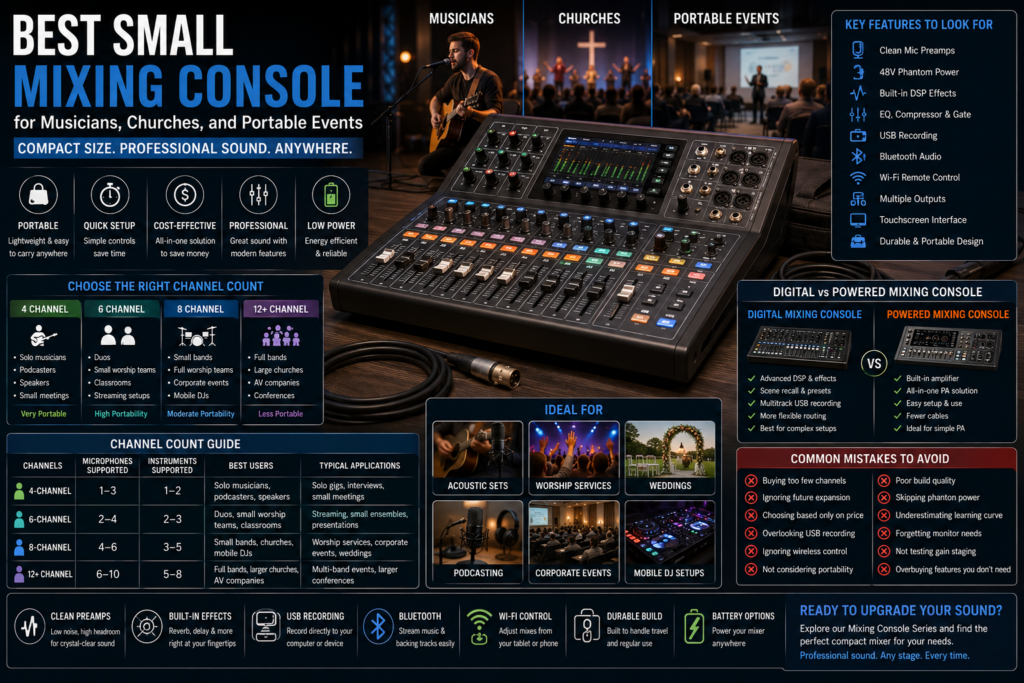
Essential Features to Look for in the Best Small Mixing Console
Not all compact mixers are built the same. Here’s what actually matters when comparing options.
Number of channels. This determines how many microphones and instruments you can run simultaneously — more on this below.
High-quality microphone preamps. Clean, quiet preamps are the foundation of good sound. Cheap preamps introduce hiss and coloration, especially at higher gain settings.
XLR and line inputs. Look for a mix of XLR inputs for microphones and line inputs for keyboards, DI boxes, or playback devices.
Phantom power. A 48V phantom power supply is required to run most studio-quality condenser microphones, which are common in churches and vocal-heavy setups.
Built-in DSP effects. Onboard digital effects — reverb, delay, chorus — let you add polish without external processors.
Equalizer (EQ). Even a basic 3-band EQ per channel makes a major difference in shaping vocals and instruments.
Compressor. Built-in compression evens out vocal dynamics automatically, which is especially useful for singers with inconsistent mic technique.
USB recording. Multitrack or stereo USB recording lets you capture rehearsals, sermons, or live sets directly to a laptop.
Bluetooth audio. Handy for streaming backing tracks or background music without an extra cable run.
Wi-Fi remote control. Wireless control from a tablet or phone lets one person adjust monitor mixes from the stage instead of running back to the booth.
Touchscreen interface. Higher-end digital mixing consoles include touchscreens for faster scene recall and routing changes.
Audio routing. Flexible routing to multiple outputs (mains, monitors, recording) adds versatility as your needs grow.
Expandability. Some compact mixers support expansion via stage boxes or additional input modules.
Durable construction. Metal chassis and solid faders hold up far better to repeated transport than plastic-heavy builds.
Battery or external power options. Battery-powered options are valuable for outdoor events, buskers, and locations without easy power access.
Choosing the Right Channel Count
Channel count is one of the biggest factors in picking the right mixer console. Here’s how to think about it based on your setup.
4 Channel Mixing Console
A 4-channel mixer console is ideal for:
- Solo musicians running vocal mic plus acoustic guitar
- Podcasters recording one or two hosts
- Public speaking and single-microphone presentations
- Small meetings with minimal audio needs
6 Channel Mixing Console
A 6-channel mixer console works well for:
- Acoustic duos with vocals and multiple instruments
- Small worship teams with a vocalist, guitar, and keys
- Classroom presentations with a lapel mic and playback
- Live streaming setups needing a couple of extra inputs
8 Channel Mixing Console
An 8-channel mixer console is recommended for:
- Small bands with drums, bass, guitar, and vocals
- Churches running a full worship team plus speech mics
- Corporate events with multiple presenters and panel discussions
- Mobile DJs mixing multiple sources plus a wireless mic
When Should You Choose More Channels?
If you expect your group, band, or ministry to grow, it’s worth buying one tier above your current needs. Adding a drummer, a second vocalist, or extra speech mics down the line is common, and running out of channels mid-project is a frustrating (and avoidable) problem. A mixer with a few spare channels also gives you flexibility for guest musicians or backup mics.
| Channels | Microphones Supported | Instruments Supported | Best Users | Portability | Typical Applications |
| 4-Channel | 1–3 | 1–2 | Solo musicians, podcasters, speakers | Very high | Solo gigs, interviews, small meetings |
| 6-Channel | 2–4 | 2–3 | Duos, small worship teams, classrooms | High | Streaming, small ensembles, presentations |
| 8-Channel | 4–6 | 3–5 | Small bands, churches, mobile DJs | Moderate | Worship services, corporate events, weddings |
| 12+ Channel | 6–10 | 5–8 | Full bands, larger churches, AV companies | Moderate | Multi-band events, larger conferences |
Digital Mixing Console vs Powered Mixing Console
These two categories often get confused, but they solve different problems. A digital mixing console focuses on signal processing — EQ, effects, routing, and recording — while a powered mixing console adds a built-in amplifier that drives speakers directly.
| Factor | Digital Mixing Console | Powered Mixing Console |
| Features | Extensive DSP, EQ, effects, scene recall | Basic to moderate mixing plus built-in amp |
| Portability | Very portable, lightweight | Slightly heavier due to amplifier |
| Recording capability | Strong, often multitrack USB | Limited, usually stereo only |
| Live performance | Excellent for complex mixes | Excellent for simple, all-in-one PA setups |
| Ease of use | Moderate learning curve | Very beginner-friendly |
| Cost | Mid to higher range | Often more affordable for small PA needs |
| Maintenance | Firmware updates, careful handling | Simple, fewer components to manage |
In short: choose a digital mixing console if you want maximum control and recording flexibility. Choose a powered mixing console if you want a true grab-and-go PA solution without buying separate power amps or a portable speaker system.
Best Small Mixing Console for Musicians
For solo performers, acoustic bands, street performers, and rehearsal spaces, portability and quick setup matter more than a huge feature set. A musician running vocals and guitar typically needs:
- A clean mic preamp with enough gain for close-mic’d acoustic instruments
- Basic EQ and light compression on the vocal channel
- USB recording to capture rehearsals or practice takes
- Bluetooth input for playing along with backing tracks
Real-world example: a solo singer-songwriter playing coffee shops and open mics is usually best served by a compact 4- or 6-channel digital mixer with onboard effects, since it eliminates the need for a separate reverb pedal or vocal processor.
Best Small Mixing Console for Churches
Worship audio has unique demands. A church sound system usually needs to handle:
- Multiple microphones for pastors, speakers, and worship leaders
- Worship bands with vocals, acoustic and electric instruments, and keys
- Choirs requiring several open mics at once
- Clear speech intelligibility for sermons
- Separate monitor mixes for the stage
- Recording sermons for archiving or podcast distribution
- Live streaming worship services to an online congregation
Because of these overlapping needs, churches generally benefit from an 8-channel (or larger) digital mixing console with built-in USB recording and, ideally, Wi-Fi remote control — so a volunteer can adjust monitor mixes from the stage without running back to the booth mid-service.
Best Small Mixing Console for Portable Events
Portable event production covers a wide range of scenarios: conferences, schools, weddings, hotels, outdoor events, trade shows, and community gatherings. In these settings, the priorities shift slightly:
- Portability – Equipment needs to move between venues quickly, often multiple times per week.
- Setup speed – Event techs frequently have tight load-in windows and need a mixer they can configure fast.
- Reliability – A single point of failure during a live event is costly, so durable, well-reviewed gear matters more than flashy extras.
A powered mixing console paired with a portable speaker system is often the fastest way to get a wedding or trade show booth up and running, while larger conferences with multiple presenters may lean toward a digital mixing console with more channels and scene recall.
Common Buying Mistakes
Avoid these frequent missteps when shopping for a compact mixer:
- Choosing too few channels and running out of inputs on your very next event.
- Ignoring future expansion — not planning for a growing band or ministry.
- Buying based only on price instead of build quality and preamp performance.
- Overlooking recording features like USB multitrack capture.
- Ignoring wireless control, which is a major convenience for live monitor mixing.
- Not considering portability and ending up with something too bulky for regular transport.
- Choosing poor build quality, leading to faders and jacks failing after repeated use.
- Skipping phantom power and later discovering your condenser mics won’t work.
- Underestimating the learning curve of a fully digital mixing console without reading the manual first.
- Forgetting about monitor needs, then struggling to give musicians a usable stage mix.
- Not testing gain staging, resulting in distorted or noisy recordings on day one.
- Overbuying features you’ll never use, paying for touchscreens and DSP chains a simple duo gig doesn’t need.
Maintenance and Care Tips
A little routine care extends the life of any mixer console significantly:
- Cleaning – Wipe down faders and knobs regularly; dust and moisture buildup can cause scratchy pots.
- Firmware updates – Keep digital mixing consoles updated for bug fixes and new features.
- Cable management – Coil cables properly and label inputs to speed up future setups.
- Protective cases – A padded case prevents fader damage during transport.
- Transportation – Avoid stacking heavy gear directly on top of your mixer in a car or van.
- Ventilation – Keep vents clear, especially on powered mixing consoles that generate heat from the built-in amplifier.
- Storage – Store in a dry, temperature-stable space to protect internal electronics.
Frequently Asked Questions
What is the best small mixing console?
The best small mixing console depends on your channel needs, but a good compact digital mixer with clean preamps, built-in EQ, and USB recording covers most musicians, churches, and portable event use cases.
Is a compact digital mixer good enough for live events?
Yes. Modern digital mixing consoles offer preamp quality and DSP that rival much larger boards, making them suitable for most live event sizes.
How many channels do I need?
Count your microphones and instruments, then add 1–2 extra channels for future growth. Most solo acts need 4, small groups need 6, and bands or churches need 8 or more.
Can I use a small mixer in a church?
Yes, small mixing consoles are widely used in churches, especially for services with worship bands, speech mics, and live streaming needs.
Is a powered mixing console better for portable events?
It depends. A powered mixing console is great for simple, all-in-one PA setups, while a digital mixing console offers more control for complex events.
Can I record directly to USB?
Many compact mixers support direct USB recording, either as a stereo mix or full multitrack capture depending on the model.
Is Bluetooth useful on a mixer?
Yes, Bluetooth audio makes it easy to stream backing tracks or background music without extra cables.
Which mixer is best for musicians?
Solo musicians and small acoustic acts generally do best with a compact 4- or 6-channel digital mixer that includes built-in effects.
Can beginners use digital mixers?
Yes, most modern digital mixing consoles are designed with simplified layouts and presets specifically to help beginners get good results quickly.
What is phantom power?
Phantom power is a 48V electrical current sent through an XLR cable to power condenser microphones, which don’t have their own internal power source.
Can I use a compact mixer for podcasting?
Absolutely. A 4-channel mixer with clean preamps and USB output is a popular choice for podcasters recording one or two hosts.
How do I maintain a small mixing console?
Keep it clean, update firmware regularly, transport it in a protective case, and store it in a dry, ventilated space.
Do small mixers support monitor mixes?
Yes, many compact mixers include dedicated aux sends for creating separate monitor mixes for performers on stage.
Are analog or digital small mixers better?
Analog mixers are simpler and often cheaper, while digital mixers offer more flexibility, effects, and recall making digital the better choice for most growing setups.
Can I expand a small mixing console later?
Some models support expansion through stage boxes or additional input modules, so check for expandability before buying if you expect to grow.
Conclusion
Choosing the best small mixing console comes down to matching channel count, features, and portability to your actual use case whether that’s a solo acoustic gig, a full Sunday worship service, or a weekend wedding circuit. Pay attention to preamp quality, phantom power, USB recording, and wireless control, and avoid the common mistake of buying based on price alone. A well-chosen compact mixer simplifies setup, improves sound quality, and holds up reliably across dozens of events.
Ready to find your perfect match? Explore our full Mixing Console Series to compare compact, professional-grade options built for musicians, churches, and portable event production.